Join us at FabCon Atlanta from March 16 - 20, 2026, for the ultimate Fabric, Power BI, AI and SQL community-led event. Save $200 with code FABCOMM.
Register now!The Power BI Data Visualization World Championships is back! Get ahead of the game and start preparing now! Learn more
Hi guys!
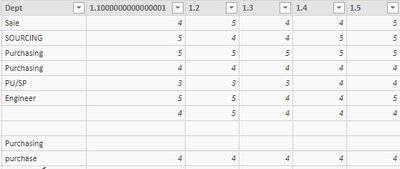
This is my first time to do customer satisfaction survey analysis via Power BI. I have stuggles how to count the number in several columns. Example: survey score 1-5 and I would like to count how many customer given "1" from Q.1 - Q5 and percentage as well. In excel very simple just drag and count but I can't do so in Power BI. It's allow just only one column. please enlighten me
Thanks in advance!
Solved! Go to Solution.
Thank you for your advise!
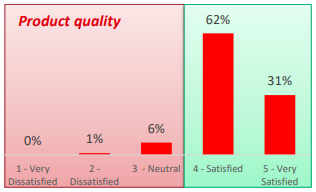
I want to the count number of people who given score 1 and 2 and 3 ..... from question 1-5 to do a chart like this.
@wongmeta You every column you need to create seperate Count formula.
Count Q_1 = COUNT(Table[Q.1 Column])
Count Q_2 = COUNT(Table[Q.2 Column])
. ..... and so on.
Thank you for your advise!
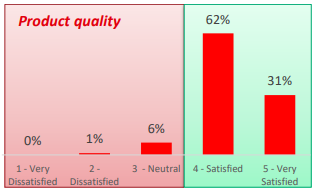
I want to the count number of people who given score 1 and 2 and 3 ..... from question 1-5 to do a chart like this.
@wongmeta , If Columns 1.1, 1.2 ,1.3 are question numbers, I would advise them to unpivot. And you can have a question dimension if needed. That should make it easy
I've 25 questions in survey.
I did unpivoted but don't know how to count the number of people who given score 1, 2, 3 in several questions.
I want to create chart like below example. this is to show number of people who given score 1-5 in question number 1-5 (combine into 1 chart).
Thanks
Check out the November 2025 Power BI update to learn about new features.
Advance your Data & AI career with 50 days of live learning, contests, hands-on challenges, study groups & certifications and more!
| User | Count |
|---|---|
| 57 | |
| 43 | |
| 41 | |
| 21 | |
| 17 |