cancel
Showing results for 
Search instead for 
Did you mean: 

Get Fabric Certified for FREE during Fabric Data Days. Don't miss your chance! Request now

Reply
SamJW
New Member

Count number of accounts that invoiced between 2 amounts

Hello


I have a dataset of all our customers and all of their invoices. I want to analyse how many accounts have between £0 and £2500 invoiced last year, how many had between £2500 and £5000 invoiced and so on. What's the best way to do this?


Thank you

Sam

1 ACCEPTED SOLUTION
v-xuding-msft
Community Support
Community Support

Hi @SamJW ,

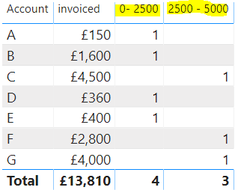
I create a sample using measures. Please try and check if it is what you want.

0- 2500 = CALCULATE(COUNT('Table'[Account]),FILTER('Table','Table'[invoiced]<=2500))
2500 - 5000 = CALCULATE(COUNT('Table'[Account]),FILTER('Table','Table'[invoiced]>=2500 && 'Table'[invoiced]<=5000))

2.PNG 

For more details, please see the attached file. If this is not your expected output, please share some sample data and the expected results. Then we will understand clearly and solve it as soon as possible.


Best Regards,

Xue Ding

If this post helps, then please consider Accept it as the solution to help the other members find it more quickly.

Best Regards,
Xue Ding
If this post helps, then please consider Accept it as the solution to help the other members find it more quickly.

View solution in original post

4 REPLIES 4
v-xuding-msft
Community Support
Community Support

Hi @SamJW ,

Could you tell me if you have implemented the results? If it is, kindly accept the helpful answers as solutions. Welcome to share your own solution. More people will benefit from here. If you are still confused, please share some sample data and expected results. Then we will understand clearly and solve it quickly.


Best Regards,

Xue Ding

If this post helps, then please consider Accept it as the solution to help the other members find it more quickly.

Best Regards,
Xue Ding
If this post helps, then please consider Accept it as the solution to help the other members find it more quickly.
v-xuding-msft
Community Support
Community Support

Hi @SamJW ,

I create a sample using measures. Please try and check if it is what you want.

0- 2500 = CALCULATE(COUNT('Table'[Account]),FILTER('Table','Table'[invoiced]<=2500))
2500 - 5000 = CALCULATE(COUNT('Table'[Account]),FILTER('Table','Table'[invoiced]>=2500 && 'Table'[invoiced]<=5000))

2.PNG 

For more details, please see the attached file. If this is not your expected output, please share some sample data and the expected results. Then we will understand clearly and solve it as soon as possible.


Best Regards,

Xue Ding

If this post helps, then please consider Accept it as the solution to help the other members find it more quickly.

Best Regards,
Xue Ding
If this post helps, then please consider Accept it as the solution to help the other members find it more quickly.
I_Like_Pi
Resolver II
Resolver II

The simplest to walkthrough would be to create a table and a measure.

Assumeing your dataset table is called "Cust_Inv" with the related columns Cust and InvAmount


From the modeling tab "New Table"

Cust_Inv_Sum = SUMMARIZE(Cust_Inv,
                                                Cust_Inv[Cust],
                                                "INV_totals",SUM(Cust_Inv[InvAmount]),
                                                 "Bin", ROUNDUP(SUM(Cust_Inv[InvAmount])/2500,0)*2500)


Measure: Cust Count = DISTINCTCOUNT('Cust_Inv_Sum'[Cust])


On your visuals page add a table visual. Add the Bin to the row. It will probably sum so you will have to right click Bin from the Row section of the visualations ribbon on the Right, and then click dont Summarize, you should now see a list of -2500, 0, 2500, 5000... drag and drop the Cust Count Measure. Why -2500? I am just pointing out you will likely have some in the negative.


You probably want to relate this new Cust_Inv_Sum to the Cust_Inv table via the Cust field. So they link for filters.


Good luck


On the point of filtering, you need to understand how those contexts will work.

For example, lets say your Cust Inv table has a date feild and you filter on that.

A visual presenting a Cust_Inv_Sum field will not limit its sum of invoices to the date range, it will filter the customers that had transactions in the time frame but will calc the total for all their transactions.

Helpful resources

Announcements
November Power BI Update Carousel

Power BI Monthly Update - November 2025

Check out the November 2025 Power BI update to learn about new features.

Fabric Data Days Carousel

Fabric Data Days

Advance your Data & AI career with 50 days of live learning, contests, hands-on challenges, study groups & certifications and more!

FabCon Atlanta 2026 carousel

FabCon Atlanta 2026

Join us at FabCon Atlanta, March 16-20, for the ultimate Fabric, Power BI, AI and SQL community-led event. Save $200 with code FABCOMM.

Top Solution Authors
Top Kudoed Authors