Learn from the best! Meet the four finalists headed to the FINALS of the Power BI Dataviz World Championships! Register now
Hello,
I have a column which can have multiple users; it looks like:
Column1
Row 1: UserA
Row 2: UserB
Row 3: UserB, UserC, UserG, UserZ
Row 4: User D,
Row 5: UserA, UserD, UserG
Row 6: UserD, UserF
As we see, UserD appeared in the column 3 times, UserA appeared 2 times etc. How to pull out every user from the column to make a visual which says how many times each user appeared in the column?
Thank you for your time!
Regards,
Wojciech
Solved! Go to Solution.
Hello @pal95 ,
You will need to split your column into multiple columns in the query editor as shown in this blog:
https://www.tutorialgateway.org/how-to-split-columns-in-power-bi/
You can then count the occurrences of a string in multiple columns that reference the following existing thread:
https://community.powerbi.com/t5/Desktop/Count-instances-of-string-in-multiple-columns/td-p/239302
Thank you
Pragati
in the pq, split column
then group by
Proud to be a Super User!
Hi @pal95,
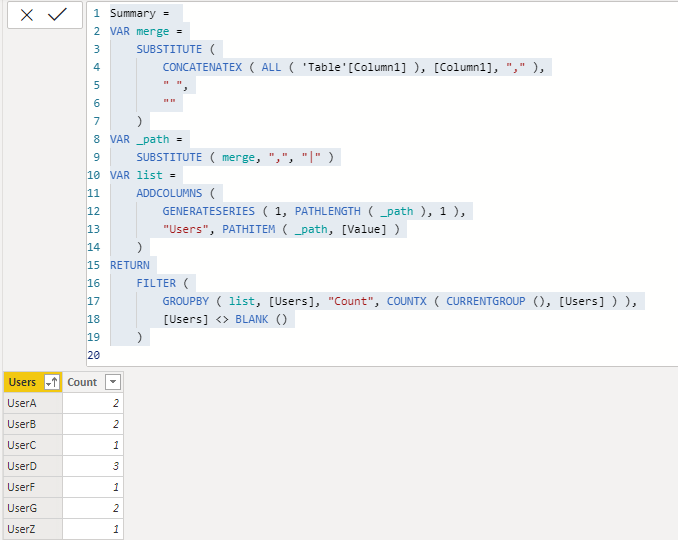
You can try to use following calculate table formulae to analysis raw table and generated the summarize user tables based on each item and their count:
Summary =
VAR merge =
SUBSTITUTE (
CONCATENATEX ( ALL ( 'Table'[Column1] ), [Column1], "," ),
" ",
""
)
VAR _path =
SUBSTITUTE ( merge, ",", "|" )
VAR list =
ADDCOLUMNS (
GENERATESERIES ( 1, PATHLENGTH ( _path ), 1 ),
"Users", PATHITEM ( _path, [Value] )
)
RETURN
FILTER (
GROUPBY ( list, [Users], "Count", COUNTX ( CURRENTGROUP (), [Users] ) ),
[Users] <> BLANK ()
)
Regards,
Xiaoxin Sheng
in the pq, split column
then group by
Proud to be a Super User!
Hello @pal95 ,
You will need to split your column into multiple columns in the query editor as shown in this blog:
https://www.tutorialgateway.org/how-to-split-columns-in-power-bi/
You can then count the occurrences of a string in multiple columns that reference the following existing thread:
https://community.powerbi.com/t5/Desktop/Count-instances-of-string-in-multiple-columns/td-p/239302
Thank you
Pragati
@pal95 , see split by row/column in power Query.edit query can help
https://www.tutorialgateway.org/how-to-split-columns-in-power-bi/
A new Power BI DataViz World Championship is coming this June! Don't miss out on submitting your entry.
Share feedback directly with Fabric product managers, participate in targeted research studies and influence the Fabric roadmap.
| User | Count |
|---|---|
| 47 | |
| 36 | |
| 27 | |
| 15 | |
| 15 |
| User | Count |
|---|---|
| 58 | |
| 56 | |
| 38 | |
| 21 | |
| 21 |