Join us at FabCon Atlanta from March 16 - 20, 2026, for the ultimate Fabric, Power BI, AI and SQL community-led event. Save $200 with code FABCOMM.
Register now!Get Fabric Certified for FREE during Fabric Data Days. Don't miss your chance! Request now
Hi,
I cannot figure out this problem (I am novice to PowerBI).
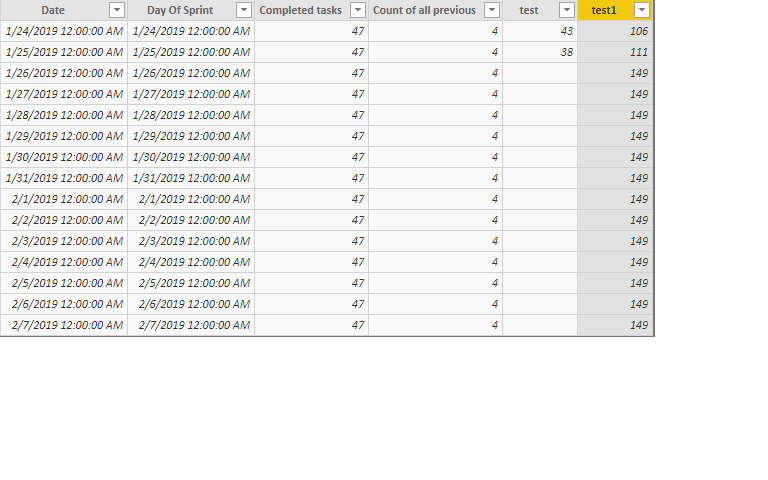
I have two tables. First table contains dates, I would like to count number of rows from another table that has dates older than the current row. I would like to do it for each row (passing current date for given row in the first table). It seems to be simple - but I am not getting right results. Here is the query I use:
test1 = CALCULATE(COUNTROWS(ReportCurrentSprint), FILTER(ReportCurrentSprint, FullSprint[Date] >= ReportCurrentSprint[Completed Date]))
For 1/25/2019 - I should see 4 (as in column Count of All Previus - but here I hardcoded the date), however the results in column test1 are totally different - I am not even sure what I am getting.
Solved! Go to Solution.
I found solution - most probably there is more elegant way of doing this, please let me know if you come up with something better.
The problem is that one table contains datetime with time part always starting at 12 am. The other table has also datetime, and while the date part is corresponding to the first table, the time part could be anything between 12 am and 11:59 pm. So to solve this, I created new columns in each table, dropping the time parts, leaving only short dates. This allowed me to create relationship between the tables and the COUNTROWS started working.
I found solution - most probably there is more elegant way of doing this, please let me know if you come up with something better.
The problem is that one table contains datetime with time part always starting at 12 am. The other table has also datetime, and while the date part is corresponding to the first table, the time part could be anything between 12 am and 11:59 pm. So to solve this, I created new columns in each table, dropping the time parts, leaving only short dates. This allowed me to create relationship between the tables and the COUNTROWS started working.
Are the 2 tables related to one another? I take it that the table shown is the FullSprintDate table? What if [Completed Date] in the other table is blank?
Hi Greg,
the tables are not related unfortunately, so I cannot use RELATED or RELATEDTABLE. The table shown is FullSprint. I will want to ignore rows with blanks, but at this point I cannot even get it working with populated data.
Thank you for looking into this
Check out the November 2025 Power BI update to learn about new features.
Advance your Data & AI career with 50 days of live learning, contests, hands-on challenges, study groups & certifications and more!