cancel
Showing results for 
Search instead for 
Did you mean: 

Next up in the FabCon + SQLCon recap series: The roadmap for Microsoft SQL and Maximizing Developer experiences in Fabric. All sessions are available on-demand after the live show. Register now

Reply
Anonymous
Not applicable

Count function not applying values in chart

First time question-er here.


I'll try to keep it simple.  Can't share data due to privacy issues.


1)Center table: list of invoices that have gone through a center

2)Dispute table: list of invoices that have had disputes

3)Fact table: all invoices, sales $


The first two tables are related in a 1:* relationship to the fact table


I have added two columns to my Fact table that are simply a yes/no based on whether that invoice appears in the corresponding tables: "Is Dispute Invoice" and "Is center invoice"

formula example: Is Dispute invoice = if(isblank(related('Dispute info'[Dispute Invoice ID])), "No", "Yes")


I have TRIED to create a measure that looks at the % of disputes: 

% disputes = divide(count('Dispute info'[Dispute Invoice ID]),CALCULATE(sum(Sales $], filter('Fact', 'Fact'[Is dispute invoice]="yes")))


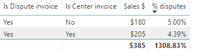
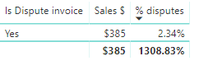
This seems to work fine until I drop in (to my table visual) the "Is Center Invoice".  Say there are a total of 9 dispute invoices.  The first table I attached calculates this correctly.  The second table is still using a count of 9 invoices, even though I've dropped in the Center yes/no column.  How do I get the count function to take into account any columns I may drag into the visual?!


Really hope this makes sense...
 

1.png


2.png

2 REPLIES 2
v-chuncz-msft
Community Support
Community Support

@Anonymous,


You may try using ALL FunctionALLEXCEPT Function and ALLSELECTED Function.

Community Support Team _ Sam Zha
If this post helps, then please consider Accept it as the solution to help the other members find it more quickly.
Anonymous
Not applicable

Thanks for replying... Those actually seem to make it worse.  I was wrapping those around the 'Fact' table after the FILTER function.

Helpful resources

Announcements
New to Fabric survey Carousel

New to Fabric Survey

If you have recently started exploring Fabric, we'd love to hear how it's going. Your feedback can help with product improvements.

Power BI DataViz World Championships carousel

Power BI DataViz World Championships - June 2026

A new Power BI DataViz World Championship is coming this June! Don't miss out on submitting your entry.

Join our Fabric User Panel

Join our Fabric User Panel

Share feedback directly with Fabric product managers, participate in targeted research studies and influence the Fabric roadmap.

March Power BI Update Carousel

Power BI Community Update - March 2026

Check out the March 2026 Power BI update to learn about new features.