cancel
Showing results for 
Search instead for 
Did you mean: 

Next up in the FabCon + SQLCon recap series: The roadmap for Microsoft SQL and Maximizing Developer experiences in Fabric. All sessions are available on-demand after the live show. Register now

Reply
rlooney
Frequent Visitor

Count distinct of nulls in Power BI doesn't work like SQL Server

We had a customer run across this while validating data.  


We see an idea in the old forum that indicates others have seen this problem as well, but I don't see any staff feedback to note that this is by design or a bug. It feels like a bug to us.  Old feedback:

https://ideas.powerbi.com/forums/265200-power-bi-ideas/suggestions/20324836-dax-distinctcount-treats...


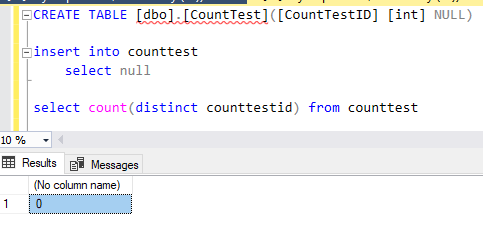
It is easy to duplicate.  On a local Sql server database create a table with a single column and a single null row of data. 

Note that count(distinct) of that table returns 0.


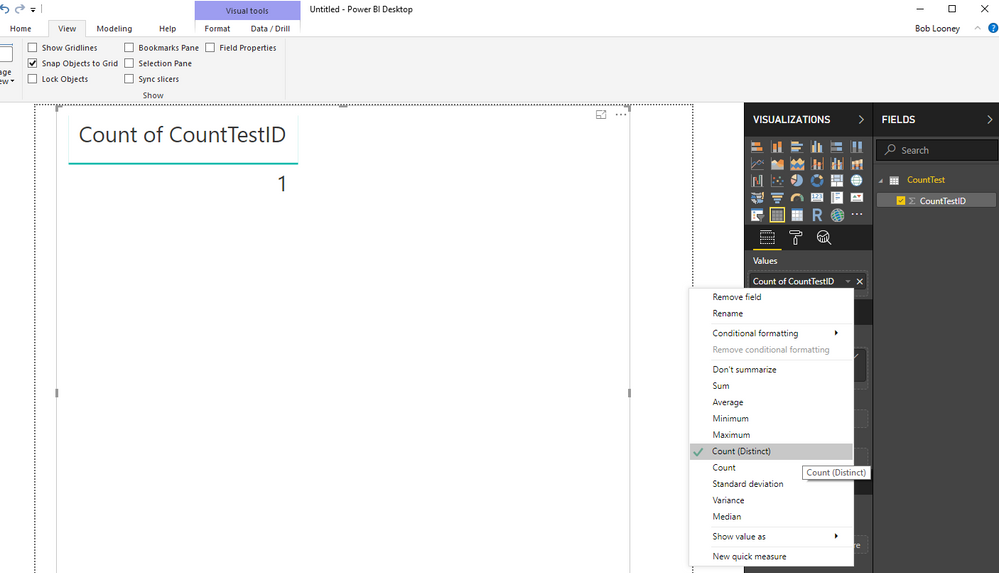
Now connect Power BI to that table (import or directquery - it doesn't matter). Show that column in a table or matrix and toggle to count (distinct).  Power BI shows 1.


It seems wrong that Power BI would work differently than SQL Server.  


Examples below...


sql server count distinct.PNGpower bi count distinct.PNG

2 ACCEPTED SOLUTIONS
Anonymous
Not applicable

@rlooney,

I have got response from PG that this behavior is by design, please vote up the idea you have mentioned above.

Regards,
Lydia

View solution in original post

rlooney
Frequent Visitor


 @Anonymous - Thank you for checking on this.  I have voted for the idea and this can be closed.


Also, for others that might see this, one of the forum questions about this suggests adding a filter to the data to exclude the (blank) data.  Doing that will produce a count and count(distinct) that is consistent with SQL Server.  Just keep in mind what level you're filtering that data at as that might cause other problems if not fully accounted for.

View solution in original post

4 REPLIES 4
rlooney
Frequent Visitor


 @Anonymous - Thank you for checking on this.  I have voted for the idea and this can be closed.


Also, for others that might see this, one of the forum questions about this suggests adding a filter to the data to exclude the (blank) data.  Doing that will produce a count and count(distinct) that is consistent with SQL Server.  Just keep in mind what level you're filtering that data at as that might cause other problems if not fully accounted for.

Anonymous
Not applicable

@rlooney,

I have got response from PG that this behavior is by design, please vote up the idea you have mentioned above.

Regards,
Lydia

Anonymous
Not applicable

@rlooney,


I will consult this issue internally and post back here once I get any updates.

Regards,
Lydia

rlooney
Frequent Visitor

A couple more pieces of info -


1 - I can confirm that Cognos and Tableau both implement Count (distinct) like SQL Server does - ignoring nulls.  As a result, most users are going to expect count(distinct) to work in an industry standard way.


2 - Count also suffers from some oddities when a null value is in play. 


Count of the above table in SQL Server produces 0, but shows as a blank in Power BI which seems like another related bug.  


Adding a row of non-null data [insert into counttest (CountTestID) Values (1) ] then caauses this in Power BI:


Count = 1

Count (distinct) = 2


SQL Server produces:


Count = 1

Count (distinct) = 1


So Count is working when non-null values exist, but is broken when that is the only row of data.


Count (distinct) seems consistently to count the null value which other systems do not - and as a result, users won't expect.


Helpful resources

Announcements
New to Fabric survey Carousel

New to Fabric Survey

If you have recently started exploring Fabric, we'd love to hear how it's going. Your feedback can help with product improvements.

Power BI DataViz World Championships carousel

Power BI DataViz World Championships - June 2026

A new Power BI DataViz World Championship is coming this June! Don't miss out on submitting your entry.

Join our Fabric User Panel

Join our Fabric User Panel

Share feedback directly with Fabric product managers, participate in targeted research studies and influence the Fabric roadmap.

March Power BI Update Carousel

Power BI Community Update - March 2026

Check out the March 2026 Power BI update to learn about new features.