Join us at FabCon Atlanta from March 16 - 20, 2026, for the ultimate Fabric, Power BI, AI and SQL community-led event. Save $200 with code FABCOMM.
Register now!The Power BI Data Visualization World Championships is back! Get ahead of the game and start preparing now! Learn more
Hello,
The number of days between dates I am referring to is as follows:
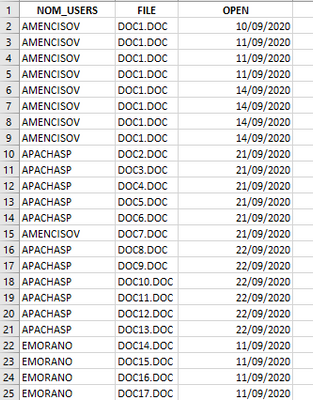
The following table records the date when a user opens a Word document in this case.
I would need to add a column indicating the days the "Word" application was used. For example, with the filter of dates from 09/01/2020 to 09/30/2020, in that month the user only has documents open on 3, 5 and 28, in this case in the third column it must indicate 3 days.
I've been thinking over and over again and I haven't been able to know where to start, I hope you can give me some idea.
Thank you
Solved! Go to Solution.
Seems like you'd like to get the Distinct count, did you try this option?
your sample input and ourput doesn't match.
Sample your input in a small set and provide desired output for that particular input.
From what I could understand, Please try the below code.
Calculate(distinctcount('table'[nom_users]), ALLEXCEPT('table','table'[File]))
Hello @pranit828 ,
The apologies for not giving me to understand, I will try to be more precise:
The following image shows how the data is approximately.
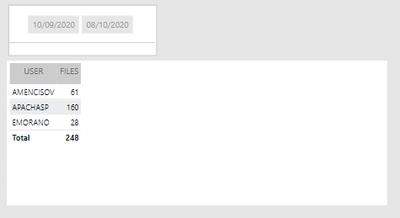
in this other image is the result, which tells us that AMENCISOV got to use the software "Word" in three days (10, 11 and 14) and "APACHASP" only one day (21). I think that the result should be given in a new table "CALCULATETABLE" and that as a calculated column I don't see that it is possible.
thanks
Seems like you'd like to get the Distinct count, did you try this option?
Check out the November 2025 Power BI update to learn about new features.
Advance your Data & AI career with 50 days of live learning, contests, hands-on challenges, study groups & certifications and more!
| User | Count |
|---|---|
| 58 | |
| 45 | |
| 42 | |
| 21 | |
| 18 |