cancel
Showing results for 
Search instead for 
Did you mean: 

The Power BI Data Visualization World Championships is back! Get ahead of the game and start preparing now! Learn more

Reply
Junaid11
Helper V
Helper V

Count based on Current quarter and Next Quarter

Hello,
I have thre columns as shown in table below. I want to count the status column. Open status should be done based on due date column while closed status should be done on closed date column. I want to count the open and close for current quarter and next quarter which will come after this quarter. 

StatusDue DateClosed Date
Open23/2/202312/1/2023
Close11/2/20233/1/2023
Open12/4/202318/3/2023
Close20/6/20232/6/2023
Open19/1/20234/1/2023
Open25/6/20235/5/2023
Close7/9/202327/8/23
Open17/9/202317/9/2023

It should not count next quarter for all the next coming quarter but for the single next quarter. My outcome will look like below as per above data. 

StatusCurrent QuarterNext Quarter
Open22
Close12

Your help would be highly appreciated.
Thank you

5 REPLIES 5
Rudy_D
Resolver I
Resolver I

Hey !


Please try this 🙂 :


Current Quarter = QUARTER(TODAY())
Quarter Due Date = QUARTER(SELECTEDVALUE(Table[Due Date]))
Quarter Close Date = QUARTER(SELECTEDVALUE(Table[Close Date]))
 
Current Quarter Count =

CALCULATE(COUNT(Table[Status]), FILTER(Table, (Table[Status] = "Open" && [Quarter Due Date] = [Current Quarter]) || (Table[Status] = "Close" && [Quarter Close Date] = [Current Quarter]) ))
 
Next Quarter Count =

CALCULATE(COUNT(Table[Status]), FILTER(Table, (Table[Status] = "Open" && [Quarter Due Date] = [Current Quarter] + 1) || (Table[Status] = "Close" && [Quarter Close Date] = [Current Quarter] + 1) ))
 
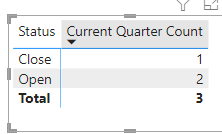
Please find below the result for the current quarter count :).
 
Rudy_D_0-1674227694741.png


Helo @Rudy_D ,
Can you provide the file as I am applying same measures but getting blank. Can you provide the file please?

Please find my test file here :


Test 

Hello @Rudy_D ,
I checked but next quarter formula is not getting the correct outcome. 

I don't understand you expectation. 
Which are the 2 "close" that you expect for the next quarter ? For me there's only one in your table.

Helpful resources

Announcements
Power BI DataViz World Championships

Power BI Dataviz World Championships

The Power BI Data Visualization World Championships is back! Get ahead of the game and start preparing now!

December 2025 Power BI Update Carousel

Power BI Monthly Update - December 2025

Check out the December 2025 Power BI Holiday Recap!

FabCon Atlanta 2026 carousel

FabCon Atlanta 2026

Join us at FabCon Atlanta, March 16-20, for the ultimate Fabric, Power BI, AI and SQL community-led event. Save $200 with code FABCOMM.