Learn from the best! Meet the four finalists headed to the FINALS of the Power BI Dataviz World Championships! Register now
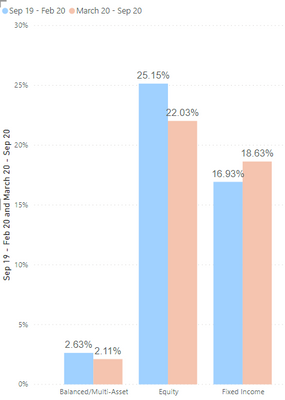
I have created the below column chart which is correct however the DAX code I used to create the columns is far too long.
I want to show the values of Asset Class between Sep 19 to Feb 20 and the same between March 20 to Sep 20
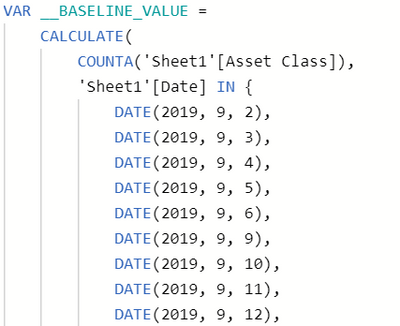
What is the cleanest formulat to calculate values between two dates, my current formula involved selecting each individual day (example below)
Solved! Go to Solution.
@DominicK, you can try as
calculate(countA(Sheet1[Asset Class]), filter(Sheet1,Sheet1[Date] > date(2019,09,01) && Sheet1[Date] < date(2020,02,29)))
You can try this with the date table
calculate(countA(Sheet1[Asset Class]), DATESBETWEEN(DAte[Data], date(2019,09,01), date(2020,02,29)))
You can use date segmentation and this will work -countA(Sheet1[Asset Class])
To get the best out of the time intelligence function. Make sure that you have a date calendar and that it has been marked as the date in the model view. Also, join her with the date column of your events. Recommended:
https://radacad.com/creating-calendar-table-in-power-bi-using-dax-functions
https://www.archerpoint.com/blog/Posts/creating-date-table-power-bi
https://www.sqlbi.com/articles/creating-a-simple-date-table-in-dax/
See if my Time Intelligence webinar can help: https://community.powerbi.com/t5/Webinars-and-Video-Gallery/PowerBI-Time-Intelligence-Calendar-WTD-Y...
We appreciate your congratulations.
@DominicK, you can try as
calculate(countA(Sheet1[Asset Class]), filter(Sheet1,Sheet1[Date] > date(2019,09,01) && Sheet1[Date] < date(2020,02,29)))
You can try this with the date table
calculate(countA(Sheet1[Asset Class]), DATESBETWEEN(DAte[Data], date(2019,09,01), date(2020,02,29)))
You can use date segmentation and this will work -countA(Sheet1[Asset Class])
To get the best out of the time intelligence function. Make sure that you have a date calendar and that it has been marked as the date in the model view. Also, join her with the date column of your events. Recommended:
https://radacad.com/creating-calendar-table-in-power-bi-using-dax-functions
https://www.archerpoint.com/blog/Posts/creating-date-table-power-bi
https://www.sqlbi.com/articles/creating-a-simple-date-table-in-dax/
See if my Time Intelligence webinar can help: https://community.powerbi.com/t5/Webinars-and-Video-Gallery/PowerBI-Time-Intelligence-Calendar-WTD-Y...
We appreciate your congratulations.
Thank You!
I will be looking at automating this report.
Do you have any advice on how to create a measure that shows a rolling 6 months?
Next quarter I will want to run this again but the dates will be different( December 2019 - June 2020 and July 2020 - December 2020)
Thanks!
If you have recently started exploring Fabric, we'd love to hear how it's going. Your feedback can help with product improvements.
A new Power BI DataViz World Championship is coming this June! Don't miss out on submitting your entry.
Share feedback directly with Fabric product managers, participate in targeted research studies and influence the Fabric roadmap.
| User | Count |
|---|---|
| 57 | |
| 38 | |
| 34 | |
| 18 | |
| 16 |
| User | Count |
|---|---|
| 68 | |
| 67 | |
| 42 | |
| 30 | |
| 26 |