FabCon is coming to Atlanta
Join us at FabCon Atlanta from March 16 - 20, 2026, for the ultimate Fabric, Power BI, AI and SQL community-led event. Save $200 with code FABCOMM.
Register now!- Power BI forums
- Get Help with Power BI
- Desktop
- Service
- Report Server
- Power Query
- Mobile Apps
- Developer
- DAX Commands and Tips
- Custom Visuals Development Discussion
- Health and Life Sciences
- Power BI Spanish forums
- Translated Spanish Desktop
- Training and Consulting
- Instructor Led Training
- Dashboard in a Day for Women, by Women
- Galleries
- Data Stories Gallery
- Themes Gallery
- Contests Gallery
- QuickViz Gallery
- Quick Measures Gallery
- Visual Calculations Gallery
- Notebook Gallery
- Translytical Task Flow Gallery
- TMDL Gallery
- R Script Showcase
- Webinars and Video Gallery
- Ideas
- Custom Visuals Ideas (read-only)
- Issues
- Issues
- Events
- Upcoming Events
Get Fabric Certified for FREE during Fabric Data Days. Don't miss your chance! Request now
- Power BI forums
- Forums
- Get Help with Power BI
- Desktop
- Re: Count Total Workforce if Termination Date is >...
- Subscribe to RSS Feed
- Mark Topic as New
- Mark Topic as Read
- Float this Topic for Current User
- Bookmark
- Subscribe
- Printer Friendly Page


- Mark as New
- Bookmark
- Subscribe
- Mute
- Subscribe to RSS Feed
- Permalink
- Report Inappropriate Content
Count Total Workforce if Termination Date is >= to Date filter
Good morning,
Qlikview user here trying to move to Power BI.
Need to define a calculated measure to count active workforce based on selected year.
Name Hire Date Termination date
Name 1 January 2, 2010
Name 2 Februray 5, 2010
Name 3 April 2, 2011
Name 4 April 15, 2012
Name 5 March 5, 2013
Name 6 March 18, 2014 January 16, 2017
Name 7 Sept 15, 2015
Name 8, January 7, 2016 February 8, 2017
Name 9 February 25, 2017
Having above sample data.
If i choose year 2017, my active workforce is 8 as 1 resigned in Feb,
If i choose year 2016, my active worforce is 8 as Name 8 and Name 6 resigned in 2017
Many thanks
Solved! Go to Solution.

- Mark as New
- Bookmark
- Subscribe
- Mute
- Subscribe to RSS Feed
- Permalink
- Report Inappropriate Content
Hi @CJ_96601,
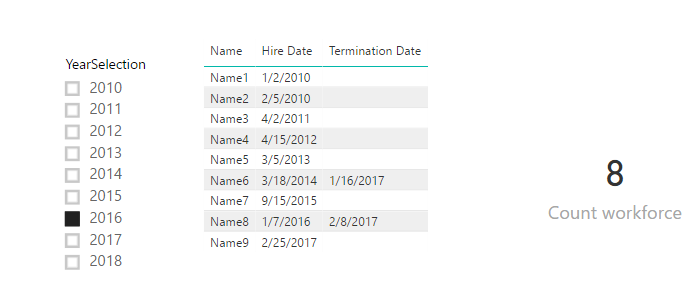
Suppose the data table is named as 'Workforce', also you have an extra table which lists unique year values named as 'Year Table'.
Please refer to below measure:
Count workforce =
CALCULATE (
    COUNT ( Workforce[Name] ),
    FILTER (
        Workforce,
        Workforce[Hire Date].[Year] <= MAX ( 'Year Table'[YearSelection] )
            && (
                Workforce[Termination Date] = BLANK ()
                    || Workforce[Termination Date].[Year] > MAX ( 'Year Table'[YearSelection] )
            )
    )
)
Best regards,
Yuliana Gu
If this post helps, then please consider Accept it as the solution to help the other members find it more quickly.
- Mark as New
- Bookmark
- Subscribe
- Mute
- Subscribe to RSS Feed
- Permalink
- Report Inappropriate Content
Hi @CJ_96601,
Using a calendar table also applies to this scenario. Please remove the relationship between these two tables. If you cann't remove the relationship, please create another unrelated date table like what I have did.
Regards,
Yuliana Gu
If this post helps, then please consider Accept it as the solution to help the other members find it more quickly.
- Mark as New
- Bookmark
- Subscribe
- Mute
- Subscribe to RSS Feed
- Permalink
- Report Inappropriate Content
Hi @CJ_96601,
Suppose the data table is named as 'Workforce', also you have an extra table which lists unique year values named as 'Year Table'.
Please refer to below measure:
Count workforce =
CALCULATE (
    COUNT ( Workforce[Name] ),
    FILTER (
        Workforce,
        Workforce[Hire Date].[Year] <= MAX ( 'Year Table'[YearSelection] )
            && (
                Workforce[Termination Date] = BLANK ()
                    || Workforce[Termination Date].[Year] > MAX ( 'Year Table'[YearSelection] )
            )
    )
)
Best regards,
Yuliana Gu
If this post helps, then please consider Accept it as the solution to help the other members find it more quickly.
- Mark as New
- Bookmark
- Subscribe
- Mute
- Subscribe to RSS Feed
- Permalink
- Report Inappropriate Content
hi @v-yulgu-msft,
Thank you for your response.
I appreciate if you could send your sample pbix file.
Furthermore, i dont have a table with unique list of year, i use calendar.
The workforce table is link to calendar. Active relation is HIREDate, inactive is Termination Date.
Regards
- Mark as New
- Bookmark
- Subscribe
- Mute
- Subscribe to RSS Feed
- Permalink
- Report Inappropriate Content
Hi @CJ_96601,
Using a calendar table also applies to this scenario. Please remove the relationship between these two tables. If you cann't remove the relationship, please create another unrelated date table like what I have did.
Regards,
Yuliana Gu
If this post helps, then please consider Accept it as the solution to help the other members find it more quickly.
- Mark as New
- Bookmark
- Subscribe
- Mute
- Subscribe to RSS Feed
- Permalink
- Report Inappropriate Content
Thanks @v-yulgu-msft,
You're saying there is no need to establish a relationship between calendar and my workforce file?
If i may ask what is the use of calendar in power bi.
My apology, i'm new in power bi
Regards,
- Mark as New
- Bookmark
- Subscribe
- Mute
- Subscribe to RSS Feed
- Permalink
- Report Inappropriate Content
Hi,
Please provide sample on how to count those who were terminated based on year selection.
Is there a way, if i need to filter based on month / year or quarter / year
Regards,

Helpful resources

Power BI Monthly Update - November 2025
Check out the November 2025 Power BI update to learn about new features.

Fabric Data Days
Advance your Data & AI career with 50 days of live learning, contests, hands-on challenges, study groups & certifications and more!

FabCon Atlanta 2026
Join us at FabCon Atlanta, March 16-20, for the ultimate Fabric, Power BI, AI and SQL community-led event. Save $200 with code FABCOMM.


