cancel
Showing results for 
Search instead for 
Did you mean: 

Learn from the best! Meet the four finalists headed to the FINALS of the Power BI Dataviz World Championships! Register now

Reply
astano05
Helper III
Helper III

Count Rows counting all values

I need to get the distinct count of products in a matrix by customer. I want it to count the # of products sold that have sales for each customer. The measure counts the products as 1 on the product level of the matrix, but it always shows 59 at the customer and segment levels (59 is the total count of all products). In the below example it should show 2.


Count = if(not(isblank(Sales)),countrows(values('Product Class'[Major Planning Group Name])))


My Matrix is set up :

 Count
Segment59
     Customer59
          Product1
          Product1
1 ACCEPTED SOLUTION
AlexisOlson
Super User
Super User

Does this work more like you expect?

CALCULATE (
    DISTINCTCOUNT ( 'Product Class'[Major Planning Group Name] ),
    Sales
)

View solution in original post

4 REPLIES 4
AlexisOlson
Super User
Super User

Does this work more like you expect?

CALCULATE (
    DISTINCTCOUNT ( 'Product Class'[Major Planning Group Name] ),
    Sales
)
tackytechtom
Most Valuable Professional

Hi @astano05 ,


What does Sales refer to in your initial formular? Is this a measure or a column?

Maybe try it with this:

Count = 
CALCULATE (
    COUNTROWS ( 'Product Class' ),
    Table[Sales] <> BLANK()
)


/Tom
https://www.tackytech.blog/
https://www.instagram.com/tackytechtom/


Did I answer your question➡️ Please, mark my post as a solution ✔️

Also happily accepting Kudos 🙂

Feel free to connect with me on LinkedIn! linkedIn

#proudtobeasuperuser 

tackytechtom
Most Valuable Professional

Hi @astano05 ,

I'll give it a shot. Would it work with this?

Count = 
CALCULATE (
    COUNTROWS ( 'Product Class' ),
    NOT ( ISBLANK ( Table[Sales] )
)


Let me know, if that helped 🙂 Otherwise feel free to share some data!


/Tom
https://www.tackytech.blog/
https://www.instagram.com/tackytechtom/


Did I answer your question➡️ Please, mark my post as a solution ✔️

Also happily accepting Kudos 🙂

Feel free to connect with me on LinkedIn! linkedIn

#proudtobeasuperuser 

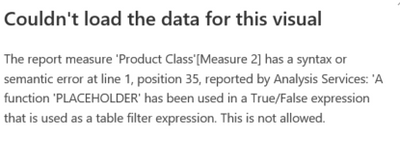
thanks for the reply! i get this error with this formula with calcluate.


astano05_0-1647549003738.png


Helpful resources

Announcements
New to Fabric survey Carousel

New to Fabric Survey

If you have recently started exploring Fabric, we'd love to hear how it's going. Your feedback can help with product improvements.

Power BI DataViz World Championships carousel

Power BI DataViz World Championships - June 2026

A new Power BI DataViz World Championship is coming this June! Don't miss out on submitting your entry.

Join our Fabric User Panel

Join our Fabric User Panel

Share feedback directly with Fabric product managers, participate in targeted research studies and influence the Fabric roadmap.

March Power BI Update Carousel

Power BI Community Update - March 2026

Check out the March 2026 Power BI update to learn about new features.