FabCon is coming to Atlanta
Join us at FabCon Atlanta from March 16 - 20, 2026, for the ultimate Fabric, Power BI, AI and SQL community-led event. Save $200 with code FABCOMM.
Register now!- Power BI forums
- Get Help with Power BI
- Desktop
- Service
- Report Server
- Power Query
- Mobile Apps
- Developer
- DAX Commands and Tips
- Custom Visuals Development Discussion
- Health and Life Sciences
- Power BI Spanish forums
- Translated Spanish Desktop
- Training and Consulting
- Instructor Led Training
- Dashboard in a Day for Women, by Women
- Galleries
- Data Stories Gallery
- Themes Gallery
- Contests Gallery
- QuickViz Gallery
- Quick Measures Gallery
- Visual Calculations Gallery
- Notebook Gallery
- Translytical Task Flow Gallery
- TMDL Gallery
- R Script Showcase
- Webinars and Video Gallery
- Ideas
- Custom Visuals Ideas (read-only)
- Issues
- Issues
- Events
- Upcoming Events
View all the Fabric Data Days sessions on demand. View schedule
- Power BI forums
- Forums
- Get Help with Power BI
- Desktop
- Count Row if the result of the measure is greater ...
- Subscribe to RSS Feed
- Mark Topic as New
- Mark Topic as Read
- Float this Topic for Current User
- Bookmark
- Subscribe
- Printer Friendly Page


- Mark as New
- Bookmark
- Subscribe
- Mute
- Subscribe to RSS Feed
- Permalink
- Report Inappropriate Content
Count Row if the result of the measure is greater than zero
Hi,
Can you help me write a DAX command that will count the raw that satisfy this condition.
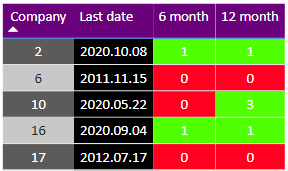
I have a table of clients and dates of recent activity.
The "6 months" column check how much activity has been in the last 6 months in specific types of tasks.
The "12 months" column works in a similar way.
Solved! Go to Solution.


- Mark as New
- Bookmark
- Subscribe
- Mute
- Subscribe to RSS Feed
- Permalink
- Report Inappropriate Content
The code works fine as it was but you need the filters that you are applyting to the table visual (ClassificationID and TextFiled14) applied at the page level instead. Otherwise you'll get different results in the table and elsewhere, because the filters are different. You can in any case simplify the measure above a bit:
Green 6 or 12 =
COUNTROWS (
    FILTER (
        DISTINCT ( cicmpy[cmp_code] ),
         ( [6 miesięcy_miara] + [12 miesięcy_miara] ) > 0
    )
)
Notice that the result is exactly the same as checking for green on 12 months only, since checking if a date is within the last 12 months is equivalent to checking if a date is within the last 6 months OR within the last 12 months
See it all at work in the attached file (Page 2)
Please mark the question solved when done and consider giving a thumbs up if posts are helpful.
Contact me privately for support with any larger-scale BI needs, tutoring, etc.
Cheers

- Mark as New
- Bookmark
- Subscribe
- Mute
- Subscribe to RSS Feed
- Permalink
- Report Inappropriate Content
The code works fine as it was but you need the filters that you are applyting to the table visual (ClassificationID and TextFiled14) applied at the page level instead. Otherwise you'll get different results in the table and elsewhere, because the filters are different. You can in any case simplify the measure above a bit:
Green 6 or 12 =
COUNTROWS (
    FILTER (
        DISTINCT ( cicmpy[cmp_code] ),
         ( [6 miesięcy_miara] + [12 miesięcy_miara] ) > 0
    )
)
Notice that the result is exactly the same as checking for green on 12 months only, since checking if a date is within the last 12 months is equivalent to checking if a date is within the last 6 months OR within the last 12 months
See it all at work in the attached file (Page 2)
Please mark the question solved when done and consider giving a thumbs up if posts are helpful.
Contact me privately for support with any larger-scale BI needs, tutoring, etc.
Cheers
- Mark as New
- Bookmark
- Subscribe
- Mute
- Subscribe to RSS Feed
- Permalink
- Report Inappropriate Content
Hi @amiskow
How do you want the result?
Place this measure in a card visual:
Measure =
COUNTROWS (
    FILTER (
        ADDCOLUMNS ( DISTINCT ( Table1[Company] ), "@Lasdate", [LastDate] ),
        ([6 months] + [12 month]) > 0
    )
)
If this doesn't work please share a pbix with dummy data reproducing the issue
By the way, you can simplify the code for [LastDate] using the IN operator
Please mark the question solved when done and consider giving a thumbs up if posts are helpful.
Contact me privately for support with any larger-scale BI needs, tutoring, etc.
Cheers
- Mark as New
- Bookmark
- Subscribe
- Mute
- Subscribe to RSS Feed
- Permalink
- Report Inappropriate Content
Hi @AlB ,
Thank you for contacting me. Your solution does not work correctly, or I cannot make it. 😞
I'm sending the file http://gofile.me/4vwta/cXXTFhjYm

- Mark as New
- Bookmark
- Subscribe
- Mute
- Subscribe to RSS Feed
- Permalink
- Report Inappropriate Content
Hi @amiskow ,
Can you please a bit a clearer about your requirement? Are you looking to get the count of the green values from 6 months and 12 months columns?
If yes, what is thelogic behind the red and green colurs in your table?
- Mark as New
- Bookmark
- Subscribe
- Mute
- Subscribe to RSS Feed
- Permalink
- Report Inappropriate Content
Hi @PC2790 ,
I want to know how many green rows is in the table (single rows), not the sum of the numbers in the cells .
In the photo we have 2 green rows in the 6 month column, and 3 rows in the 12 month column.
The table actually over 10k rows.
The logic is as described above.
"Last date" is a measure that searches for the latest task from SQL table a given task type, it is not very important for this case.
"6 month" is measure with simple logic that allows conditional formatting. (6 month = IF([LastDate]<TODAY()-182,0,1))
"12 month" is measure same as 6 only 12
I hope I have described the cave enough 😉

Helpful resources

Power BI Monthly Update - November 2025
Check out the November 2025 Power BI update to learn about new features.

Fabric Data Days
Advance your Data & AI career with 50 days of live learning, contests, hands-on challenges, study groups & certifications and more!

FabCon Atlanta 2026
Join us at FabCon Atlanta, March 16-20, for the ultimate Fabric, Power BI, AI and SQL community-led event. Save $200 with code FABCOMM.


