Join us at FabCon Atlanta from March 16 - 20, 2026, for the ultimate Fabric, Power BI, AI and SQL community-led event. Save $200 with code FABCOMM.
Register now!The Power BI Data Visualization World Championships is back! Get ahead of the game and start preparing now! Learn more
Hi,
We recently started using Power Bi and while doing some tests i've come across unexpected results when aggregating data between 2 tables with One to Many Relationship.
This is a part of our model:
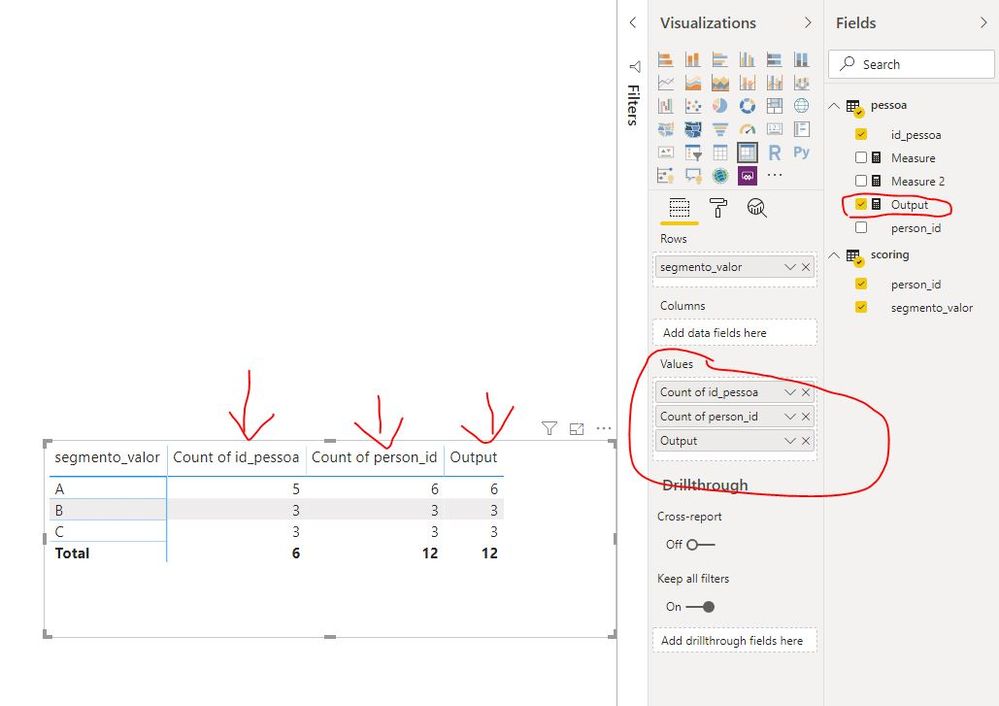
When creating a matrix with count of id_pessoa by segmento_valor, i get strange values per row, and a total row count equal to the total of rows from table pessoa.
We only get the correct results when we build a matrix with count of person_id (scoring table) by segmento_valor, but we can't accept this solution, since we want to hide the tables keys from the users.
When creating a table view, with the fields id_pessoa and segmento_valor, i can confirm that the relationship is working (id_pessoa is duplicated for each row of the scoring table).
Can someone explain what are we doing wrong?
Thanks.
Solved! Go to Solution.
hi, @luisc
This is a measure totals problem. Very common. See this post about it
https://community.powerbi.com/t5/DAX-Commands-and-Tips/Dealing-with-Measure-Totals/td-p/63376
Also, this Quick Measure, Measure Totals, The Final Word should get you what you need:
https://community.powerbi.com/t5/Quick-Measures-Gallery/Measure-Totals-The-Final-Word/m-p/547907
For your case, when you count of id_pessoa (pessoa table) , It likes a measure as below:
Output = var _table=ADDCOLUMNS(scoring,"_id_pessod",RELATED(pessoa[id_pessoa])) return COUNTAX(_table,[_id_pessod])Result:
Regards,
Lin
hi, @luisc
This is a measure totals problem. Very common. See this post about it
https://community.powerbi.com/t5/DAX-Commands-and-Tips/Dealing-with-Measure-Totals/td-p/63376
Also, this Quick Measure, Measure Totals, The Final Word should get you what you need:
https://community.powerbi.com/t5/Quick-Measures-Gallery/Measure-Totals-The-Final-Word/m-p/547907
For your case, when you count of id_pessoa (pessoa table) , It likes a measure as below:
Output = var _table=ADDCOLUMNS(scoring,"_id_pessod",RELATED(pessoa[id_pessoa])) return COUNTAX(_table,[_id_pessod])Result:
Regards,
Lin
Thanks for the help and the posts.
Was really hoping that this was a problem with the model, since this is something that the users used to do in our other BI.
The Power BI Data Visualization World Championships is back! Get ahead of the game and start preparing now!
| User | Count |
|---|---|
| 56 | |
| 45 | |
| 35 | |
| 34 | |
| 21 |
| User | Count |
|---|---|
| 143 | |
| 122 | |
| 100 | |
| 80 | |
| 57 |