FabCon is coming to Atlanta
Join us at FabCon Atlanta from March 16 - 20, 2026, for the ultimate Fabric, Power BI, AI and SQL community-led event. Save $200 with code FABCOMM.
Register now!- Power BI forums
- Get Help with Power BI
- Desktop
- Service
- Report Server
- Power Query
- Mobile Apps
- Developer
- DAX Commands and Tips
- Custom Visuals Development Discussion
- Health and Life Sciences
- Power BI Spanish forums
- Translated Spanish Desktop
- Training and Consulting
- Instructor Led Training
- Dashboard in a Day for Women, by Women
- Galleries
- Data Stories Gallery
- Themes Gallery
- Contests Gallery
- QuickViz Gallery
- Quick Measures Gallery
- Visual Calculations Gallery
- Notebook Gallery
- Translytical Task Flow Gallery
- TMDL Gallery
- R Script Showcase
- Webinars and Video Gallery
- Ideas
- Custom Visuals Ideas (read-only)
- Issues
- Issues
- Events
- Upcoming Events
The Power BI Data Visualization World Championships is back! Get ahead of the game and start preparing now! Learn more
- Power BI forums
- Forums
- Get Help with Power BI
- Desktop
- Re: Count Number of Times a Word is Found in All C...
- Subscribe to RSS Feed
- Mark Topic as New
- Mark Topic as Read
- Float this Topic for Current User
- Bookmark
- Subscribe
- Printer Friendly Page


- Mark as New
- Bookmark
- Subscribe
- Mute
- Subscribe to RSS Feed
- Permalink
- Report Inappropriate Content
Count Number of Times a Word is Found in All Columns of a Table
Hello,
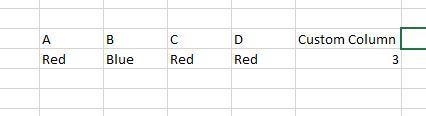
Does anyone know of a way in DAX or maybe a different solution to check all columns in a table for a certain word and if the word is found return a 1 or even a count of how mant times the work was found?
For example, I need the count of Red for a record but want to check all columns without listing them in my DAX
Solved! Go to Solution.


- Mark as New
- Bookmark
- Subscribe
- Mute
- Subscribe to RSS Feed
- Permalink
- Report Inappropriate Content
Hello @Justair07
you can do this easily with power query:
let
    Source = Table.FromRows(Json.Document(Binary.Decompress(Binary.FromText("i45WCkpNUdJRcsopTQVSEA6IjI0FAA==", BinaryEncoding.Base64), Compression.Deflate)), let _t = ((type text) meta [Serialized.Text = true]) in type table [Column1 = _t, Column2 = _t, Column3 = _t, Column4 = _t]),
    ChangedType = Table.TransformColumnTypes(Source,{{"Column1", type text}, {"Column2", type text}, {"Column3", type text}, {"Column4", type text}}),

    Test = Table.AddColumn(ChangedType, "WordCount", each List.Count(List.Select(Record.ToList(_), each Text.Contains(_, "Red"))), Int64.Type)
in
    Test
Did I answer your question correctly? Mark my answer as a solution!
Proud to be a Datanaut!
- Mark as New
- Bookmark
- Subscribe
- Mute
- Subscribe to RSS Feed
- Permalink
- Report Inappropriate Content
Hello @Justair07
you can do this easily with power query:
let
    Source = Table.FromRows(Json.Document(Binary.Decompress(Binary.FromText("i45WCkpNUdJRcsopTQVSEA6IjI0FAA==", BinaryEncoding.Base64), Compression.Deflate)), let _t = ((type text) meta [Serialized.Text = true]) in type table [Column1 = _t, Column2 = _t, Column3 = _t, Column4 = _t]),
    ChangedType = Table.TransformColumnTypes(Source,{{"Column1", type text}, {"Column2", type text}, {"Column3", type text}, {"Column4", type text}}),

    Test = Table.AddColumn(ChangedType, "WordCount", each List.Count(List.Select(Record.ToList(_), each Text.Contains(_, "Red"))), Int64.Type)
in
    Test
Did I answer your question correctly? Mark my answer as a solution!
Proud to be a Datanaut!
- Mark as New
- Bookmark
- Subscribe
- Mute
- Subscribe to RSS Feed
- Permalink
- Report Inappropriate Content
@LivioLanzo thank you. Is this the only solution you know of which requires the nameing of the columns? If I add a column to the table, will I also have to add it to the query? Is there a more dynamic solution that you know of?
- Mark as New
- Bookmark
- Subscribe
- Mute
- Subscribe to RSS Feed
- Permalink
- Report Inappropriate Content
Hi @Justair07
the last line of the query (which is the one of the calculation) is fully dynamic and will work for all the columns
Did I answer your question correctly? Mark my answer as a solution!
Proud to be a Datanaut!
- Mark as New
- Bookmark
- Subscribe
- Mute
- Subscribe to RSS Feed
- Permalink
- Report Inappropriate Content
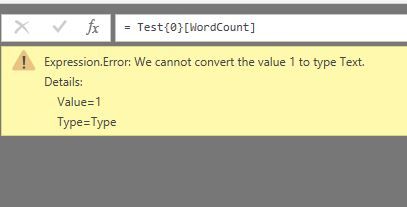
Do all columns in the table have to be Text? What if I only want to check the already existing text columns? I'm getting an error:
- Mark as New
- Bookmark
- Subscribe
- Mute
- Subscribe to RSS Feed
- Permalink
- Report Inappropriate Content
You can convert them all first to Text like this
Test = Table.AddColumn(ChangedType, "WordCount", each List.Count(List.Select(Record.ToList(_), each Text.Contains(Text.From(_), "Red"))), Int64.Type)
Did I answer your question correctly? Mark my answer as a solution!
Proud to be a Datanaut!
- Mark as New
- Bookmark
- Subscribe
- Mute
- Subscribe to RSS Feed
- Permalink
- Report Inappropriate Content
@LivioLanzo but what if I need the date fields to remain date fields, number fields to remain number fields, etc..?
- Mark as New
- Bookmark
- Subscribe
- Mute
- Subscribe to RSS Feed
- Permalink
- Report Inappropriate Content
this will not change the data type of the original column
Did I answer your question correctly? Mark my answer as a solution!
Proud to be a Datanaut!
- Mark as New
- Bookmark
- Subscribe
- Mute
- Subscribe to RSS Feed
- Permalink
- Report Inappropriate Content
Perfect! Thank you!
- Mark as New
- Bookmark
- Subscribe
- Mute
- Subscribe to RSS Feed
- Permalink
- Report Inappropriate Content
@LivioLanzo is it possible to edit this line to count all text that IS NOT "Conforming"
Test = Table.AddColumn(ChangedType, "Non-Conforming", each List.Count(List.Select(Record.ToList(_), each Text.Contains(Text.From(_),
"Non-Conforming"))), Int64.Type)
something like this
Test = Table.AddColumn(ChangedType, "Non-Conforming", each List.Count(List.Select(Record.ToList(_), each Text.Contains(Text.From(_),
<> "Conforming"))), Int64.Type)
or maybe add an OR operator
Test = Table.AddColumn(ChangedType, "Non-Conforming", each List.Count(List.Select(Record.ToList(_), each Text.Contains(Text.From(_),
OR("Non-Conforming", "Failed")))), Int64.Type)
- Mark as New
- Bookmark
- Subscribe
- Mute
- Subscribe to RSS Feed
- Permalink
- Report Inappropriate Content
if you want the text to not contain something you can just add a NOT:
Test = Table.AddColumn(ChangedType, "Non-Conforming", each List.Count(List.Select(Record.ToList(_), each not Text.Contains(Text.From(_), <> "Conforming"))), Int64.Type)
Did I answer your question correctly? Mark my answer as a solution!
Proud to be a Datanaut!
- Mark as New
- Bookmark
- Subscribe
- Mute
- Subscribe to RSS Feed
- Permalink
- Report Inappropriate Content
@LivioLanzo ok that is very helpful. Thank you. Is the AND operator an option in M as well? Instead of using NOT I can just add more conditions for various words. I hope this make s sense.
- Mark as New
- Bookmark
- Subscribe
- Mute
- Subscribe to RSS Feed
- Permalink
- Report Inappropriate Content
Hi @Justair07
you could add more words like this
let
    Source = Table.FromRows(Json.Document(Binary.Decompress(Binary.FromText("i45WCkpNUdJRcsopTQVSEA6IjI0FAA==", BinaryEncoding.Base64), Compression.Deflate)), let _t = ((type text) meta [Serialized.Text = true]) in type table [Column1 = _t, Column2 = _t, Column3 = _t, Column4 = _t]),

    ChangedType = Table.TransformColumnTypes(Source,{{"Column1", type text}, {"Column2", type text}, {"Column3", type text}, {"Column4", type text}}),

    Test = Table.AddColumn(
                ChangedType,
                "WordCount",
                each List.Count(
                        List.Select(
                            Record.ToList(_),
                            each Text.Contains(_, "Red") or Text.Contains(_, "Yellow")
                        )
                     ), Int64.Type)
in
    Test
Did I answer your question correctly? Mark my answer as a solution!
Proud to be a Datanaut!

Helpful resources

Power BI Dataviz World Championships
The Power BI Data Visualization World Championships is back! Get ahead of the game and start preparing now!

Power BI Monthly Update - December 2025
Check out the December 2025 Power BI Holiday Recap!

FabCon Atlanta 2026
Join us at FabCon Atlanta, March 16-20, for the ultimate Fabric, Power BI, AI and SQL community-led event. Save $200 with code FABCOMM.

| User | Count |
|---|---|
| 38 | |
| 38 | |
| 37 | |
| 28 | |
| 27 |


| User | Count |
|---|---|
| 124 | |
| 89 | |
| 73 | |
| 66 | |
| 65 |


