cancel
Showing results for 
Search instead for 
Did you mean: 

A new Data Days event is coming soon! This time we’re going bigger than ever. Fabric, Power BI, SQL, AI and more. Don't miss out.

Reply
Anonymous
Not applicable

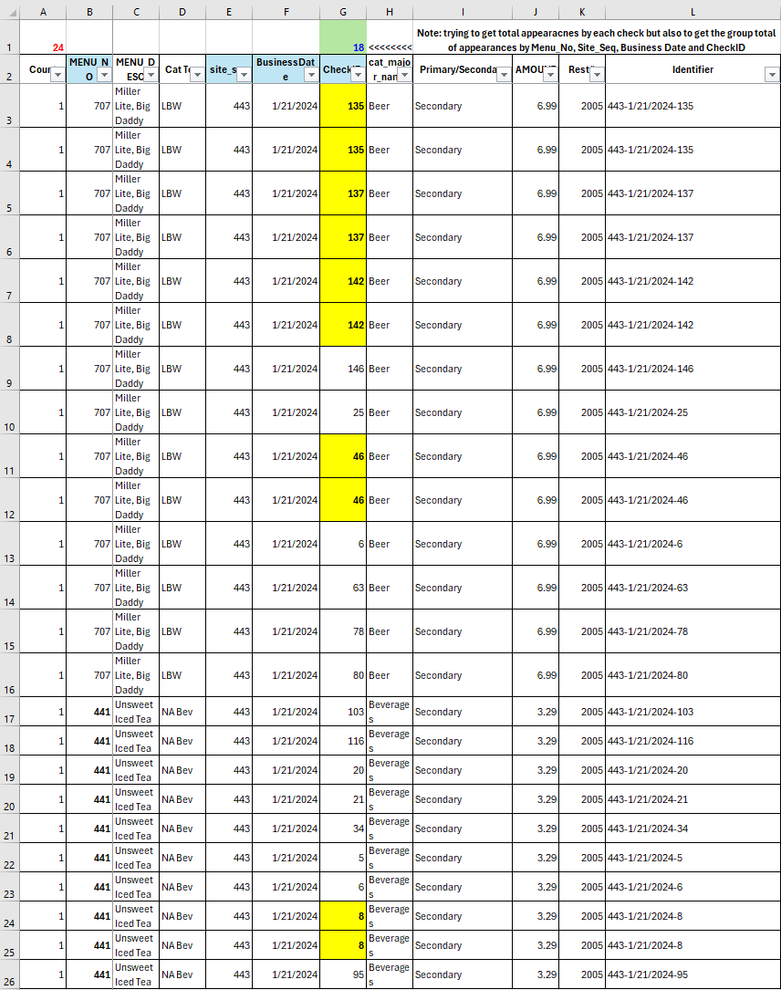
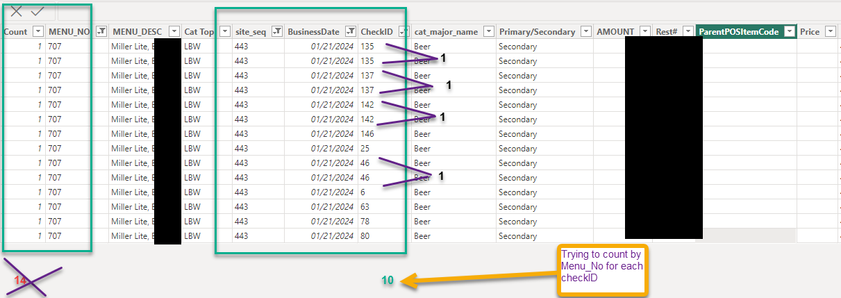
Count Menu_No by number of appearances on a check (Not by the counts)

in the example below I am trying to total each Menu_No for each CheckID 

I tried the following DAX but I keep getting an error: (expressionrefers to multiple columns and can not be converted to scalar value)


CountAppearances = SUMMARIZE(
    POS_CMI,POS_CMI[site_seq],
    POS_CMI[BusinessDate],
    POS_CMI[MENU_NO],
    "Appearances",DISTINCTCOUNT(POS_CMI[Identifier]))


Bgonen777_2-1708367084085.png


Bgonen777_3-1708367776971.png


3 REPLIES 3
Anonymous
Not applicable

Hi, @Anonymous 


When a DAX expression tries to perform an operation that requires a single value, but the expression returns a table of values, you typically see an error message.
Maybe you can try a DAX expression:

CountAppearances = 
SUMMARIZE(
    POS_CMI,
    POS_CMI[site_seq],
    POS_CMI[BusinessDate],
    POS_CMI[MENU_NO],
    "Appearances", CALCULATE(DISTINCTCOUNT(POS_CMI[Identifier]))
)


How to Get Your Question Answered Quickly 

If it does not help, please provide more details with your desired output and pbix file without privacy information (or some sample data)

Best Regards

Yongkang Hua

If this post helps, then please consider Accept it as the solution to help the other members find it more quickly.

Anonymous
Not applicable

I keep getting the same error: "the expression refers to multiple columns,,multiple columns cannot be converted to a scalar value"

I wish there was a way to add a tiny excel file in here.

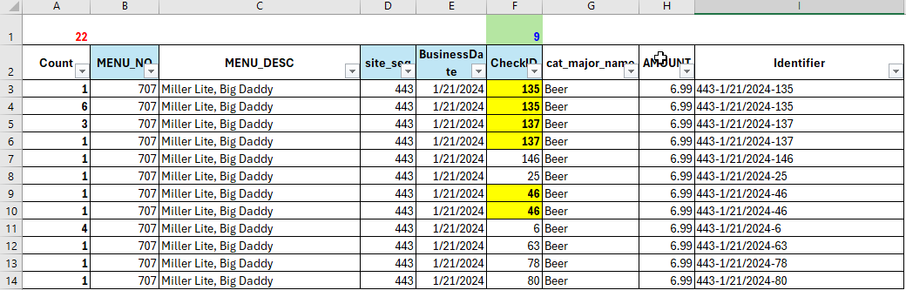
This is what I am trying to acheive:

Instead of sum up all the counts (A) 

I am trying to reflect the menu item on the check. 

so if the item reflected 6 times it does not count as 6 but as 1 (if the check itself appear twice it still will count as one time)

I tried to add an identifier  (contain site ID- Tran Date- check ID) and then tried DISTINCTCOUNT of the identifier and it doesn't work.


Bgonen777_0-1708638728352.png


ryan_mayu
Super User
Super User

could you pls provide the  sample data (not the screenshot)?


Did I answer your question? Mark my post as a solution!

Proud to be a Super User!


Helpful resources

Announcements
May Power BI Update Carousel

Power BI Monthly Update - May 2026

Check out the May 2026 Power BI update to learn about new features.

Fabric SQL PBI Data Days

Data Days 2026 coming soon!

Sign up to receive a private message when registration opens and key events begin.

New to Fabric survey Carousel

New to Fabric Survey

If you have recently started exploring Fabric, we'd love to hear how it's going. Your feedback can help with product improvements.

Power BI DataViz World Championships carousel

Power BI DataViz World Championships - June 2026

A new Power BI DataViz World Championship is coming this June! Don't miss out on submitting your entry.