Don't miss your chance to take the Fabric Data Engineer (DP-600) exam for FREE! Find out how by watching the DP-600 session on-demand now through April 28th.
Learn moreJoin the FabCon + SQLCon recap series. Up next: Power BI, Real-Time Intelligence, IQ and AI, and Data Factory take center stage. All sessions are available on-demand after the live show. Register now
Hello,
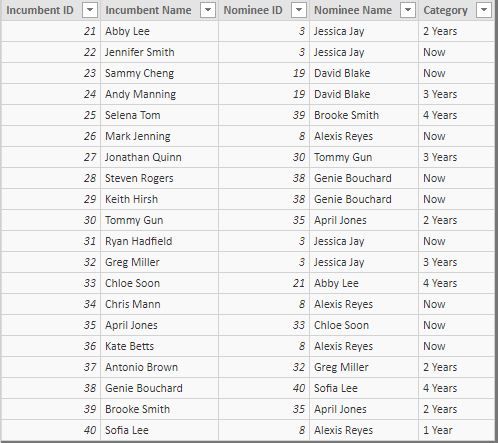
I cannot seem to figure out how to create a measure to count how many times people in Table 1 appear as a Nominee in Table 2 with the Category status as "Now" more than once.
Table 1
Table 2
Thank you,
Solved! Go to Solution.
Hi,
You may download my PBI file from here.
Hope this helps.
Hi,
Show the result you are expecting and share the link from where i can download your PBI file.
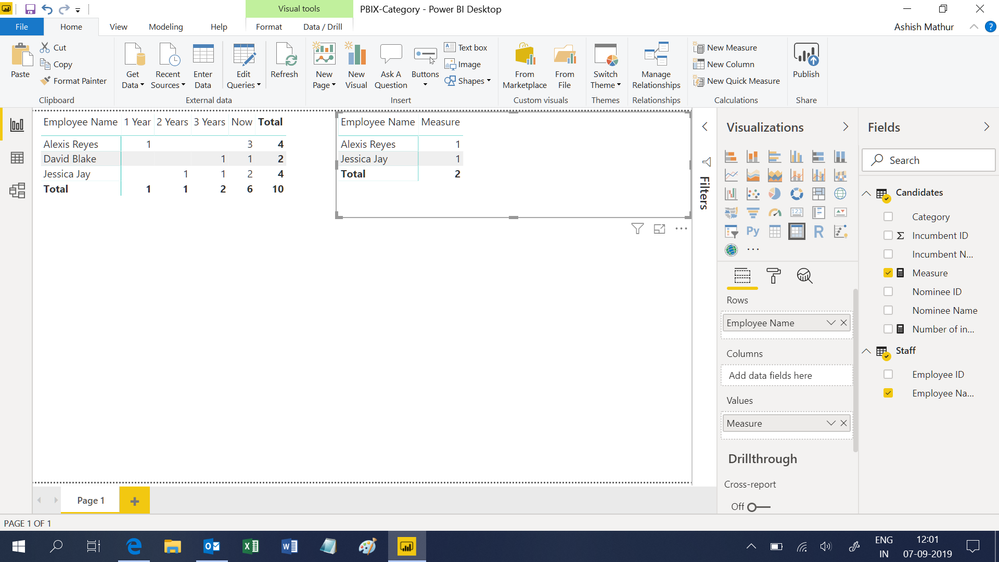
I would expect to see a count of 2 as from Table 1 only 'Jessica Jay' and 'Alexis Reyes' appear in table 2 as Nominee Name with Category "Now" more than once.
In the PBI file, I created a relationship between the two tables and created a table to show the names from table 1 who appear in table 2
Hi,
You may download my PBI file from here.
Hope this helps.
This is great. Appreciate the quick response!
You are welcome.
Create a relationship between your tables and create a measure that counts the nominee on the table 2.
Count Nominee = CALCULATE( COUNT( YourTableName[Nominee Name]) , YourTableName[Category] = "Now" )
Use your employee name of table1 and the measure you created
Check out the April 2026 Power BI update to learn about new features.
If you have recently started exploring Fabric, we'd love to hear how it's going. Your feedback can help with product improvements.
A new Power BI DataViz World Championship is coming this June! Don't miss out on submitting your entry.
| User | Count |
|---|---|
| 45 | |
| 38 | |
| 34 | |
| 21 | |
| 17 |
| User | Count |
|---|---|
| 65 | |
| 62 | |
| 31 | |
| 26 | |
| 25 |