FabCon is coming to Atlanta
Join us at FabCon Atlanta from March 16 - 20, 2026, for the ultimate Fabric, Power BI, AI and SQL community-led event. Save $200 with code FABCOMM.
Register now!- Power BI forums
- Get Help with Power BI
- Desktop
- Service
- Report Server
- Power Query
- Mobile Apps
- Developer
- DAX Commands and Tips
- Custom Visuals Development Discussion
- Health and Life Sciences
- Power BI Spanish forums
- Translated Spanish Desktop
- Training and Consulting
- Instructor Led Training
- Dashboard in a Day for Women, by Women
- Galleries
- Data Stories Gallery
- Themes Gallery
- Contests Gallery
- QuickViz Gallery
- Quick Measures Gallery
- Visual Calculations Gallery
- Notebook Gallery
- Translytical Task Flow Gallery
- TMDL Gallery
- R Script Showcase
- Webinars and Video Gallery
- Ideas
- Custom Visuals Ideas (read-only)
- Issues
- Issues
- Events
- Upcoming Events
The Power BI Data Visualization World Championships is back! Get ahead of the game and start preparing now! Learn more
- Power BI forums
- Forums
- Get Help with Power BI
- Desktop
- Re: Calculate & Count Customer Plan/Unplan Visit h...
- Subscribe to RSS Feed
- Mark Topic as New
- Mark Topic as Read
- Float this Topic for Current User
- Bookmark
- Subscribe
- Printer Friendly Page


- Mark as New
- Bookmark
- Subscribe
- Mute
- Subscribe to RSS Feed
- Permalink
- Report Inappropriate Content
Count Customer have order follow the scheduled
Hi @MFelix,
Previously posting, you provided me the suggestion and measure to calculate but after trying for a while, there were 03 measures that applied and calculate correctly.
So now could you please kindly assist and advise for some measures below?
> Customer Scheduled, Un-Scheduled; Scheduled %
Thanks and Regards,
Solved! Go to Solution.


- Mark as New
- Bookmark
- Subscribe
- Mute
- Subscribe to RSS Feed
- Permalink
- Report Inappropriate Content
Hi @ADSL ,
Please check the file attach with all the calculations.
You need to create a column on each of the tables to get the Mapping but the rest is very straitgh forward.
Regards
Miguel Félix
Did I answer your question? Mark my post as a solution!
Proud to be a Super User!
Check out my blog: Power BI em Português- Mark as New
- Bookmark
- Subscribe
- Mute
- Subscribe to RSS Feed
- Permalink
- Report Inappropriate Content
Hi @ADSL ,
Please check the file attach with all the calculations.
You need to create a column on each of the tables to get the Mapping but the rest is very straitgh forward.
Regards
Miguel Félix
Did I answer your question? Mark my post as a solution!
Proud to be a Super User!
Check out my blog: Power BI em Português- Mark as New
- Bookmark
- Subscribe
- Mute
- Subscribe to RSS Feed
- Permalink
- Report Inappropriate Content
Hi @MFelix ,
May I need your help of conditional formatting for Call Completion as the following below?
If scheduled % is 0% - 79.99% ---> "Red"
If scheduled % is 80% - 89.99% ---> "Yellow"
If scheduled % is 90% - 100% ---> "Green"

Thanks and Regards,
- Mark as New
- Bookmark
- Subscribe
- Mute
- Subscribe to RSS Feed
- Permalink
- Report Inappropriate Content
Hi @ADSL ,
For this you need to select number and 0.79, 0.81 and so on, the percente is to be calculated based on the overal number of data points and not on formula values.
Percentages are consider decimal numbers.
Regards
Miguel Félix
Did I answer your question? Mark my post as a solution!
Proud to be a Super User!
Check out my blog: Power BI em Português- Mark as New
- Bookmark
- Subscribe
- Mute
- Subscribe to RSS Feed
- Permalink
- Report Inappropriate Content
Hi @MFelix ,
Thank you for your feedback.
When I am trying, it seem not to be right when check the result.
Please kindly advise to input correctly.

Conditional Formatting Setup

- Mark as New
- Bookmark
- Subscribe
- Mute
- Subscribe to RSS Feed
- Permalink
- Report Inappropriate Content
Hi @ADSL ,
You need to select the number not the percentage has refered check the print below:
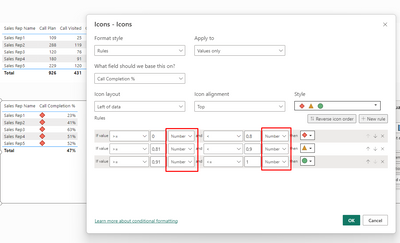
Regards
Miguel Félix
Did I answer your question? Mark my post as a solution!
Proud to be a Super User!
Check out my blog: Power BI em Português- Mark as New
- Bookmark
- Subscribe
- Mute
- Subscribe to RSS Feed
- Permalink
- Report Inappropriate Content
Hi @MFelix ,
Thank you for your helpful feedback.
Any suggestion if we want to add value "0" for blank data as the screenshot?
- Mark as New
- Bookmark
- Subscribe
- Mute
- Subscribe to RSS Feed
- Permalink
- Report Inappropriate Content
Hi @ADSL ,
In this case you have two approachs add a + 0 or do a COALESCE something similar to:
Call Plan Order =
Var Cust_Route_Values =
    SUMMARIZE(
        CUST_ROUTE_PLAN,
        CUST_ROUTE_PLAN[CUST_CODE],
        SalesRep[Sales Rep Code],
        'Calendar'[Date],
        "id",
            CUST_ROUTE_PLAN[CUST_CODE] & SalesRep[Sales Rep Code] & 'Calendar'[Date]
    )
Var ID_Table =
    DISTINCT(SELECTCOLUMNS(Cust_Route_Values, "ID_Cust_Route", [id]))
Var Daily_Time_Values =
    FILTER(
        SUMMARIZE(
            DAILY_TIME_SUMM,
            DAILY_TIME_SUMM[CUST_CODE],
            DAILY_TIME_SUMM[EFFCALL_IND],
            SalesRep[Sales Rep Code],
            'Calendar'[Date],
            "ID",
            DAILY_TIME_SUMM[CUST_CODE] & SalesRep[Sales Rep Code] & 'Calendar'[Date]
        ),
        [ID] IN ID_Table && DAILY_TIME_SUMM[EFFCALL_IND] = "E"
    )
Return
COALESCE (COUNTROWS(Daily_Time_Values), 0)


OR


Call Plan Order =
Var Cust_Route_Values =
    SUMMARIZE(
        CUST_ROUTE_PLAN,
        CUST_ROUTE_PLAN[CUST_CODE],
        SalesRep[Sales Rep Code],
        'Calendar'[Date],
        "id",
            CUST_ROUTE_PLAN[CUST_CODE] & SalesRep[Sales Rep Code] & 'Calendar'[Date]
    )
Var ID_Table =
    DISTINCT(SELECTCOLUMNS(Cust_Route_Values, "ID_Cust_Route", [id]))
Var Daily_Time_Values =
    FILTER(
        SUMMARIZE(
            DAILY_TIME_SUMM,
            DAILY_TIME_SUMM[CUST_CODE],
            DAILY_TIME_SUMM[EFFCALL_IND],
            SalesRep[Sales Rep Code],
            'Calendar'[Date],
            "ID",
            DAILY_TIME_SUMM[CUST_CODE] & SalesRep[Sales Rep Code] & 'Calendar'[Date]
        ),
        [ID] IN ID_Table && DAILY_TIME_SUMM[EFFCALL_IND] = "E"
    )
Return
COUNTROWS(Daily_Time_Values) + 0
Regards
Miguel Félix
Did I answer your question? Mark my post as a solution!
Proud to be a Super User!
Check out my blog: Power BI em Português- Mark as New
- Bookmark
- Subscribe
- Mute
- Subscribe to RSS Feed
- Permalink
- Report Inappropriate Content
Hi @MFelix ,
Thank you for your helpful and valuable feedback.
It seem to be long question of this post, and hope you understand.
If we want to calculate and find these points below from table name "CUST_ROUTE_PLAN".
No. of time visit
Any suggestion/advise?
Thanks and Regards,
- Mark as New
- Bookmark
- Subscribe
- Mute
- Subscribe to RSS Feed
- Permalink
- Report Inappropriate Content
Hi ,
Believe you want to present this by month correct?
Add a table with the following data:
Now add the following measure:
Times per month CALC =
VAR Temp_talbe =
SUMMARIZE (
CUST_ROUTE_PLAN,
CUST_ROUTE_PLAN[CUST_CODE],
'Calendar'[MonthnYear],
"Count", COUNT ( CUST_ROUTE_PLAN[CUST_CODE] )
)
RETURN
IF (
SELECTEDVALUE ( 'Times Month'[ID] ) < 5,
COUNTROWS (
DISTINCT (
SELECTCOLUMNS (
FILTER ( Temp_talbe, [Count] = SELECTEDVALUE ( 'Times Month'[ID] ) ),
"Customer", CUST_ROUTE_PLAN[CUST_CODE]
)
)
),
COUNTROWS (
DISTINCT (
SELECTCOLUMNS (
FILTER ( Temp_talbe, [Count] >= SELECTEDVALUE ( 'Times Month'[ID] ) ),
"Customer", CUST_ROUTE_PLAN[CUST_CODE]
)
)
)
)
I'm assuming you only want to count a customer a single time for each month that's why I'm making the distintct.
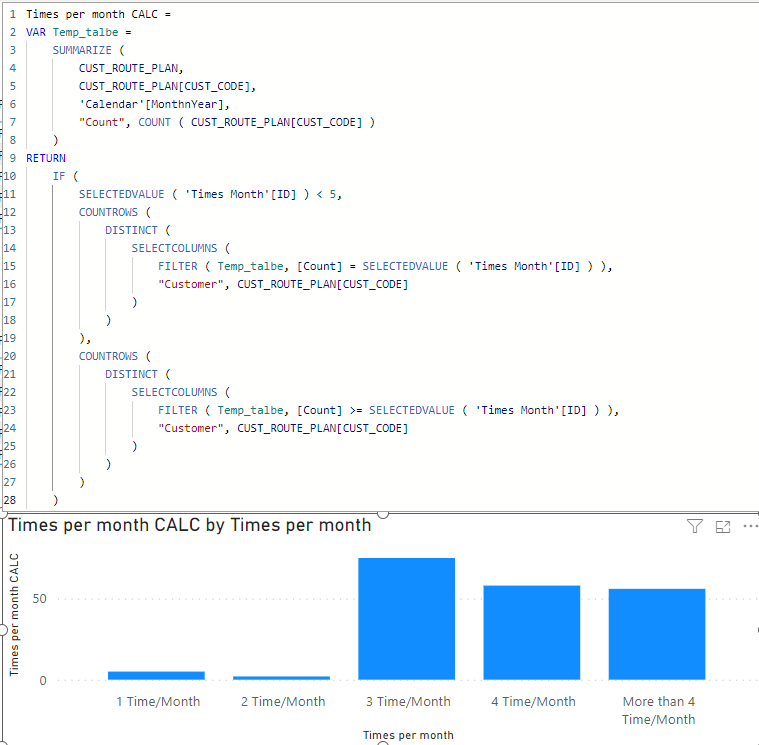
Regards
Miguel Félix
Did I answer your question? Mark my post as a solution!
Proud to be a Super User!
Check out my blog: Power BI em Português- Mark as New
- Bookmark
- Subscribe
- Mute
- Subscribe to RSS Feed
- Permalink
- Report Inappropriate Content
Hi @MFelix,
Sorry...I didn't provide more detail information & purpose.
Actually we want to find and know the visit time of customer that sales rep input like:
1. Customer A, call_date is on 01/03/2023 --- refer 1 time/month
2. Customer B, call_date is on 08/03/2023 & 22/03/2023 --- refer to 2 time/month
3. Customer C, call_date is on 16/03/2023 --- refer to 1 time/month
===> 1 time/month = 2, 2 time/month = 1
Any suggestion/advise? Thanks alot
- Mark as New
- Bookmark
- Subscribe
- Mute
- Subscribe to RSS Feed
- Permalink
- Report Inappropriate Content
Hi @ADSL ,
This is what the formula gives you if you use the sales rep in the matrix you get the expected result:

Regards
Miguel Félix
Did I answer your question? Mark my post as a solution!
Proud to be a Super User!
Check out my blog: Power BI em Português
Helpful resources

Power BI Dataviz World Championships
The Power BI Data Visualization World Championships is back! Get ahead of the game and start preparing now!

Power BI Monthly Update - December 2025
Check out the December 2025 Power BI Holiday Recap!

FabCon Atlanta 2026
Join us at FabCon Atlanta, March 16-20, for the ultimate Fabric, Power BI, AI and SQL community-led event. Save $200 with code FABCOMM.

| User | Count |
|---|---|
| 39 | |
| 38 | |
| 36 | |
| 28 | |
| 28 |


| User | Count |
|---|---|
| 124 | |
| 88 | |
| 74 | |
| 66 | |
| 65 |


