cancel
Showing results for 
Search instead for 
Did you mean: 

July 7 - July 17 | Round 2 of the Power BI Dataviz World Championships. Don't miss your chance! Learn more

Reply
JMWDBA
Advocate II
Advocate II

Cost Per Formula Help

So what I need is to know how to create what I assume would have to be a "Cost Per" measure.  So the example is related to students.  Every student costs $200 to instruct.  I have a column called "Registrations" which is the duplicated count of the Student ID.  I also have the cost a student pays per registration in a column called "Course Price".  Cost of instruction does not exist as a column in any of the tables.  Should I create a column that says "Cost of Instruction" then just enter the amount $200 or is there a better way of doing that in Power BI?


The goal is to be able to take the total registrations and the revenue generated by taking the sum of "Course Price" less the sum of "Cost Per" to give me net revenue. 

1 ACCEPTED SOLUTION
Anonymous
Not applicable

Hi @JMWDBA

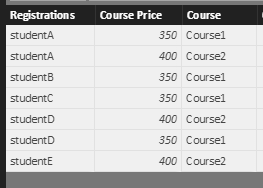
Based on your description, I make a test using the sample data below.
1.PNG

Firstly, create new columns using formulas below.

Cost of instuctions = 200
revenue = Table2[Course Price]-Table2[Cost of instuctions]

Secondly, do you want to calculate distinct registration or full registration? For the former, create a measure using DAX: Distinct registrations = DISTINCTCOUNT(Table2[Registrations]). For  the latter, create a measure using DAX: full registrations = COUNT(Table2[Registrations]).

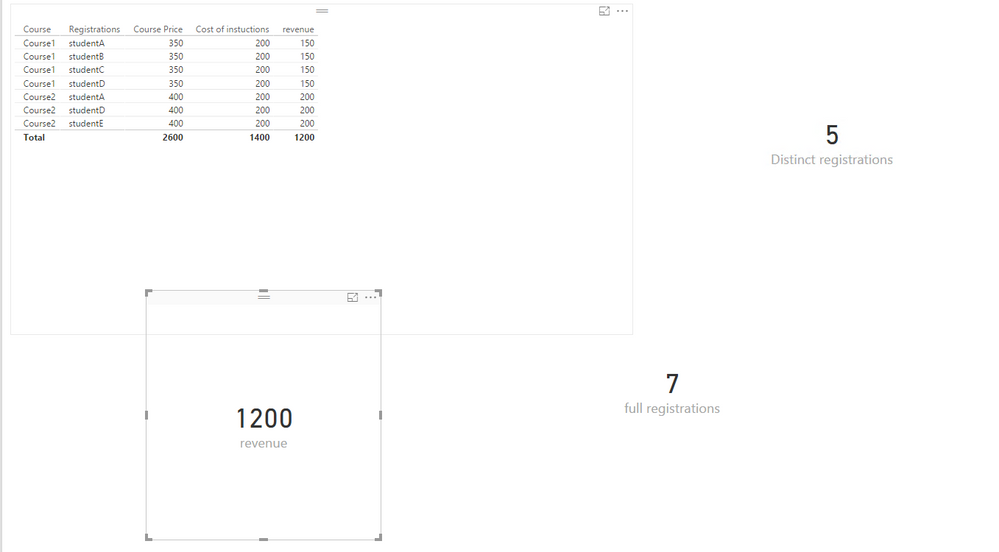
Thirdly, create card visuals to display total registrations and revenue.
2.PNG


If the above steps doesn’t help,  please share sample data of your table and post expected result here.


Thanks,
Lydia Zhang

View solution in original post

5 REPLIES 5
Anonymous
Not applicable

Hi @JMWDBA

Based on your description, I make a test using the sample data below.
1.PNG

Firstly, create new columns using formulas below.

Cost of instuctions = 200
revenue = Table2[Course Price]-Table2[Cost of instuctions]

Secondly, do you want to calculate distinct registration or full registration? For the former, create a measure using DAX: Distinct registrations = DISTINCTCOUNT(Table2[Registrations]). For  the latter, create a measure using DAX: full registrations = COUNT(Table2[Registrations]).

Thirdly, create card visuals to display total registrations and revenue.
2.PNG


If the above steps doesn’t help,  please share sample data of your table and post expected result here.


Thanks,
Lydia Zhang

Yes, this did help immensely.  Say I wanted to take it a step further.  So the column named "Course" is a Concatenation of the column "Subject" and the column called "Catalog Number".  If the catalog number is between 100-400 then the cost of instruction is $200 but if the catalog number is between 500-600 the cost of instruction is $300.  How would i set this up so that I dont have to use a flat cost of instruction of $200?

Anonymous
Not applicable

Hi @JMWDBA,

Create your column using  the DAX below.

cost of instruction = IF(Table2[Catalog Number]<=400 && Table2[Catalog Number]>=100, 200, 350)

Thanks,
Lydia Zhang

It presents an error of too few arguments.  

Anonymous
Not applicable

Hi @JMWDBA,

Would you mind sharing me your PBIX file?

Thanks,
Lydia Zhang

Helpful resources

Announcements
FabCon and SQLCon Barcelona 2026

FabCon & SQLCon – Barcelona 2026

Join us in Barcelona for FabCon and SQLCon, the Fabric, Power BI, SQL, and AI community event. Save €200 with code FABCMTY200.

60 days of Data Days Carousel

Data Days 2026

Join Fabric Data Days 2026: 60 days of free live/on-demand sessions, challenges, study groups, and certification opportunities.

Power BI DataViz World Championships carousel

Power BI DataViz World Championships - June 2026

A new Power BI DataViz World Championship is coming this June! Don't miss out on submitting your entry.