Join us at FabCon Atlanta from March 16 - 20, 2026, for the ultimate Fabric, Power BI, AI and SQL community-led event. Save $200 with code FABCOMM.
Register now!The Power BI Data Visualization World Championships is back! Get ahead of the game and start preparing now! Learn more
Solved! Go to Solution.
hi, @Anonymous
You may try to use LOOKUPVALUE Function to create a calculate column like below:
lookup = LOOKUPVALUE(TableA[ColumnA],TableA[ColumnA],TableB[ColumnA] )
For example
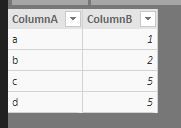
tableA
tableB
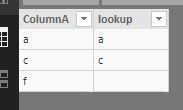
Result:
Best Regards,
Lin
hi, @Anonymous
You may try to use LOOKUPVALUE Function to create a calculate column like below:
lookup = LOOKUPVALUE(TableA[ColumnA],TableA[ColumnA],TableB[ColumnA] )
For example
tableA
tableB
Result:
Best Regards,
Lin
many thanks experts. much appreicated
Hi Route11,
First of all, you should to creat a relationship between TableA[A] y TableB[A], then in Data Tab or Data Canvas creat a calculate colum in TableB, "Name Header" = RELATED (TableA[B]).
Tell us if it works for you.
The Power BI Data Visualization World Championships is back! Get ahead of the game and start preparing now!
| User | Count |
|---|---|
| 41 | |
| 38 | |
| 36 | |
| 30 | |
| 28 |
| User | Count |
|---|---|
| 128 | |
| 88 | |
| 79 | |
| 67 | |
| 62 |