
cancel
Showing results for 
Search instead for 
Did you mean: 

The Power BI Data Visualization World Championships is back! Get ahead of the game and start preparing now! Learn more

Reply
bourne2000
Helper V
Helper V

Converting text column into decimals?

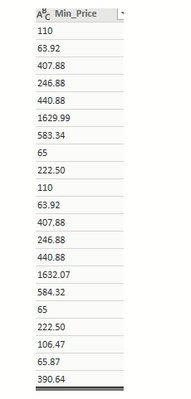
Hi I am unable to convert the below text columns into decimal


bourne2000_0-1630100882245.png


Decimals points are replacing, when I tried to convert using changed type into decimal in power query. I want to show the decimal point in my report. Also, I changed the regional settings into United States .


bourne2000_1-1630100972097.png


Any suggestions?


1 ACCEPTED SOLUTION
sevenhills
Super User
Super User


 I tried with your few rows of sample data, converting as currency and it worked fine.

let
    Source = Table.FromRows(Json.Document(Binary.Decompress(Binary.FromText("i45WMjQ0UIrViVYyM9azNAKzTAzM9SwswExDMyNLPUtLiAJTpdhYAA==", BinaryEncoding.Base64), Compression.Deflate)), let _t = ((type nullable text) meta [Serialized.Text = true]) in type table [Column1 = _t]),
    #"Changed Type" = Table.TransformColumnTypes(Source,{{"Column1", Currency.Type}})
in
    #"Changed Type"


I am not recommending but to understand the problem, Can you try doing 

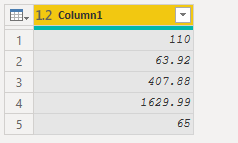
     data type change to decimal in Power Query? 

#"Changed Type" = Table.TransformColumnTypes(Source,{{"Column1", type number}})

sevenhills_0-1630107632878.png


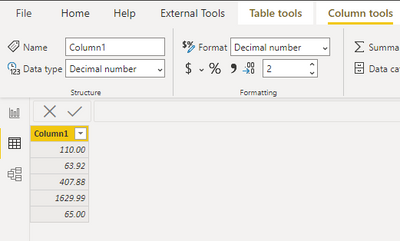
     Format in Data tab as decimal with two points?


sevenhills_1-1630107679316.png


See if this shows as you wanted. 

View solution in original post

1 REPLY 1
sevenhills
Super User
Super User


 I tried with your few rows of sample data, converting as currency and it worked fine.

let
    Source = Table.FromRows(Json.Document(Binary.Decompress(Binary.FromText("i45WMjQ0UIrViVYyM9azNAKzTAzM9SwswExDMyNLPUtLiAJTpdhYAA==", BinaryEncoding.Base64), Compression.Deflate)), let _t = ((type nullable text) meta [Serialized.Text = true]) in type table [Column1 = _t]),
    #"Changed Type" = Table.TransformColumnTypes(Source,{{"Column1", Currency.Type}})
in
    #"Changed Type"


I am not recommending but to understand the problem, Can you try doing 

     data type change to decimal in Power Query? 

#"Changed Type" = Table.TransformColumnTypes(Source,{{"Column1", type number}})

sevenhills_0-1630107632878.png


     Format in Data tab as decimal with two points?


sevenhills_1-1630107679316.png


See if this shows as you wanted. 

Helpful resources

Announcements
November Power BI Update Carousel

Power BI Monthly Update - November 2025

Check out the November 2025 Power BI update to learn about new features.

Fabric Data Days Carousel

Fabric Data Days

Advance your Data & AI career with 50 days of live learning, contests, hands-on challenges, study groups & certifications and more!

FabCon Atlanta 2026 carousel

FabCon Atlanta 2026

Join us at FabCon Atlanta, March 16-20, for the ultimate Fabric, Power BI, AI and SQL community-led event. Save $200 with code FABCOMM.