
cancel
Showing results for 
Search instead for 
Did you mean: 

The Power BI Data Visualization World Championships is back! Get ahead of the game and start preparing now! Learn more

Reply
bourne2000
Helper V
Helper V

Converting text column into decimals?

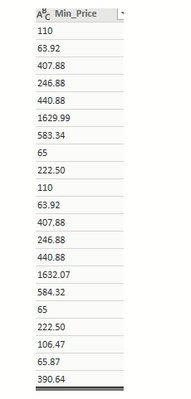
Hi I am unable to convert the below text columns into decimal


bourne2000_0-1630100882245.png


Decimals points are replacing, when I tried to convert using changed type into decimal in power query. I want to show the decimal point in my report. Also, I changed the regional settings into United States .


bourne2000_1-1630100972097.png


Any suggestions?


1 ACCEPTED SOLUTION
sevenhills
Super User
Super User


 I tried with your few rows of sample data, converting as currency and it worked fine.

let
    Source = Table.FromRows(Json.Document(Binary.Decompress(Binary.FromText("i45WMjQ0UIrViVYyM9azNAKzTAzM9SwswExDMyNLPUtLiAJTpdhYAA==", BinaryEncoding.Base64), Compression.Deflate)), let _t = ((type nullable text) meta [Serialized.Text = true]) in type table [Column1 = _t]),
    #"Changed Type" = Table.TransformColumnTypes(Source,{{"Column1", Currency.Type}})
in
    #"Changed Type"


I am not recommending but to understand the problem, Can you try doing 

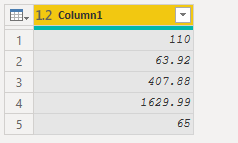
     data type change to decimal in Power Query? 

#"Changed Type" = Table.TransformColumnTypes(Source,{{"Column1", type number}})

sevenhills_0-1630107632878.png


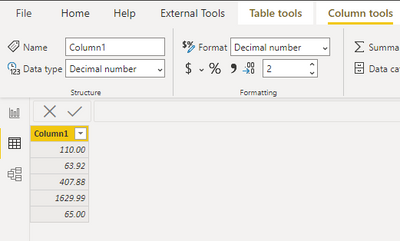
     Format in Data tab as decimal with two points?


sevenhills_1-1630107679316.png


See if this shows as you wanted. 

View solution in original post

1 REPLY 1
sevenhills
Super User
Super User


 I tried with your few rows of sample data, converting as currency and it worked fine.

let
    Source = Table.FromRows(Json.Document(Binary.Decompress(Binary.FromText("i45WMjQ0UIrViVYyM9azNAKzTAzM9SwswExDMyNLPUtLiAJTpdhYAA==", BinaryEncoding.Base64), Compression.Deflate)), let _t = ((type nullable text) meta [Serialized.Text = true]) in type table [Column1 = _t]),
    #"Changed Type" = Table.TransformColumnTypes(Source,{{"Column1", Currency.Type}})
in
    #"Changed Type"


I am not recommending but to understand the problem, Can you try doing 

     data type change to decimal in Power Query? 

#"Changed Type" = Table.TransformColumnTypes(Source,{{"Column1", type number}})

sevenhills_0-1630107632878.png


     Format in Data tab as decimal with two points?


sevenhills_1-1630107679316.png


See if this shows as you wanted. 

Helpful resources

Announcements
Power BI DataViz World Championships

Power BI Dataviz World Championships

The Power BI Data Visualization World Championships is back! Get ahead of the game and start preparing now!

November Power BI Update Carousel

Power BI Monthly Update - November 2025

Check out the November 2025 Power BI update to learn about new features.

FabCon Atlanta 2026 carousel

FabCon Atlanta 2026

Join us at FabCon Atlanta, March 16-20, for the ultimate Fabric, Power BI, AI and SQL community-led event. Save $200 with code FABCOMM.