cancel
Showing results for 
Search instead for 
Did you mean: 

The Power BI Data Visualization World Championships is back! It's time to submit your entry. Live now!

Reply
Gully
Frequent Visitor

Converting different date formats to same format.

I am new to PowerBI and am having issues formatting a column with different date formats.

I have the following 3 types of date in a text field. Every time I try to convert the column to a date format at least one comes back with 'Error'. 

CreationDate
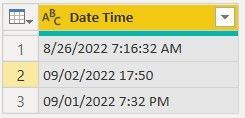
8/26/2022 7:16:32 AM      - missing leading zero for month and includes seconds
09/02/2022 17:50             - uses 24 hour clock. 
09/01/2022 7:32 PM         - uses 12 hour clock. 

How to I make the date format consistant ?


Many thanks,

Gully.


1 ACCEPTED SOLUTION
Shaurya
Memorable Member
Memorable Member

Hi @Gully,


I created a table with datetime values in the 3 formats given by you.


Screenshot 2022-10-11 201324.jpg


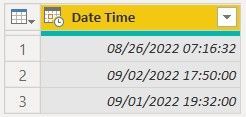
There shouldn't be any issue in converting all of these to datetime. Select Date/Time as the data type.


Screenshot 2022-10-11 201344.jpg


Result:


Screenshot 2022-10-11 201405.jpg


Works for you? Mark this post as a solution if it does!
Consider taking a look at my blog: Forecast Period - Graphical Comparison 

View solution in original post

3 REPLIES 3
CaioBauab
Regular Visitor

Hello!


I have a different mix of locales at same column as en-US and es-MX:


1/22/2023 8:13:01 AM

25/05/2020 08:00:19 p. m.


When I try to convert using locale in two steps, I got an error for the second one.


Any hint will be appreciate!


Gully
Frequent Visitor

Hi, Shaurya.

Thanks for your response. I followed your steps and it still didn't work. 

I then reloaded the data and followed your steps again and it worked.

I'm not sure what happened but all is good now.

Thanks,

Gully

Shaurya
Memorable Member
Memorable Member

Hi @Gully,


I created a table with datetime values in the 3 formats given by you.


Screenshot 2022-10-11 201324.jpg


There shouldn't be any issue in converting all of these to datetime. Select Date/Time as the data type.


Screenshot 2022-10-11 201344.jpg


Result:


Screenshot 2022-10-11 201405.jpg


Works for you? Mark this post as a solution if it does!
Consider taking a look at my blog: Forecast Period - Graphical Comparison 

Helpful resources

Announcements
Power BI DataViz World Championships

Power BI Dataviz World Championships

The Power BI Data Visualization World Championships is back! It's time to submit your entry.

January Power BI Update Carousel

Power BI Monthly Update - January 2026

Check out the January 2026 Power BI update to learn about new features.

FabCon Atlanta 2026 carousel

FabCon Atlanta 2026

Join us at FabCon Atlanta, March 16-20, for the ultimate Fabric, Power BI, AI and SQL community-led event. Save $200 with code FABCOMM.