cancel
Showing results for 
Search instead for 
Did you mean: 

Get Fabric Certified for FREE during Fabric Data Days. Don't miss your chance! Request now

Reply
NBOnecall
Helper V
Helper V

Converting Text to Date with MMM, DD, YYYY, HH:MMM PDT

Hi, 


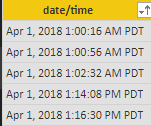
I have looked throughout this forum and other online resources and I cannot find an example with my criteria. I would like to convert the following text column into MM/DD/YYYY date value. 


image.png


The difference between what I was able to research was this has "APR 1, 2018 timestamp" vs "04/01/2018 timestamp." 


Thank you!

1 ACCEPTED SOLUTION
Anonymous
Not applicable

@NBOnecall,

Here is an example how you could achieve this in Query Editor:

let
    Source = Table.FromRows(Json.Document(Binary.Decompress(Binary.FromText("i45WciwoUjDUUTAyMLRQMLQyNLAyNFNw9FUIcAlRio0FAA==", BinaryEncoding.Base64), Compression.Deflate)), let _t = ((type text) meta [Serialized.Text = true]) in type table [Column1 = _t]),
    #"Split Column by Delimiter" = Table.SplitColumn(Source, "Column1", Splitter.SplitTextByDelimiter(" ", QuoteStyle.Csv), {"Column1.1", "Column1.2", "Column1.3", "Column1.4", "Column1.5", "Column1.6"}),
    #"Inserted Merged Column" = Table.AddColumn(#"Split Column by Delimiter", "Merged", each Text.Combine({[Column1.1], Text.From([Column1.2], "en-US"), Text.From([Column1.3], "en-US")}, " "), type text),
    #"Changed Type" = Table.TransformColumnTypes(#"Inserted Merged Column",{{"Merged", type date}}),
    #"Removed Other Columns" = Table.SelectColumns(#"Changed Type",{"Merged"})
in
    #"Removed Other Columns"

View solution in original post

2 REPLIES 2
Anonymous
Not applicable

@NBOnecall,

Here is an example how you could achieve this in Query Editor:

let
    Source = Table.FromRows(Json.Document(Binary.Decompress(Binary.FromText("i45WciwoUjDUUTAyMLRQMLQyNLAyNFNw9FUIcAlRio0FAA==", BinaryEncoding.Base64), Compression.Deflate)), let _t = ((type text) meta [Serialized.Text = true]) in type table [Column1 = _t]),
    #"Split Column by Delimiter" = Table.SplitColumn(Source, "Column1", Splitter.SplitTextByDelimiter(" ", QuoteStyle.Csv), {"Column1.1", "Column1.2", "Column1.3", "Column1.4", "Column1.5", "Column1.6"}),
    #"Inserted Merged Column" = Table.AddColumn(#"Split Column by Delimiter", "Merged", each Text.Combine({[Column1.1], Text.From([Column1.2], "en-US"), Text.From([Column1.3], "en-US")}, " "), type text),
    #"Changed Type" = Table.TransformColumnTypes(#"Inserted Merged Column",{{"Merged", type date}}),
    #"Removed Other Columns" = Table.SelectColumns(#"Changed Type",{"Merged"})
in
    #"Removed Other Columns"
Thanks. Pretty new to Power BI and didn't realize there was a "Text to Column" like option in the query editor. 

Helpful resources

Announcements
November Power BI Update Carousel

Power BI Monthly Update - November 2025

Check out the November 2025 Power BI update to learn about new features.

Fabric Data Days Carousel

Fabric Data Days

Advance your Data & AI career with 50 days of live learning, contests, hands-on challenges, study groups & certifications and more!

FabCon Atlanta 2026 carousel

FabCon Atlanta 2026

Join us at FabCon Atlanta, March 16-20, for the ultimate Fabric, Power BI, AI and SQL community-led event. Save $200 with code FABCOMM.

Top Solution Authors
Top Kudoed Authors