FabCon is coming to Atlanta
Join us at FabCon Atlanta from March 16 - 20, 2026, for the ultimate Fabric, Power BI, AI and SQL community-led event. Save $200 with code FABCOMM.
Register now!- Power BI forums
- Get Help with Power BI
- Desktop
- Service
- Report Server
- Power Query
- Mobile Apps
- Developer
- DAX Commands and Tips
- Custom Visuals Development Discussion
- Health and Life Sciences
- Power BI Spanish forums
- Translated Spanish Desktop
- Training and Consulting
- Instructor Led Training
- Dashboard in a Day for Women, by Women
- Galleries
- Data Stories Gallery
- Themes Gallery
- Contests Gallery
- QuickViz Gallery
- Quick Measures Gallery
- Visual Calculations Gallery
- Notebook Gallery
- Translytical Task Flow Gallery
- TMDL Gallery
- R Script Showcase
- Webinars and Video Gallery
- Ideas
- Custom Visuals Ideas (read-only)
- Issues
- Issues
- Events
- Upcoming Events
The Power BI Data Visualization World Championships is back! Get ahead of the game and start preparing now! Learn more
- Power BI forums
- Forums
- Get Help with Power BI
- Desktop
- Re: Converting Excel Template to Power BI Report T...
- Subscribe to RSS Feed
- Mark Topic as New
- Mark Topic as Read
- Float this Topic for Current User
- Bookmark
- Subscribe
- Printer Friendly Page

- Mark as New
- Bookmark
- Subscribe
- Mute
- Subscribe to RSS Feed
- Permalink
- Report Inappropriate Content
Converting Excel Template to Power BI Report Template
Greetings,
We currently have excel templates made up of multiple tabs, some of which have pivot tables on them. The source of the pivot tables are tables populated on other tabs within the same workbook. These data tables are refreshed with VBA making Oracle stored procedure calls. Is it possible to upload the the tabs from the given template into Power BI but then make some changes so that Power BI makes the procedure calls to populate the tables and fill in the associated Pivot tables? Do the pivot tables in question need to be done in Power BI from scratch?
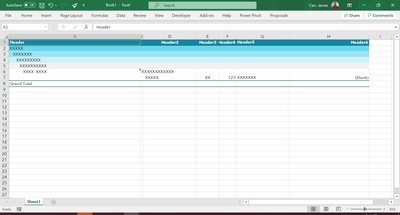
If the pivot tables need to be done from scratch, the next question is can the following pivot table layout be replicated in Power BI? As you can see, the first column has multiple fields in outline form (stepped out) with idents, then the rest are in tabular form. I have been searching for answers to all of these questions for a couple of days now and cannot find definitive answers:
| Header | Header | Header | Header | Header | Header | |
| XXXX | ||||||
| XXXXXX | ||||||
| XXXXXXXX | ||||||
| XXXXXXXXXXX | ||||||
| XXXXX XXXXX XXX | XXXXXX | |||||
| XXXXX | XX | 123 | (blank) | (blank) | ||
| Grand Total |
Solved! Go to Solution.


- Mark as New
- Bookmark
- Subscribe
- Mute
- Subscribe to RSS Feed
- Permalink
- Report Inappropriate Content
- Mark as New
- Bookmark
- Subscribe
- Mute
- Subscribe to RSS Feed
- Permalink
- Report Inappropriate Content
I'm not aware of any conversion tools. I'd guess you'd basically have to rebuild things.
As far as the format, here's an example of some easily possible layouts that I've mocked up:
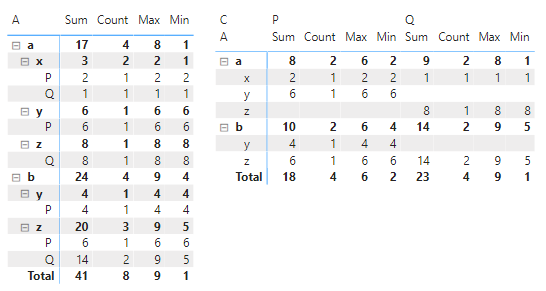
Sum, Count, Max, and Min are measures and the rest are dimensions.
- Mark as New
- Bookmark
- Subscribe
- Mute
- Subscribe to RSS Feed
- Permalink
- Report Inappropriate Content
Thank you for your prompt attention to this. Regarding your example formatting, in the case of my example, I don't have values to aggregate in each of the additional header columns. There will be aggregated values but not all of them will be. Where you see X's and (blank)'s are text. So, the first 5 fields are "stepped out" (to use Power BI terminology) but the additional fields are not. Do you know if this can this be replicated and, if so, how?
- Mark as New
- Bookmark
- Subscribe
- Mute
- Subscribe to RSS Feed
- Permalink
- Report Inappropriate Content
I think you'll have to show me an example or link to a sample Excel file where you have done this. I can't quite picture it just from your description.
- Mark as New
- Bookmark
- Subscribe
- Mute
- Subscribe to RSS Feed
- Permalink
- Report Inappropriate Content
Here's a screen shot of what I tried to put in my original post but it removed my formatting when I just copied and pasted the table itself. Does this help?
- Mark as New
- Bookmark
- Subscribe
- Mute
- Subscribe to RSS Feed
- Permalink
- Report Inappropriate Content
This is pretty much the same as your original post.
I meant something more like an example where you show some sample data in its table form and in the pivot table form. Preferably something with distinguishable column names and values. It doesn't have to be real data, but multiple dimensions named "X" and "Header" give me very few context clues to work with.
- Mark as New
- Bookmark
- Subscribe
- Mute
- Subscribe to RSS Feed
- Permalink
- Report Inappropriate Content
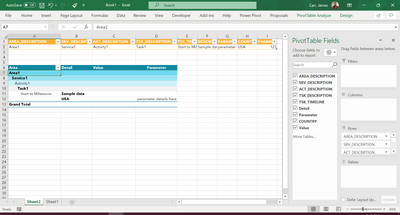
Sorry. How's this? One record in the table, the pivot table populated, and you get a glimpse of the fields added to the row labels:
- Mark as New
- Bookmark
- Subscribe
- Mute
- Subscribe to RSS Feed
- Permalink
- Report Inappropriate Content
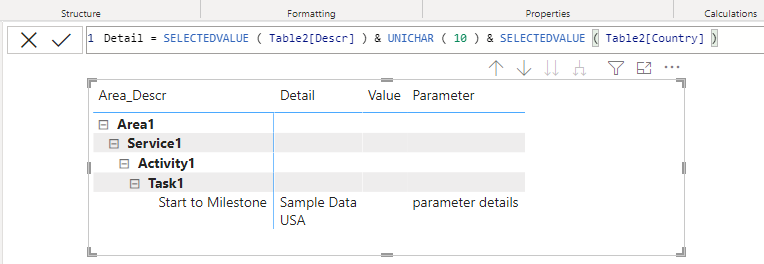
Seems possible.
- Mark as New
- Bookmark
- Subscribe
- Mute
- Subscribe to RSS Feed
- Permalink
- Report Inappropriate Content
Okay. I read your mind (or vice versa). The only thing I could think of was doing calculated fields to pull the text in order to get the layout I was looking for. Thanks for sharing. I will look further into doing it that way. My boss may not care for that approach but, it might be our only option besides redesigning the report(s) for Power BI usage.
Helpful resources

Power BI Monthly Update - November 2025
Check out the November 2025 Power BI update to learn about new features.

Fabric Data Days
Advance your Data & AI career with 50 days of live learning, contests, hands-on challenges, study groups & certifications and more!

FabCon Atlanta 2026
Join us at FabCon Atlanta, March 16-20, for the ultimate Fabric, Power BI, AI and SQL community-led event. Save $200 with code FABCOMM.

| User | Count |
|---|---|
| 58 | |
| 45 | |
| 42 | |
| 20 | |
| 18 |


