Get certified for free when you join Fabric Data Days 2026 and dive into Fabric, Power BI, SQL, AI, and other essential data skills.
Join nowJuly 7 - July 17 | Round 2 of the Power BI Dataviz World Championships. Don't miss your chance! Learn more
Hi,
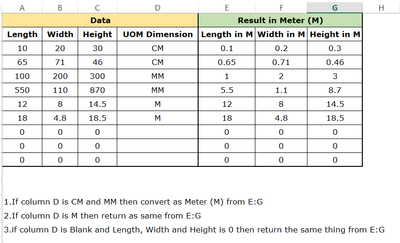
Column A:C are length, width and Height and column D is unit of dimension of each rows, column D contain multiple unit of dimension which is CM, MM and M.
How can I convert CM and MM into M based on the unit of dimesion column D? In Excel I am apply the convert function but the same function in BI completly is difference.
I would like to achieve my desired result by using new calculate column.
Can you please advise.
Rules:
1.If column D is CM and MM then convert as Meter (M) from E:G
2.If column D is M then return as same from E:G
3.If column D is Blank and Length, Width and Height is 0 then return the same thing from E:G
| Data | Result in Meter (M) | |||||
| Length | Width | Height | UOM Dimension | Length in M | Width in M | Height in M |
| 10 | 20 | 30 | CM | 0.1 | 0.2 | 0.3 |
| 65 | 71 | 46 | CM | 0.65 | 0.71 | 0.46 |
| 100 | 200 | 300 | MM | 1 | 2 | 3 |
| 550 | 110 | 870 | MM | 5.5 | 1.1 | 8.7 |
| 12 | 8 | 14.5 | M | 12 | 8 | 14.5 |
| 18 | 4.8 | 18.5 | M | 18 | 4.8 | 18.5 |
| 0 | 0 | 0 | 0 | 0 | 0 | |
| 0 | 0 | 0 | 0 | 0 | 0 | |
| 0 | 0 | 0 | 0 | 0 | 0 |
Solved! Go to Solution.
Hey @Saxon10 ,
for each of the 3 columns (Lenght, Width and Height) add a calculated column:
Length in Meter =
SWITCH(
MyTable[UOM Dimension],
"M", MyTable[Length],
"CM", MyTable[Length] / 100,
"MM", MyTable[Length] / 1000
)
Same formula for the other 2 measures 😉
Hey @Saxon10 ,
for each of the 3 columns (Lenght, Width and Height) add a calculated column:
Length in Meter =
SWITCH(
MyTable[UOM Dimension],
"M", MyTable[Length],
"CM", MyTable[Length] / 100,
"MM", MyTable[Length] / 1000
)
Same formula for the other 2 measures 😉
Thanks for your qucik reply. I am receving error here Exprssions that yield variant data-type cannot be used to define calulated column.
Those three columns came from as a calculate column and those three column are stored as a text so can you please help me.
Hey @Saxon10 ,
can you check if the [Length] column is from the format decimal number?
Is the column [UOM Dimension] from the format Text?
Can you post a screenshot?
Hi,
Thanks for your reply. Yes, you are right the length column is not number format that's the reason I got error. If I convert into number then everything is fine.
Thanks for the your reply. Now the problem is fixed and approved the solution
Join us in Barcelona for FabCon and SQLCon, the Fabric, Power BI, SQL, and AI community event. Save €200 with code FABCMTY200.
Join Fabric Data Days 2026: 60 days of free live/on-demand sessions, challenges, study groups, and certification opportunities.
| User | Count |
|---|---|
| 23 | |
| 22 | |
| 18 | |
| 17 | |
| 13 |
| User | Count |
|---|---|
| 67 | |
| 50 | |
| 46 | |
| 41 | |
| 39 |