
cancel
Showing results for 
Search instead for 
Did you mean: 

Next up in the FabCon + SQLCon recap series: The roadmap for Microsoft SQL and Maximizing Developer experiences in Fabric. All sessions are available on-demand after the live show. Register now

Reply
bourne2000
Helper V
Helper V

Convert timestamp into date/time

Hi


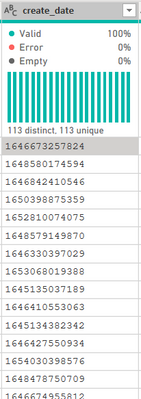
I am having the below timestamp


bourne2000_0-1655288099830.png


I tried the below formula


#datetime(1970, 1, 1, 0, 0, 0) + #duration(0, 0, 0,[create_date]/1000)


I am getting the below error


bourne2000_1-1655288719047.png


Can anyone advise me how to do this?


1 ACCEPTED SOLUTION
Anonymous
Not applicable

Hi @bourne2000 ,


Accroding to the error message, you will need to change the data type of [create_date] to whole number then use the formula.

#datetime(1970, 1, 1, 0, 0, 0) + #duration(0, 0, 0, [create_date]/1000)


Best Regards,

Jay

View solution in original post

5 REPLIES 5
Anonymous
Not applicable

Hi @bourne2000 ,


Accroding to the error message, you will need to change the data type of [create_date] to whole number then use the formula.

#datetime(1970, 1, 1, 0, 0, 0) + #duration(0, 0, 0, [create_date]/1000)


Best Regards,

Jay

Anonymous
Not applicable

Hello Jay,


Thanks for your post. I try the solution, and it works. But, why 1970? The date since not appropriate...

bourne2000
Helper V
Helper V

@PC2790 I tried to convert into date. Getting the below error


DataFormat.Error: We couldn't parse the input provided as a Date value.
Details:
1652810074075

What is the source of your data?

can you check if it is fine at the source? Also, is the Locale of your source and Power BI dekstop same?

PC2790
Community Champion
Community Champion

Hey @bourne2000 ,


As per te error, it is not letting a text field to be divided by 1000. So - [create_date]/1000 woun't work.

Did you try converting the datatype by selecting the ABC adjacent to column name and selecting date there?

Helpful resources

Announcements
New to Fabric survey Carousel

New to Fabric Survey

If you have recently started exploring Fabric, we'd love to hear how it's going. Your feedback can help with product improvements.

Power BI DataViz World Championships carousel

Power BI DataViz World Championships - June 2026

A new Power BI DataViz World Championship is coming this June! Don't miss out on submitting your entry.

Join our Fabric User Panel

Join our Fabric User Panel

Share feedback directly with Fabric product managers, participate in targeted research studies and influence the Fabric roadmap.

March Power BI Update Carousel

Power BI Community Update - March 2026

Check out the March 2026 Power BI update to learn about new features.