This time we’re going bigger than ever. Fabric, Power BI, SQL, AI and more. We're covering it all. You won't want to miss it.
Learn moreDid you hear? There's a new SQL AI Developer certification (DP-800). Start preparing now and be one of the first to get certified. Register now
Hello guys,
I have a string column with this:
20220307-06:30:06-GMT+0100
I'm trying to convert it to a date column without success.
How could it be done?
Solved! Go to Solution.
Hi, @mcflurry
In Power Query with TimeZone:
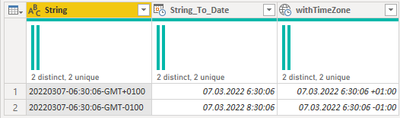
let
Date = Date.FromText(Text.BeforeDelimiter(Text.ReplaceRange([String],8,1,"T"),"T")),
Time = Time.FromText(Text.BetweenDelimiters([String], "-", "-")),
getTimeZone = Text.AfterDelimiter([String], "T"),
getPlusOrMinusZone = Text.Start(getTimeZone, 1),
GetHourOfZone = Number.FromText( Text.Middle(getTimeZone,1,2)),
GetMinuteOfZone = Number.FromText(Text.End(getTimeZone,2)),
DateTime = DateTime.From(Date & Time),
DateTimeZone = DateTime.AddZone(DateTime,GetHourOfZone,GetMinuteOfZone),
CompleteWithCheck = if getPlusOrMinusZone = "+" then DateTimeZone else DateTime.AddZone(DateTime,-GetHourOfZone,GetMinuteOfZone)
in CompleteWithCheck
Add New Column like this. "String" is your column with the provided date. Then just Change Type of the new column to "date" or "datetime" or "datetimezone".
Edit:
I enhanced the code to check whether it's "+" or "-".
Regional Settings is already to an European country.
Could you please help me on how to fix it with your code?
I guess it's this line, but i don't have the knowledge to achieve it...
Date = Date.FromText(Text.BeforeDelimiter(Text.ReplaceRange([String],8,1,"T"),"T")),
I'm transforming the the original column with unicode format... and maybe it will work.
Yep, fixed that way, thanks.
Hi, @mcflurry
In Power Query with TimeZone:
let
Date = Date.FromText(Text.BeforeDelimiter(Text.ReplaceRange([String],8,1,"T"),"T")),
Time = Time.FromText(Text.BetweenDelimiters([String], "-", "-")),
getTimeZone = Text.AfterDelimiter([String], "T"),
getPlusOrMinusZone = Text.Start(getTimeZone, 1),
GetHourOfZone = Number.FromText( Text.Middle(getTimeZone,1,2)),
GetMinuteOfZone = Number.FromText(Text.End(getTimeZone,2)),
DateTime = DateTime.From(Date & Time),
DateTimeZone = DateTime.AddZone(DateTime,GetHourOfZone,GetMinuteOfZone),
CompleteWithCheck = if getPlusOrMinusZone = "+" then DateTimeZone else DateTime.AddZone(DateTime,-GetHourOfZone,GetMinuteOfZone)
in CompleteWithCheck
Add New Column like this. "String" is your column with the provided date. Then just Change Type of the new column to "date" or "datetime" or "datetimezone".
Edit:
I enhanced the code to check whether it's "+" or "-".
Hello @vojtechsima
I have a problem with your code.
It looks like it's taking the day as month and the month as day, and imported data from yesterday fails, i've tried with 02/28 as an example:
Hi, @mcflurry
Go to Settings - Regional Settings (current file) and change it to some European country, in my case Czech Republic, or rewrite the script that it first writes month and then day.
Regional Settings is already to an European country.
Could you please help me on how to fix it with your code?
I guess it's this line, but i don't have the knowledge to achieve it...
Date = Date.FromText(Text.BeforeDelimiter(Text.ReplaceRange([String],8,1,"T"),"T")),
I'm transforming the the original column with unicode format... and maybe it will work.
Yep, fixed that way, thanks.
Check out the April 2026 Power BI update to learn about new features.
If you have recently started exploring Fabric, we'd love to hear how it's going. Your feedback can help with product improvements.
A new Power BI DataViz World Championship is coming this June! Don't miss out on submitting your entry.
| User | Count |
|---|---|
| 38 | |
| 38 | |
| 31 | |
| 22 | |
| 15 |
| User | Count |
|---|---|
| 74 | |
| 61 | |
| 31 | |
| 31 | |
| 23 |