Share feedback directly with Fabric product managers, participate in targeted research studies and influence the Fabric roadmap.
Sign up nowGet Fabric certified for FREE! Don't miss your chance! Learn more
Hi all
I have a list like
| List |
| 8 |
| abc |
| 2021.01.01 13:45:00 |
| 011010 |
How can I convert this list to a table? Is there a function or do I need to do it manually?
Should look something like
| Value | text | time | bit |
| 8 | abc | 2021.01.01 13:45:00 | 011010 |
Since the source is a list, transforming options like pivot, unpivot are not available.
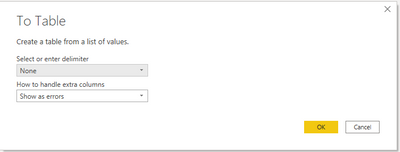
Trying to convert the list in a table "to table" results in errors, since each row is another type.
best
aleks
Solved! Go to Solution.
Fount the solution
When converting "to table" you have to choose as a delimiter "none".
After that it is possible to transpose the table.
Fount the solution
When converting "to table" you have to choose as a delimiter "none".
After that it is possible to transpose the table.
@Anonymous ,
Try unpivoting using power query.
https://www.myexcelonline.com/blog/unpivot-data-using-excel-power-query/
Regards,
Manikumar
Proud to be a Super User!
Since this is a list, options like unpivot are not available. I think I have to use dax.
@Anonymous , with the first table it seems like a case for transpose table or unpivot
https://radacad.com/pivot-and-unpivot-with-power-bi
Transpose : https://yodalearning.com/tutorials/power-query-helps-transposing-data/
The problem is, it is not a table, therfore transpose or unpivot are not available. it's a list.
If you love stickers, then you will definitely want to check out our Community Sticker Challenge!
Check out the January 2026 Power BI update to learn about new features.
| User | Count |
|---|---|
| 64 | |
| 63 | |
| 49 | |
| 21 | |
| 18 |
| User | Count |
|---|---|
| 121 | |
| 118 | |
| 38 | |
| 36 | |
| 29 |