FabCon is coming to Atlanta
Join us at FabCon Atlanta from March 16 - 20, 2026, for the ultimate Fabric, Power BI, AI and SQL community-led event. Save $200 with code FABCOMM.
Register now!- Power BI forums
- Get Help with Power BI
- Desktop
- Service
- Report Server
- Power Query
- Mobile Apps
- Developer
- DAX Commands and Tips
- Custom Visuals Development Discussion
- Health and Life Sciences
- Power BI Spanish forums
- Translated Spanish Desktop
- Training and Consulting
- Instructor Led Training
- Dashboard in a Day for Women, by Women
- Galleries
- Data Stories Gallery
- Themes Gallery
- Contests Gallery
- QuickViz Gallery
- Quick Measures Gallery
- Visual Calculations Gallery
- Notebook Gallery
- Translytical Task Flow Gallery
- TMDL Gallery
- R Script Showcase
- Webinars and Video Gallery
- Ideas
- Custom Visuals Ideas (read-only)
- Issues
- Issues
- Events
- Upcoming Events
The Power BI Data Visualization World Championships is back! Get ahead of the game and start preparing now! Learn more
- Power BI forums
- Forums
- Get Help with Power BI
- Desktop
- Re: Convert from multiple currencies to USD or EUR...
- Subscribe to RSS Feed
- Mark Topic as New
- Mark Topic as Read
- Float this Topic for Current User
- Bookmark
- Subscribe
- Printer Friendly Page

- Mark as New
- Bookmark
- Subscribe
- Mute
- Subscribe to RSS Feed
- Permalink
- Report Inappropriate Content
Convert from multiple currencies to USD or EUR using Slicer
Hello,
I'm trying to add a slicer to my report, allowing users to select EUR or USD. Based on their selection, I will convert the value of my "License Amount" field to EUR or USD.
Here is my Data Model:
Table 1 : Opportunity
Columns: OPP ID, LicenseFee, Currency
Table 2: ExchangeTable
SourceCurrency, TargetCurrency, ExchangeRate
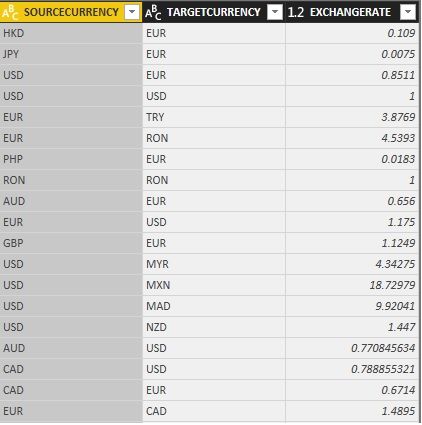
I managed to implement the formula correctly without a slicer, and converting to 1 of the 2 currencies, but when i start adding conditions based on a slicer it is not working.
Here is the formula that is working with 1 currency only:
Discounted License EUR = OPPORTUNITY[LICENSEFEE]*LOOKUPVALUE(ExchangeTable[EXCHANGERATE],ExchangeTable[SOURCECURRENCY],Opportunity[CURRENCY],ExchangeTable[TARGETCURRENCY],"EUR")
Appreciate your help,
Thanks,
Dory
Solved! Go to Solution.


- Mark as New
- Bookmark
- Subscribe
- Mute
- Subscribe to RSS Feed
- Permalink
- Report Inappropriate Content
Hi @dmelhem
Try this Measure in your Opportunity Table
Add slicer from ExchangeTable[TargetCurrency] and select a target currency
Measure =
VAR MyRate =
    CALCULATE (
        FIRSTNONBLANK ( ExchangeTable[ExchangeRate], 1 ),
        FILTER (
            ExchangeTable,
            ExchangeTable[SourceCurrency] = SELECTEDVALUE ( Opportunity[Currency] )
                && ExchangeTable[TargetCurrency] = SELECTEDVALUE ( ExchangeTable[TargetCurrency] )
        )
    )
RETURN
    SUM ( Opportunity[LicenseFee] ) * MyRate
Regards
Zubair
Please try my custom visuals
- Mark as New
- Bookmark
- Subscribe
- Mute
- Subscribe to RSS Feed
- Permalink
- Report Inappropriate Content
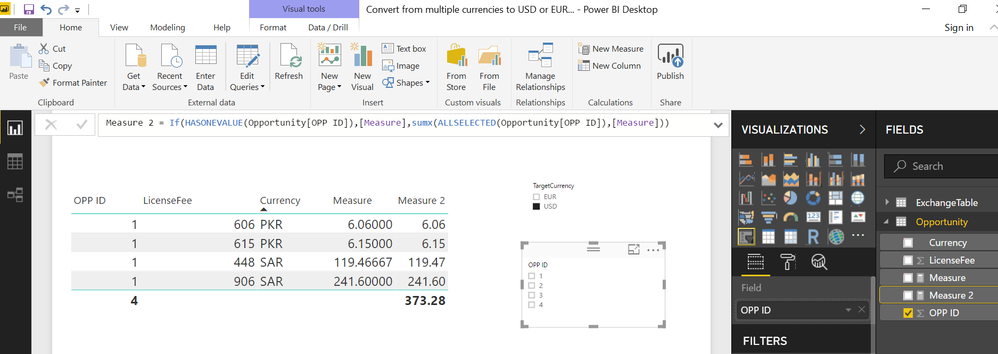
Since you need dynamic translation based on slicer selection, I believe a CALCULATED COLUMN won't work.
But we can write another MEASURE to get the Totals as well
Let me know if it works
Measure 2 =
IF (
    HASONEVALUE ( Opportunity[OPP ID] ),
    [Measure],
    SUMX ( ALLSELECTED ( Opportunity[OPP ID] ), [Measure] )
)
Regards
Zubair
Please try my custom visuals
- Mark as New
- Bookmark
- Subscribe
- Mute
- Subscribe to RSS Feed
- Permalink
- Report Inappropriate Content
Hi @dmelhem
Try this Measure in your Opportunity Table
Add slicer from ExchangeTable[TargetCurrency] and select a target currency
Measure =
VAR MyRate =
    CALCULATE (
        FIRSTNONBLANK ( ExchangeTable[ExchangeRate], 1 ),
        FILTER (
            ExchangeTable,
            ExchangeTable[SourceCurrency] = SELECTEDVALUE ( Opportunity[Currency] )
                && ExchangeTable[TargetCurrency] = SELECTEDVALUE ( ExchangeTable[TargetCurrency] )
        )
    )
RETURN
    SUM ( Opportunity[LicenseFee] ) * MyRate
Regards
Zubair
Please try my custom visuals
- Mark as New
- Bookmark
- Subscribe
- Mute
- Subscribe to RSS Feed
- Permalink
- Report Inappropriate Content
Hi Zubair,
Sorry to bother again.
Your solution indeed, worked as a measure, but now that i'm moving forward with the building Reports, i noticed that i am unable to do "Sum" on measures (sorry i'm kind of new to this).
Do you know if there is any way i can get the same result but with a column?
Thanks,
Dory
- Mark as New
- Bookmark
- Subscribe
- Mute
- Subscribe to RSS Feed
- Permalink
- Report Inappropriate Content
Since you need dynamic translation based on slicer selection, I believe a CALCULATED COLUMN won't work.
But we can write another MEASURE to get the Totals as well
Let me know if it works
Measure 2 =
IF (
    HASONEVALUE ( Opportunity[OPP ID] ),
    [Measure],
    SUMX ( ALLSELECTED ( Opportunity[OPP ID] ), [Measure] )
)
Regards
Zubair
Please try my custom visuals
- Mark as New
- Bookmark
- Subscribe
- Mute
- Subscribe to RSS Feed
- Permalink
- Report Inappropriate Content
- Mark as New
- Bookmark
- Subscribe
- Mute
- Subscribe to RSS Feed
- Permalink
- Report Inappropriate Content
Thanks a lot Zubair, it worked!!!
Really appreciate it 🙂

Helpful resources

Power BI Dataviz World Championships
The Power BI Data Visualization World Championships is back! Get ahead of the game and start preparing now!

Power BI Monthly Update - December 2025
Check out the December 2025 Power BI Holiday Recap!

FabCon Atlanta 2026
Join us at FabCon Atlanta, March 16-20, for the ultimate Fabric, Power BI, AI and SQL community-led event. Save $200 with code FABCOMM.

| User | Count |
|---|---|
| 41 | |
| 38 | |
| 36 | |
| 30 | |
| 28 |


| User | Count |
|---|---|
| 129 | |
| 88 | |
| 79 | |
| 68 | |
| 63 |


