FabCon is coming to Atlanta
Join us at FabCon Atlanta from March 16 - 20, 2026, for the ultimate Fabric, Power BI, AI and SQL community-led event. Save $200 with code FABCOMM.
Register now!- Power BI forums
- Get Help with Power BI
- Desktop
- Service
- Report Server
- Power Query
- Mobile Apps
- Developer
- DAX Commands and Tips
- Custom Visuals Development Discussion
- Health and Life Sciences
- Power BI Spanish forums
- Translated Spanish Desktop
- Training and Consulting
- Instructor Led Training
- Dashboard in a Day for Women, by Women
- Galleries
- Data Stories Gallery
- Themes Gallery
- Contests Gallery
- QuickViz Gallery
- Quick Measures Gallery
- Visual Calculations Gallery
- Notebook Gallery
- Translytical Task Flow Gallery
- TMDL Gallery
- R Script Showcase
- Webinars and Video Gallery
- Ideas
- Custom Visuals Ideas (read-only)
- Issues
- Issues
- Events
- Upcoming Events
The Power BI Data Visualization World Championships is back! Get ahead of the game and start preparing now! Learn more
- Power BI forums
- Forums
- Get Help with Power BI
- Desktop
- Convert data from one form to another
- Subscribe to RSS Feed
- Mark Topic as New
- Mark Topic as Read
- Float this Topic for Current User
- Bookmark
- Subscribe
- Printer Friendly Page

- Mark as New
- Bookmark
- Subscribe
- Mute
- Subscribe to RSS Feed
- Permalink
- Report Inappropriate Content
Convert data from one form to another
Dear All,
I have a report with status (as in values) which means it is in format of Action Status : Comp/ Pending/ Overdue, here, if number other than zero is present then that means the point has that many number of sub tasks (4/0/0 - means 4 subtasks in completed stage. How do I write dax code than using conditional formatting.
Simply: when there is a number other than zero in the format of Comp/ Pending/ Overdue, then that many sub tasks at its stage.
Solved! Go to Solution.


- Mark as New
- Bookmark
- Subscribe
- Mute
- Subscribe to RSS Feed
- Permalink
- Report Inappropriate Content
- first click on your column with the 3 statuses,
- then in the Transform ribbon click on the "Split Column" button
- then chose the "by Delimiter" option and choose "/" as your delimiter (Power Query should detect this)
- then click on ok, this should split your column into 3 numeric values
- rename the 3 new columns to "Comp", "Pend" and "Overdue"
- then click on the "Add Column" ribbon
- then click on "Custom Column"
- and paste in the following code
if [Comp] = 0 and [Pend]= 0 and [Overdue] = 0 then "No Actions Defined"
else if [Comp] > 0 and [Pend] > 0 then "Partially Complete"
else if [Comp] > 0 then "Complete"
else if [Pend] > 0 then "Pending"
else if [Overdue] > 0 then "Overdue"
else "Other"
- Mark as New
- Bookmark
- Subscribe
- Mute
- Subscribe to RSS Feed
- Permalink
- Report Inappropriate Content
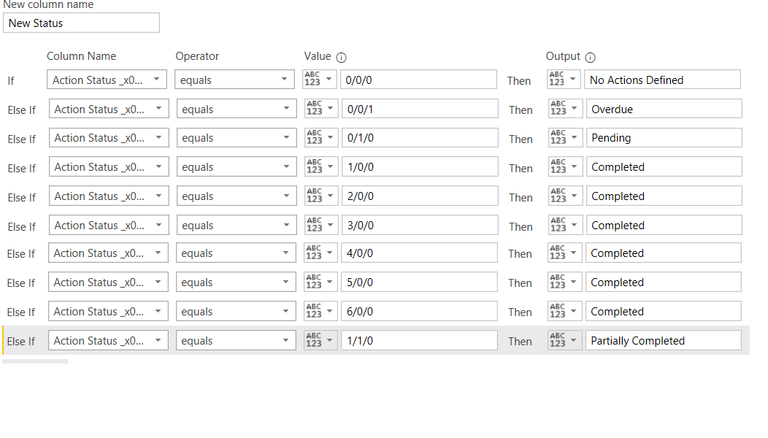
This looks like Power Query code, not DAX. The other option here would be to do a split transform using "/" to split the values in order to create 3 separate columns for each of Comp, Pending & Overdue. Then you could do numeric > 0 checks instead of having to type out. The only problem is that to check 2 columns as in the "Partial" case you would have to edit the expression code by hand as the Wizard page does not have a way to generate and "AND" condition
= Table.AddColumn(#"Renamed Columns", "Custom", each
if ([Comp] > 0) and ([Pend] > 0) then "Partial"
else if [Comp] > 0 then "Complete"
else if [Pend] > 0 then "Pending"
else "Overdue")
- Mark as New
- Bookmark
- Subscribe
- Mute
- Subscribe to RSS Feed
- Permalink
- Report Inappropriate Content
- Mark as New
- Bookmark
- Subscribe
- Mute
- Subscribe to RSS Feed
- Permalink
- Report Inappropriate Content
- first click on your column with the 3 statuses,
- then in the Transform ribbon click on the "Split Column" button
- then chose the "by Delimiter" option and choose "/" as your delimiter (Power Query should detect this)
- then click on ok, this should split your column into 3 numeric values
- rename the 3 new columns to "Comp", "Pend" and "Overdue"
- then click on the "Add Column" ribbon
- then click on "Custom Column"
- and paste in the following code
if [Comp] = 0 and [Pend]= 0 and [Overdue] = 0 then "No Actions Defined"
else if [Comp] > 0 and [Pend] > 0 then "Partially Complete"
else if [Comp] > 0 then "Complete"
else if [Pend] > 0 then "Pending"
else if [Overdue] > 0 then "Overdue"
else "Other"
- Mark as New
- Bookmark
- Subscribe
- Mute
- Subscribe to RSS Feed
- Permalink
- Report Inappropriate Content
Facing below error on doing the above procedure
Expression.Error: The field 'Pend' of the record wasn't found.
Details:
Report Number=Obs-2017-000182
Observation Date=1/2/2017 11:23:00 PM
Observation Time=23:23 (UTC+05:30) IST
Observation Method=Safety Walkaround
Site - Location No=43685
Division - Divisional Region Adhesive Technologies=MEA
Region=Asia
Country=India
Location Type=active
Site=Chennai
Division=Adhesive Technologies
Sub-division=AT
Employee function=
Team Member=Prabhu Thiagarajan
Comments=Near Packing material storage area in Extruder cooling line water leakage
Comp=1
pend=0
Overdue=0
Created By=Prabhu Thiagarajan
Created Date=1/2/2017 5:57:17 PM
Observation Location=Extruder shop floor
Safety Walkaround - Walkaround Focus=Safety
STOP Audit *(STOP is trademark of DuPont) - Audit Focus=
Safety Observation - Description :(Include name of the original reporter if applicable)=
SUSA Conversation - Location (Area):=
SUSA Conversation - Observed Type=
SUSA Conversation - Probability:=
SUSA Conversation - Consequence:=
Result Number=
Comment=
Category=
Sub Category=
Class of Observation=
Action Item Number:=Obs-2017-000182_1
Action Item Description=Near Packing material storage area in Extruder cooling line water leakage - Leakage to be arrested as soon as possible
Assigned To=Suresh Mungara
Target Date:=1/31/2017
Completion Date:=1/18/2017
Inactive-Does the observation have:=
Index=1
- Mark as New
- Bookmark
- Subscribe
- Mute
- Subscribe to RSS Feed
- Permalink
- Report Inappropriate Content
@Anonymous wrote:
Facing below error on doing the above procedure
Expression.Error: The field 'Pend' of the record wasn't found.
That most likely means you called the second column something different
Helpful resources

Power BI Dataviz World Championships
The Power BI Data Visualization World Championships is back! Get ahead of the game and start preparing now!

Power BI Monthly Update - December 2025
Check out the December 2025 Power BI Holiday Recap!

FabCon Atlanta 2026
Join us at FabCon Atlanta, March 16-20, for the ultimate Fabric, Power BI, AI and SQL community-led event. Save $200 with code FABCOMM.

| User | Count |
|---|---|
| 41 | |
| 39 | |
| 37 | |
| 29 | |
| 24 |


| User | Count |
|---|---|
| 122 | |
| 110 | |
| 83 | |
| 69 | |
| 68 |


