
cancel
Showing results for 
Search instead for 
Did you mean: 

Next up in the FabCon + SQLCon recap series: The roadmap for Microsoft SQL and Maximizing Developer experiences in Fabric. All sessions are available on-demand after the live show. Register now

Reply
Anonymous
Not applicable

Convert data / Machine Utilisation

Hello,


On my other tables i have the data formatted as time so I can convert to total seconds and then divide by the seconds in the working day (In order to get Utilisastion)

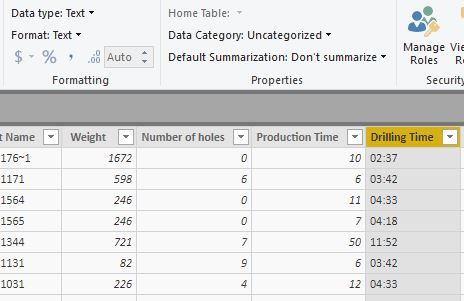
  • Is there a way to convert the "Drilling Time" column to time in hh:mm:ss format. It currently is displaying as Text but the data appears in mm:ss e.g 02:37 is 2 minutes and 37 seconds
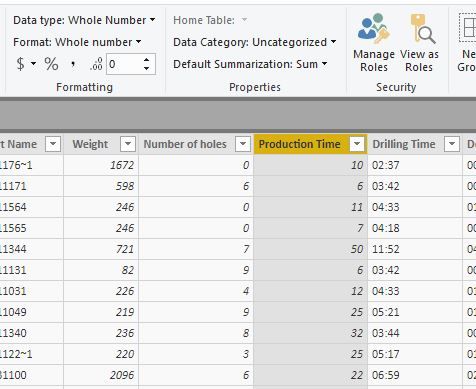
  • Is it possible to also convert the "production time"column to time in hh:mm:ss format. The whole number data is in seconds eg 10 is 00:00:10.   


I would ideally like to add the drilling time and production time together for each part.  Then divide by seconds in the day.


I may be going about this the wrong way so I am open to suggestions and new methods.


Thanks,


Drilling TimeDrilling TimeProduction TimeProduction Time

2 REPLIES 2
v-xicai
Community Support
Community Support

Hi @Anonymous ,


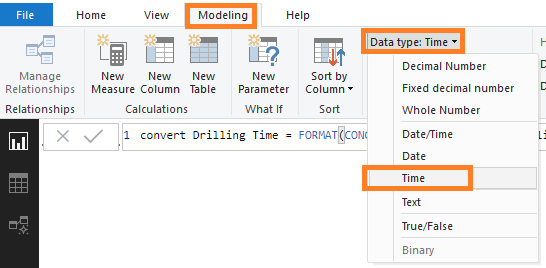
You can create column or measure using DAX below. Then convert them to Time data type.


Column:


convert Drilling Time = FORMAT(CONCATENATE("00:",Table1[Drilling Time]),"hh:mm:ss")


convert Production Time = var d=IF(Table1[Production Time]=BLANK(),"00:00:00",IF(LEN(Table1[Production Time])=1,CONCATENATE("00:00:0",Table1[Production Time]),CONCATENATE("00:00:",Table1[Production Time])))

return FORMAT(d,"hh:mm:ss")


Measure:


convert Drilling Time measure = FORMAT(CONCATENATE("00:",MAX(Table1[Drilling Time])),"hh:mm:ss")


convert Production Time measure = var d=IF(MAX(Table1[Production Time])=BLANK(),"00:00:00",IF(LEN(MAX(Table1[Production Time]))=1,CONCATENATE("00:00:0",MAX(Table1[Production Time])),CONCATENATE("00:00:",MAX(Table1[Production Time]))))

return FORMAT(d,"hh:mm:ss")

2.png3.png

Best Regards,

Amy


If this post helps, then please consider Accept it as the solution to help the other members find it more quickly.


Anonymous
Not applicable

Thats a huge Help amy and nearly 100% there.


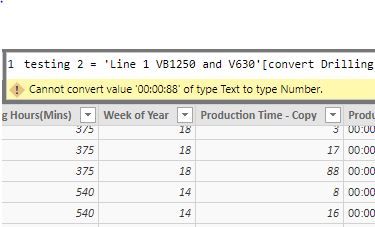
I have just found out that some of the data in the production time data is greater that 60 seconds so I am unable to convert to time.

Any suggestions @v-xicai ?


amy.JPG


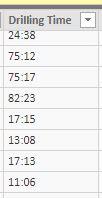
some Drilling time is also greater than 60 minutes

dt.JPG

Thanks for your help thus far

Helpful resources

Announcements
New to Fabric survey Carousel

New to Fabric Survey

If you have recently started exploring Fabric, we'd love to hear how it's going. Your feedback can help with product improvements.

Power BI DataViz World Championships carousel

Power BI DataViz World Championships - June 2026

A new Power BI DataViz World Championship is coming this June! Don't miss out on submitting your entry.

March Power BI Update Carousel

Power BI Community Update - March 2026

Check out the March 2026 Power BI update to learn about new features.