Join us at FabCon Atlanta from March 16 - 20, 2026, for the ultimate Fabric, Power BI, AI and SQL community-led event. Save $200 with code FABCOMM.
Register now!The Power BI Data Visualization World Championships is back! Get ahead of the game and start preparing now! Learn more
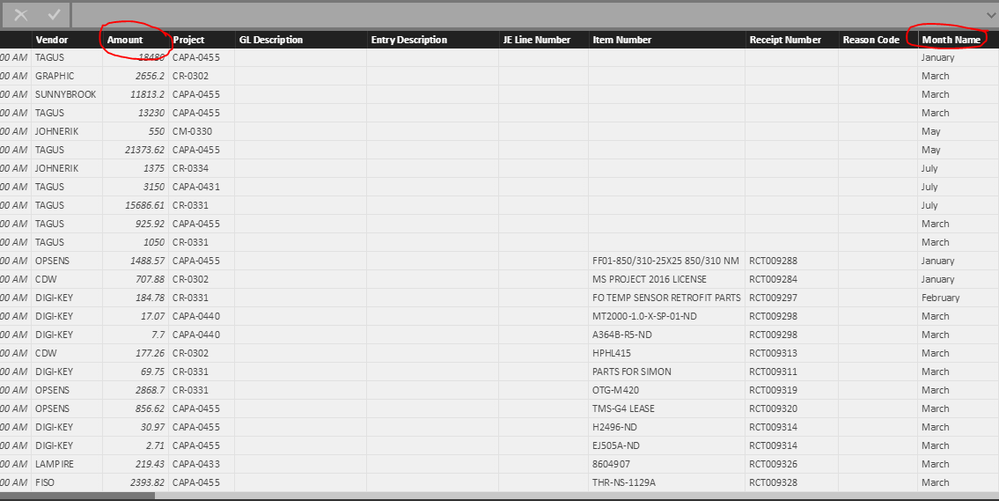
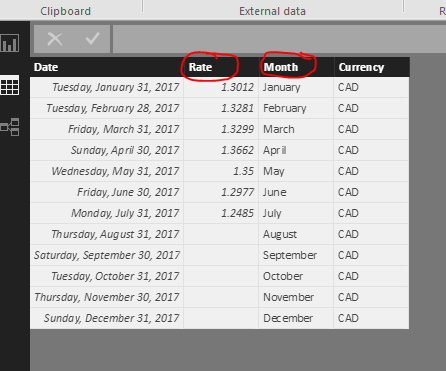
I'm trying to convert CAD to USD using month end exchange rate. Below are the tables I am using. How do I use the "rate" (this is a month end rate) in the Echange Rate Table (below) to convert the "amount" column in the bavProjectDtl MMI table (also below)? I was thinking I could use the month name as a pivot point bewteen to the two tables? I tried to use the LOOKUPVALUE fuction in DAX with little success, but I don't know much about that function...Maybe there is a way to drop the exchange rate from the Exchange Rate table into the BavProjectDtl MMI table? If so, I could do a simple multiplication column in that table...
Any thoughts would be appreciated!!!
Solved! Go to Solution.
Hi @kglende,
If you have created a one to many relationship betwee Echange Rate Table and bavProjectDtl MMI table, you could directly point to the Rate column in bavProjectDtl MMI table.
Create a calculated column using this formula:
Rate=Related('Echange Rate'[Rate])
If there isn't any relationship between these two tables, you could use LOOKUPVALUE function to create calculated column:
Rate=LOOKUPVALUE('Echange Rate'[Rate],'Echange Rate'[Month],'bavProjectDtl MMI'[Month Name])
Best regards,
Yuliana Gu
Hi @kglende,
If you have created a one to many relationship betwee Echange Rate Table and bavProjectDtl MMI table, you could directly point to the Rate column in bavProjectDtl MMI table.
Create a calculated column using this formula:
Rate=Related('Echange Rate'[Rate])
If there isn't any relationship between these two tables, you could use LOOKUPVALUE function to create calculated column:
Rate=LOOKUPVALUE('Echange Rate'[Rate],'Echange Rate'[Month],'bavProjectDtl MMI'[Month Name])
Best regards,
Yuliana Gu
Check out the November 2025 Power BI update to learn about new features.
Advance your Data & AI career with 50 days of live learning, contests, hands-on challenges, study groups & certifications and more!