Fabric Data Days starts November 4th!
Advance your Data & AI career with 50 days of live learning, dataviz contests, hands-on challenges, study groups & certifications and more!
Get registered- Power BI forums
- Get Help with Power BI
- Desktop
- Service
- Report Server
- Power Query
- Mobile Apps
- Developer
- DAX Commands and Tips
- Custom Visuals Development Discussion
- Health and Life Sciences
- Power BI Spanish forums
- Translated Spanish Desktop
- Training and Consulting
- Instructor Led Training
- Dashboard in a Day for Women, by Women
- Galleries
- Data Stories Gallery
- Themes Gallery
- Contests Gallery
- QuickViz Gallery
- Quick Measures Gallery
- Visual Calculations Gallery
- Notebook Gallery
- Translytical Task Flow Gallery
- TMDL Gallery
- R Script Showcase
- Webinars and Video Gallery
- Ideas
- Custom Visuals Ideas (read-only)
- Issues
- Issues
- Events
- Upcoming Events
Get Fabric Certified for FREE during Fabric Data Days. Don't miss your chance! Request now
- Power BI forums
- Forums
- Get Help with Power BI
- Desktop
- Re: Convert currency to text, but keep currency sy...
- Subscribe to RSS Feed
- Mark Topic as New
- Mark Topic as Read
- Float this Topic for Current User
- Bookmark
- Subscribe
- Printer Friendly Page


- Mark as New
- Bookmark
- Subscribe
- Mute
- Subscribe to RSS Feed
- Permalink
- Report Inappropriate Content
Convert currency to text, but keep currency symbol and formatting
Hello,
I'm trying to figure out how to convert a column of currency values to text while also keeping the $ symbol and thousands separator. I've been trying a number of things in Power BI, but nothing has worked. Is there a way to do this using DAX or M? I wouldn't be surprised if I'm missing something obvious, but my Google searches haven't turned up anything either.
Thanks!
Solved! Go to Solution.


- Mark as New
- Bookmark
- Subscribe
- Mute
- Subscribe to RSS Feed
- Permalink
- Report Inappropriate Content
@jimgores try this in DAX
Column = FORMAT([Column1],"$#,##0.00")


- Mark as New
- Bookmark
- Subscribe
- Mute
- Subscribe to RSS Feed
- Permalink
- Report Inappropriate Content
Hi @jimgores
Download this example PBIX file with the following data.
You can do this with Custom Format Strings without needing to actually convert the currency to text and create another column.
If your data looks like this
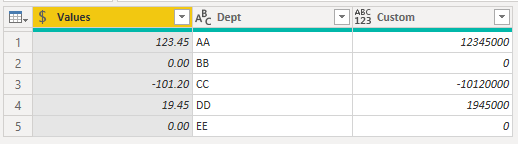
You can apply this format string
"$"#,##0.00;-"$"#,##0.00;"Not Reported"
It's like in Excel where you have separate components for the formatting string, in this case the string takes the structure Positive Format;Negative Format;Zero Format so 0 values will be displayed as Not Reported
Just type the format string into the Format area and hit Enter
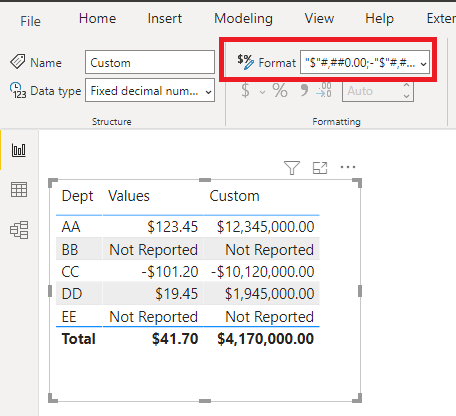
Further reading if you are interested
https://www.myonlinetraininghub.com/custom-formatting-strings-in-power-bi
Regards
Phil
Did I answer your question? Then please mark my post as the solution.
If I helped you, click on the Thumbs Up to give Kudos.
Blog :: YouTube Channel :: Connect on Linkedin
Proud to be a Super User!
- Mark as New
- Bookmark
- Subscribe
- Mute
- Subscribe to RSS Feed
- Permalink
- Report Inappropriate Content
@jimgoresin my screenshot Column1 is the decimal number formatted as currency. What is your column1? Can you give me the an example? Is it a string or decimal number or whole number? Please provide an example.
- Mark as New
- Bookmark
- Subscribe
- Mute
- Subscribe to RSS Feed
- Permalink
- Report Inappropriate Content
Hi @jimgores
Why do you want to convert numbers to text and lose the ability to (easily) analyse the values?
Regards
Phil
Did I answer your question? Then please mark my post as the solution.
If I helped you, click on the Thumbs Up to give Kudos.
Blog :: YouTube Channel :: Connect on Linkedin
Proud to be a Super User!
- Mark as New
- Bookmark
- Subscribe
- Mute
- Subscribe to RSS Feed
- Permalink
- Report Inappropriate Content
My collegue needs the value $0 to return "Not Reported" instead of $0 when it occurs. The only way I can see to accomplish this is to convert the column to text and then replace values.
- Mark as New
- Bookmark
- Subscribe
- Mute
- Subscribe to RSS Feed
- Permalink
- Report Inappropriate Content
Hi @jimgores
Download this example PBIX file with the following data.
You can do this with Custom Format Strings without needing to actually convert the currency to text and create another column.
If your data looks like this
You can apply this format string
"$"#,##0.00;-"$"#,##0.00;"Not Reported"
It's like in Excel where you have separate components for the formatting string, in this case the string takes the structure Positive Format;Negative Format;Zero Format so 0 values will be displayed as Not Reported
Just type the format string into the Format area and hit Enter
Further reading if you are interested
https://www.myonlinetraininghub.com/custom-formatting-strings-in-power-bi
Regards
Phil
Did I answer your question? Then please mark my post as the solution.
If I helped you, click on the Thumbs Up to give Kudos.
Blog :: YouTube Channel :: Connect on Linkedin
Proud to be a Super User!
- Mark as New
- Bookmark
- Subscribe
- Mute
- Subscribe to RSS Feed
- Permalink
- Report Inappropriate Content
That is a pretty slick solution too! Thanks!


- Mark as New
- Bookmark
- Subscribe
- Mute
- Subscribe to RSS Feed
- Permalink
- Report Inappropriate Content
You can use custom format strings (see link). That way you can get the currency symbol and still do math on that column/use it in visuals/etc.
Use custom format strings in Power BI Desktop - Power BI | Microsoft Docs
Pat
Did I answer your question? Mark my post as a solution! Kudos are also appreciated!
To learn more about Power BI, follow me on Twitter or subscribe on YouTube.
@mahoneypa HoosierBI on YouTube
- Mark as New
- Bookmark
- Subscribe
- Mute
- Subscribe to RSS Feed
- Permalink
- Report Inappropriate Content
I've seen this, but from the way I read it, you still need to keep the values formatted as a number. I need to convert the numbers to text.
- Mark as New
- Bookmark
- Subscribe
- Mute
- Subscribe to RSS Feed
- Permalink
- Report Inappropriate Content
@jimgores try this in DAX
Column = FORMAT([Column1],"$#,##0.00")
- Mark as New
- Bookmark
- Subscribe
- Mute
- Subscribe to RSS Feed
- Permalink
- Report Inappropriate Content
I was very hopeful when I tried this, but I get the error, "Cannot convert value '' of type Text to type Number."
- Mark as New
- Bookmark
- Subscribe
- Mute
- Subscribe to RSS Feed
- Permalink
- Report Inappropriate Content
Thank you smpa01, you got me pointed in the right direction. I had to convert the column to a string
Column1 = CONVERT([Column],STRING) and then use your formula Column2 = FORMAT([Column1],"$#,##0.00")
- Mark as New
- Bookmark
- Subscribe
- Mute
- Subscribe to RSS Feed
- Permalink
- Report Inappropriate Content
@jimgores can you please provide sample data and tell me what is the data type of column1 value in your example ?

Helpful resources

Fabric Data Days
Advance your Data & AI career with 50 days of live learning, contests, hands-on challenges, study groups & certifications and more!

Power BI Monthly Update - October 2025
Check out the October 2025 Power BI update to learn about new features.

FabCon Atlanta 2026
Join us at FabCon Atlanta, March 16-20, for the ultimate Fabric, Power BI, AI and SQL community-led event. Save $200 with code FABCOMM.


