Join us at FabCon Atlanta from March 16 - 20, 2026, for the ultimate Fabric, Power BI, AI and SQL community-led event. Save $200 with code FABCOMM.
Register now!View all the Fabric Data Days sessions on demand. View schedule
Ok I have a column in my data that has the year and month of an item captured.
The issue is that it is a text field that lists it as text in this format:
YYMM
I know I could split these and recombine them in the correct order and format it as date but that would take several steps.
Is there a more efficient way to perform this funtion?
Solved! Go to Solution.
Are all the years in the 2000s ?
you may have to modify the above if your column is only the last 2 year digits - YYMM
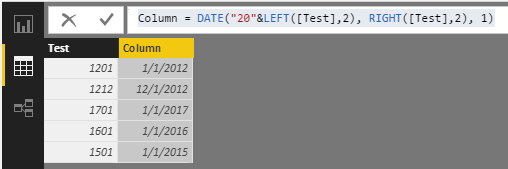
Column = DATE("20"&LEFT([Test],2), RIGHT([Test],2), 1)
If the column is called [Test] and if the format is YYYYMM, I generally do
= DATE(LEFT([Test],4), RIGHT([Test],2),1)
Careful about the year though. In your case, you only have YY instead of YYYY, so might have to concatenate 19 or 20 based on what you want.
Are all the years in the 2000s ?
you may have to modify the above if your column is only the last 2 year digits - YYMM
Column = DATE("20"&LEFT([Test],2), RIGHT([Test],2), 1)
Thanks this woked
Interesting I'm getting an error that the name date wasn't recognized?
Forgot to tell you, I did this in DAX (the modelling side) and not in M (query editor side)
Check out the November 2025 Power BI update to learn about new features.
Advance your Data & AI career with 50 days of live learning, contests, hands-on challenges, study groups & certifications and more!