cancel
Showing results for 
Search instead for 
Did you mean: 

The Power BI Data Visualization World Championships is back! Get ahead of the game and start preparing now! Learn more

Reply
Zarzuela
Regular Visitor

Convert SQL to Power BI

Hello,


I'm very new to Power BI, therefore please be indulgent with me 😄

Actually, I have 2 tables called Report and Mails. In the Report table I have a column UserId and in the Mails table I have a column called Body that might contain UserId.

I would like to convert this sql to Power BI


select Report.UserId, Mails.Body where Mails.Body LIKE '%' + Report.UserId + '%'; 


Is it possible?

Thx in advance.

4 REPLIES 4
amitchandak
Super User
Super User

@Zarzuela , Create a measure  like this and use with required columns

calculate(count(Report[UserId]), filter(Mails, search(max(Report.UserId), Mails[Mails.Body],,0)>0), values(Report[UserId]) )

Share with Power BI Enthusiasts: Full Power BI Video (20 Hours) YouTube
Microsoft Fabric Series 60+ Videos YouTube
Microsoft Fabric Hindi End to End YouTube

Hi amitchandak,


By removing one extra "," I don't have the eror anymore.

But actually, the measure gives me a number and I would like to have the actual text message in Mails[Body].

And note that for 1 Report[Racine] it might have 0-n Mails[Body]

Thx 

Hi @Zarzuela 


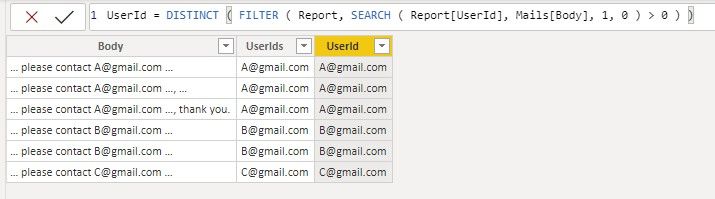
You can add a column in the Mails table with the following DAX codes:

UserId = DISTINCT ( FILTER ( Report, SEARCH ( Report[UserId], Mails[Body], 1, 0 ) > 0 ) )

Or (if a body has multiple UserIds)

UserIds = 
CONCATENATEX (
    CALCULATETABLE (
        VALUES ( Report[UserId] ),
        FILTER ( Report, SEARCH ( Report[UserId], Mails[Body], 1, 0 ) > 0 )
    ),
    [UserId],
    ","
)

112703.jpg


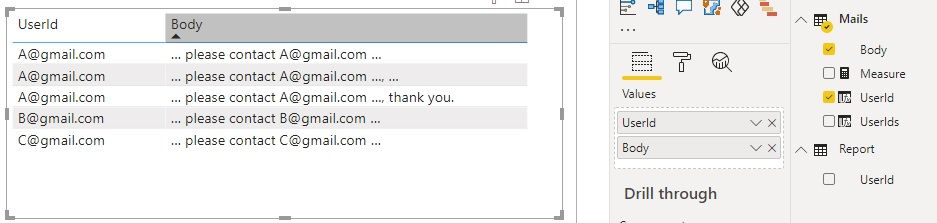
Then put UserId column and Body column into a table visual.

112704.jpg


You can also create a relationship between Report[UserId] and Mails[UserId], then you can put Report[UserId] in the table visual instead.


Reference:

SEARCH FUNCTION WITH A LIST VALUE - Microsoft Power BI Community


Kindly let me know if this helps.

Community Support Team _ Jing Zhang
If this post helps, please consider Accept it as the solution to help other members find it.

Hi amitchandak,


First thank you for your prompt answer. I have tried like this

Measure = calculate(count(Report[Racine]); filter(Mails; search(max(Report[Racine]); Mails[Body];,0)>0); values(Report[Racine]))

Note that I have changed the colu,n name from UserID to Racine.

But I got an error

"The followingsystem error occurred:" and nothing else after the :


Helpful resources

Announcements
Power BI DataViz World Championships

Power BI Dataviz World Championships

The Power BI Data Visualization World Championships is back! Get ahead of the game and start preparing now!

December 2025 Power BI Update Carousel

Power BI Monthly Update - December 2025

Check out the December 2025 Power BI Holiday Recap!

FabCon Atlanta 2026 carousel

FabCon Atlanta 2026

Join us at FabCon Atlanta, March 16-20, for the ultimate Fabric, Power BI, AI and SQL community-led event. Save $200 with code FABCOMM.