Join us at FabCon Atlanta from March 16 - 20, 2026, for the ultimate Fabric, Power BI, AI and SQL community-led event. Save $200 with code FABCOMM.
Register now!The Power BI Data Visualization World Championships is back! Get ahead of the game and start preparing now! Learn more
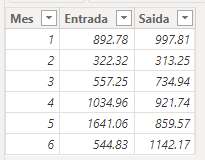
Input:
import pandas as pd
data = {
'Mes': list(range(1, 7)),
'Entrada': [892.78, 322.32, 557.25, 1034.96, 1641.06, 544.83],
'Saida': [997.81, 313.25, 734.94, 921.74, 859.57, 1142.17]
}
df = pd.DataFrame(data)
# Calculando o saldo
saldo = 0
saldo_list = []
for entrada, saida in zip(df['Entrada'], df['Saida']):
saldo = max(0, saldo + entrada - saida)
saldo_list.append(saldo)
df['Saldo'] = saldo_list
print(df)
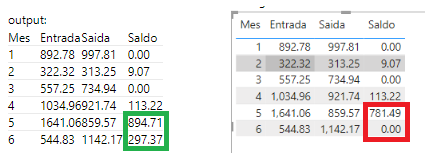
output:
| Mes | Entrada | Saida | Saldo |
| 1 | 892.78 | 997.81 | 0.00 |
| 2 | 322.32 | 313.25 | 9.07 |
| 3 | 557.25 | 734.94 | 0.00 |
| 4 | 1034.96 | 921.74 | 113.22 |
| 5 | 1641.06 | 859.57 | 894.71 |
| 6 | 544.83 | 1142.17 | 297.37 |
Hi @VilmarSch ,
Based on my testing, please try the following methods:
1.Create the simple table.
2.Create the measure to calculate saldo.
Saldo =
VAR sal = 0
VAR entra = CALCULATE(SUMX('Table', 'Table'[Entrada]))
VAR sasi = CALCULATE(SUMX('Table', 'Table'[Saida]))
RETURN
MAX(0, 0 + entra - sasi)
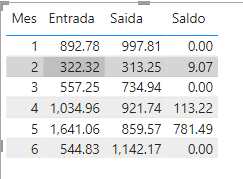
3.Drag the measure into the table visual, the result is shown below.
Best Regards,
Wisdom Wu
If this post helps, then please consider Accept it as the solution to help the other members find it more quickly.
@Anonymousthanks for the answer, but it didn't give the expected result. I believe it is something more complex.
Hi @VilmarSch ,
May be you can try to use power query.
Solved: Do Not Consider If Accumulated Value Is Negative P... - Microsoft Fabric Community
Best Regardsd,
Wisdom Wu
If this post helps, then please consider Accept it as the solution to help the other members find it more quickly.
@AnonymousI saw this topic, but I really needed to do it in DAX
The Power BI Data Visualization World Championships is back! Get ahead of the game and start preparing now!
| User | Count |
|---|---|
| 46 | |
| 42 | |
| 34 | |
| 31 | |
| 21 |
| User | Count |
|---|---|
| 140 | |
| 125 | |
| 100 | |
| 82 | |
| 64 |