Join us in Barcelona for FabCon and SQLCon, September 28 - October 1, 2026.
This is best Fabric, Power BI, SQL and AI community event. How do we know? The last event sold out! Save €200 with code FABCMTY200.
Register now- Power BI forums
- Get Help with Power BI
- Desktop
- Service
- Report Server
- Power Query
- Mobile Apps
- Developer
- DAX Commands and Tips
- Custom Visuals Development Discussion
- Health and Life Sciences
- Power BI Spanish forums
- Translated Spanish Desktop
- Training and Consulting
- Instructor Led Training
- Dashboard in a Day for Women, by Women
- Galleries
- Data Stories Gallery
- Themes Gallery
- Contests Gallery
- QuickViz Gallery
- Quick Measures Gallery
- Visual Calculations Gallery
- Fabric Apps Gallery
- Notebook Gallery
- Translytical Task Flow Gallery
- TMDL Gallery
- R Script Showcase
- Webinars and Video Gallery
- Ideas
- Custom Visuals Ideas (read-only)
- Issues
- Issues
- Events
- Upcoming Events
The Fabric community is now in read-only for platform upgrade. Learn more
- Power BI forums
- Forums
- Get Help with Power BI
- Desktop
- Convert Measure Formula into Calculated Column
- Subscribe to RSS Feed
- Mark Topic as New
- Mark Topic as Read
- Float this Topic for Current User
- Bookmark
- Subscribe
- Printer Friendly Page

- Mark as New
- Bookmark
- Subscribe
- Mute
- Subscribe to RSS Feed
- Permalink
- Report Inappropriate Content
Convert Measure Formula into Calculated Column
Hello All,
In my table i have the timelog details for each empployees.
So i am trying to calculate the count of days that each employee not entered the timelog i.e the blank rows.
By using below formula as a measure i got right the values.
EmpCount = CALCULATE(COUNTROWS(Timelog),FILTER(Timelog,Timelog[Time Log]=BLANK()))

As you can see in above image, that there are three slicers(Date, Emp Name & SBU) which will be using as filters for the same.
And by measure it is filtering the table values perfectly.
Now I am trying get these emp count values into some ranges like 0-5, 5-10, 10-15,>15.
I did it in measure using switch function. but i cant use this switch measure in column bar chart's AXIS field as it needs only a column.
So, now how can i write a calculated column which can give me the same result as the above measure is giving so that i can write a ranges calculated column further.
Any help.
Mohan V
Solved! Go to Solution.


- Mark as New
- Bookmark
- Subscribe
- Mute
- Subscribe to RSS Feed
- Permalink
- Report Inappropriate Content
Hi @Anonymous,
Now I am trying get these emp count values into some ranges like 0-5, 5-10, 10-15,>15.
I did it in measure using switch function. but i cant use this switch measure in column bar chart's AXIS field as it needs only a column.
So, now how can i write a calculated column which can give me the same result as the above measure is giving so that i can write a ranges calculated column further.
Please modify the measure for [EmpCount] as below:
EmpCount =
CALCULATE (
    COUNTROWS ( Timelog ),
    FILTER (
        ALLEXCEPT ( Timelog, Timelog[Emp Name] ),
        Timelog[Time Log] = BLANK ()
    )
)
_Column =
IF (
    [EmpCount] < 5,
    "0-5",
    IF (
        [EmpCount] >= 5
            && [EmpCount] < 10,
        "5-10",
        IF ( [EmpCount] >= 10 && [EmpCount] < 15, "10-15", ">15" )
    )
)
Best regards,
Yuliana Gu
If this post helps, then please consider Accept it as the solution to help the other members find it more quickly.
- Mark as New
- Bookmark
- Subscribe
- Mute
- Subscribe to RSS Feed
- Permalink
- Report Inappropriate Content
Hi @Anonymous,
Now I am trying get these emp count values into some ranges like 0-5, 5-10, 10-15,>15.
I did it in measure using switch function. but i cant use this switch measure in column bar chart's AXIS field as it needs only a column.
So, now how can i write a calculated column which can give me the same result as the above measure is giving so that i can write a ranges calculated column further.
Please modify the measure for [EmpCount] as below:
EmpCount =
CALCULATE (
    COUNTROWS ( Timelog ),
    FILTER (
        ALLEXCEPT ( Timelog, Timelog[Emp Name] ),
        Timelog[Time Log] = BLANK ()
    )
)
_Column =
IF (
    [EmpCount] < 5,
    "0-5",
    IF (
        [EmpCount] >= 5
            && [EmpCount] < 10,
        "5-10",
        IF ( [EmpCount] >= 10 && [EmpCount] < 15, "10-15", ">15" )
    )
)
Best regards,
Yuliana Gu
If this post helps, then please consider Accept it as the solution to help the other members find it more quickly.


- Mark as New
- Bookmark
- Subscribe
- Mute
- Subscribe to RSS Feed
- Permalink
- Report Inappropriate Content
Hi @Anonymous
Maybe you can try an If column?
Something like :
IF(EmpCount<5;"0-5";IF(EmpCount<10;"5-10";IF(EmpCount<15;"10-15";">15")))
- Quentin
- Mark as New
- Bookmark
- Subscribe
- Mute
- Subscribe to RSS Feed
- Permalink
- Report Inappropriate Content
@quentin_vigne Thanks for the reply.
I have already tried that, but im getting wrong output as in below image.
Calulated column formula
_Column = IF([EmpCount]<5,"0-5",IF([EmpCount]>=5 && [EmpCount]<10 ,"5-10",IF([EmpCount]>=10 && [EmpCount]<15,"10-15",">15")))
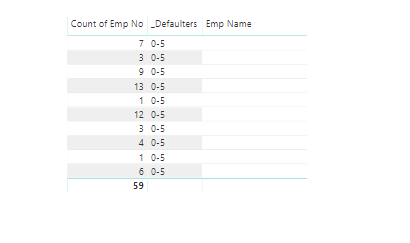
In measure it is givng perfect values.
_Measure=
IF([EmpCount]<5,"0-5",IF([EmpCount]>=5 && [EmpCount]<10 ,"5-10",IF([EmpCount]>=10 && [EmpCount]<15,"10-15",">15")))
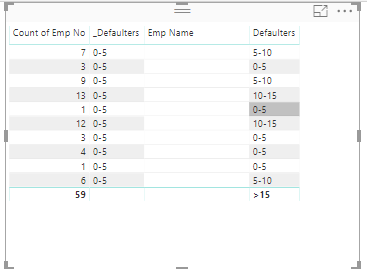
But as i said i cant use this measure in bar chart axis feild..
Any suggestions Please.
Mohan V
- Mark as New
- Bookmark
- Subscribe
- Mute
- Subscribe to RSS Feed
- Permalink
- Report Inappropriate Content
@Anonymous
Can you copy and paste this one :
New_Column = IF([EmpCount]<5,"0-5",IF([EmpCount]<10 ,"5-10",IF([EmpCount]<15,"10-15",">15")))
You don't need the && condition because If goes from one level to another.
If it is still not working, is [EmpCount] the SAME thing that "Count of Emp No" on your snapshot ?
- Quentin
- Mark as New
- Bookmark
- Subscribe
- Mute
- Subscribe to RSS Feed
- Permalink
- Report Inappropriate Content
Still no luck.
New_Column = IF([EmpCount]<5,"0-5",IF([EmpCount]<10 ,"5-10",IF([EmpCount]<15,"10-15",">15")))
getting the same Output.
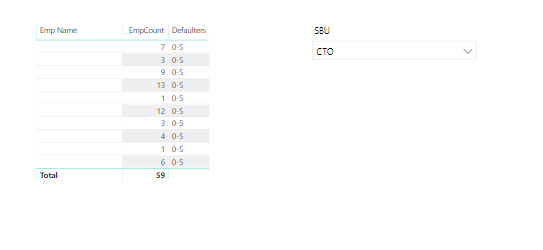
If it is still not working, is [EmpCount] the SAME thing that "Count of Emp No" on your snapshot ?
Yes they are.
Any Help.
Mohan V
Helpful resources

FabCon & SQLCon – Barcelona 2026
Join us in Barcelona for FabCon and SQLCon, the Fabric, Power BI, SQL, and AI community event. Save €200 with code FABCMTY200.

Power BI DataViz World Championships - June 2026
A new Power BI DataViz World Championship is coming this June! Don't miss out on submitting your entry.

| User | Count |
|---|---|
| 23 | |
| 22 | |
| 14 | |
| 14 | |
| 13 |


| User | Count |
|---|---|
| 47 | |
| 39 | |
| 24 | |
| 22 | |
| 20 |


