cancel
Showing results for 
Search instead for 
Did you mean: 

Join the FabCon + SQLCon recap series. Up next: Power BI, Real-Time Intelligence, IQ and AI, and Data Factory take center stage. All sessions are available on-demand after the live show. Register now

Reply
lionzandvliet
Frequent Visitor

Convert JSON data to new columns

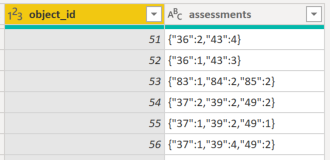
Im trying to convert a column with JSON-data to new columns. This is my input:

lionzandvliet_0-1634562620484.png

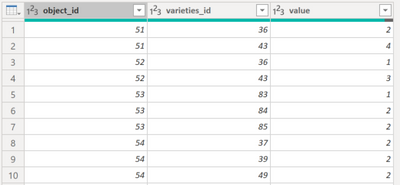
I need my output like this:
lionzandvliet_2-1634562988272.png


I'm trying to convert my 'assessments' column to JSON in the Power Query Editor, but not getting the right outcome:


lionzandvliet_3-1634563277732.png


let
Source = objects,
#"Parsed JSON" = Table.TransformColumns(Source,{{"assessments", Json.Document}}),
#"Expanded assessments" = Table.ExpandRecordColumn(#"Parsed JSON", "assessments", {"36", "43"}, {"product_id", "value"})
in
#"Expanded assessments"


Thanks in advance!


1 ACCEPTED SOLUTION
MFelix
Super User
Super User

Hi @lionzandvliet ,


If you have the information has you present in the first image you just need to make some addtional steps:

  • Remove the { }
  • Split columns to rows using the comma +space ", " separator:

MFelix_0-1634634792787.png


MFelix_1-1634634811265.png

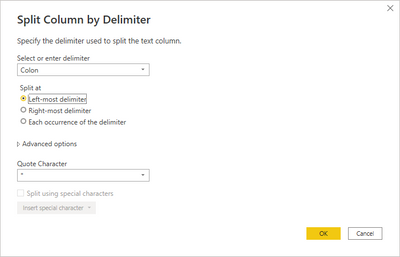
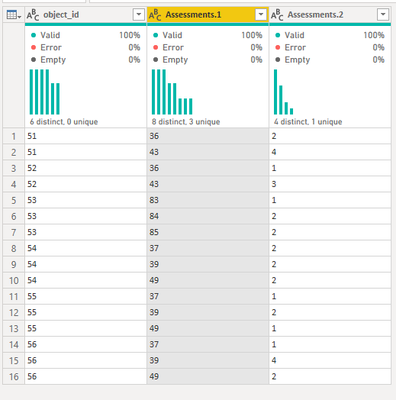
  • Split column by delimiter two dots ":"

MFelix_2-1634634875030.pngMFelix_3-1634634886692.png

Check PBIX file attach, it's not based on JSON but you only need the steps after "opening" the JSON that is what I show here.


Regards

Miguel Félix


Did I answer your question? Mark my post as a solution!

Proud to be a Super User!

Check out my blog: Power BI em Português


View solution in original post

2 REPLIES 2
lionzandvliet
Frequent Visitor

@MFelix thanx for your solution.

lionzandvliet_0-1634636368237.png


MFelix
Super User
Super User

Hi @lionzandvliet ,


If you have the information has you present in the first image you just need to make some addtional steps:

  • Remove the { }
  • Split columns to rows using the comma +space ", " separator:

MFelix_0-1634634792787.png


MFelix_1-1634634811265.png

  • Split column by delimiter two dots ":"

MFelix_2-1634634875030.pngMFelix_3-1634634886692.png

Check PBIX file attach, it's not based on JSON but you only need the steps after "opening" the JSON that is what I show here.


Regards

Miguel Félix


Did I answer your question? Mark my post as a solution!

Proud to be a Super User!

Check out my blog: Power BI em Português


Helpful resources

Announcements
April Power BI Update Carousel

Power BI Monthly Update - April 2026

Check out the April 2026 Power BI update to learn about new features.

New to Fabric survey Carousel

New to Fabric Survey

If you have recently started exploring Fabric, we'd love to hear how it's going. Your feedback can help with product improvements.

Power BI DataViz World Championships carousel

Power BI DataViz World Championships - June 2026

A new Power BI DataViz World Championship is coming this June! Don't miss out on submitting your entry.

FabCon and SQLCon Highlights Carousel

FabCon &SQLCon Highlights

Experience the highlights from FabCon & SQLCon, available live and on-demand starting April 14th.