This time we’re going bigger than ever. Fabric, Power BI, SQL, AI and more. We're covering it all. You won't want to miss it.
Learn moreLevel up your Power BI skills this month - build one visual each week and tell better stories with data! Get started
Hi,
I'm looking for the right function to replace a DateTime to a Date in M.
The challenge is that the DateTime length may vary based on month and day number, so for example I have: 8/5/2017 12:00:00 AM OR 10/21/2019 12:00:00 AM
In both cases I need to keep only the date without the time and change it to: "mm/dd/yyyy".
I used the split function but that requires 2-3 steps in query. Not a big deal but I’m after adding a custom column with the right M formula that will get me the right result.
Thanks!
NH
Solved! Go to Solution.
Hi,
This should help.
Try wrapping the original DateTime data with the 'DateTime.Date()' function
Also, make sure the date you are referring to is actually a date and not a string
For example:
DateTime.Date(
Date.AddDays(
Date.StartOfMonth( DateTime.LocalNow())
,-1))
You may find this link on how to use the function useful
https://docs.microsoft.com/en-us/powerquery-m/datetime-date
Best,
Eric
Hi,
This should help.
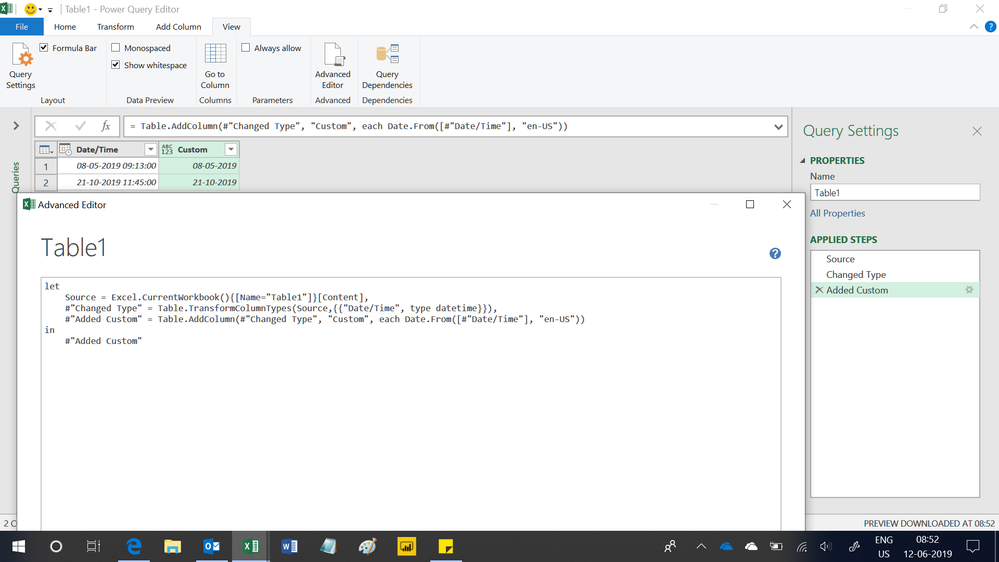
after this advanced editing, right click the Date/Time columns to change type to Date! No errors 😀
Hi @NirH_at_BITeam,
You can go to Query Editor, click on the left icon of the column name, then select the Date to change DateTime type to Date type. The corresponding M query uses the Table.TransformColumnTypes() function.
Best Regards,
Qiuyun Yu
Check out the April 2026 Power BI update to learn about new features.
Sign up to receive a private message when registration opens and key events begin.
If you have recently started exploring Fabric, we'd love to hear how it's going. Your feedback can help with product improvements.
| User | Count |
|---|---|
| 36 | |
| 29 | |
| 29 | |
| 21 | |
| 18 |
| User | Count |
|---|---|
| 69 | |
| 39 | |
| 33 | |
| 24 | |
| 23 |