cancel
Showing results for 
Search instead for 
Did you mean: 

Learn from the best! Meet the four finalists headed to the FINALS of the Power BI Dataviz World Championships! Register now

Reply
flemingg62
Helper I
Helper I

Controlling the Width of the Legends in Graphs

Hi

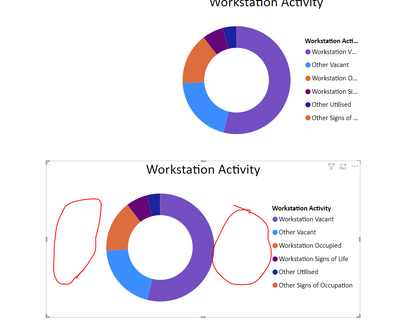
The ledgends is not displaying all the description in most of my graphs, but I have to stretch the bounding box a lot to get the full description, which leave a lot of wasted white space, is there a way to control thge width of each sagment, or spaerate the ledgend from the graph so you can control it location and size?


flemingg62_0-1668954999669.png


4 REPLIES 4
v-xiaotang
Community Support
Community Support

Hi @flemingg62 

You can try this ,

change the font size,

vxiaotang_0-1669964226509.png

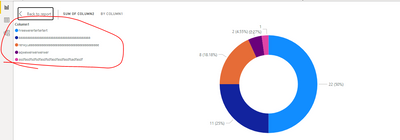
Or select "show as a table"

vxiaotang_1-1669964248036.pngvxiaotang_2-1669964266304.png


Best Regards,

Community Support Team _Tang

If this post helps, please consider Accept it as the solution to help the other members find it more quickly.

Hi

I want a same font size through out, also it is harder to read if you make it so small. even then you are left with so much White space, I just need to move the Legend into the wasted white space and closer to the graph.

flemingg62
Helper I
Helper I

Thanks Some graphs have a very long list so I want to try and keep it ti the side, also looks better on the Web

VijayP
Super User
Super User

@flemingg62 

you can change the position of the legend like top left ... etc , you can save space!


Did I answer your question? Mark my post as a solution! Appreciate your Kudos!!
MY Blog || My YouTube Channel || Connect with me on Linkedin || My Latest Data Story - Ageing Analysis

Proud to be a Super User!


Helpful resources

Announcements
Join our Fabric User Panel

Join our Fabric User Panel

Share feedback directly with Fabric product managers, participate in targeted research studies and influence the Fabric roadmap.

February Power BI Update Carousel

Power BI Monthly Update - February 2026

Check out the February 2026 Power BI update to learn about new features.

FabCon Atlanta 2026 carousel

FabCon Atlanta 2026

Join us at FabCon Atlanta, March 16-20, for the ultimate Fabric, Power BI, AI and SQL community-led event. Save $200 with code FABCOMM.