FabCon is coming to Atlanta
Join us at FabCon Atlanta from March 16 - 20, 2026, for the ultimate Fabric, Power BI, AI and SQL community-led event. Save $200 with code FABCOMM.
Register now!- Power BI forums
- Get Help with Power BI
- Desktop
- Service
- Report Server
- Power Query
- Mobile Apps
- Developer
- DAX Commands and Tips
- Custom Visuals Development Discussion
- Health and Life Sciences
- Power BI Spanish forums
- Translated Spanish Desktop
- Training and Consulting
- Instructor Led Training
- Dashboard in a Day for Women, by Women
- Galleries
- Data Stories Gallery
- Themes Gallery
- Contests Gallery
- QuickViz Gallery
- Quick Measures Gallery
- Visual Calculations Gallery
- Notebook Gallery
- Translytical Task Flow Gallery
- TMDL Gallery
- R Script Showcase
- Webinars and Video Gallery
- Ideas
- Custom Visuals Ideas (read-only)
- Issues
- Issues
- Events
- Upcoming Events
The Power BI Data Visualization World Championships is back! Get ahead of the game and start preparing now! Learn more
- Power BI forums
- Forums
- Get Help with Power BI
- Desktop
- Re: Continuous X-axis with monthly labels, daily d...
- Subscribe to RSS Feed
- Mark Topic as New
- Mark Topic as Read
- Float this Topic for Current User
- Bookmark
- Subscribe
- Printer Friendly Page

- Mark as New
- Bookmark
- Subscribe
- Mute
- Subscribe to RSS Feed
- Permalink
- Report Inappropriate Content
Continuous X-axis with monthly labels, daily data categorised by year (legend)
Hi,
I'd like to display a line chart with side by side comparison of daily quantities for each year, with monthly x-axis labels.
I have a simple table [Date, Quantity] with daily values for several years.
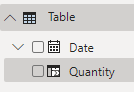
Chart-1
Quantity - Values
Months (Date Hierarchy) - Axis
Years - Legend
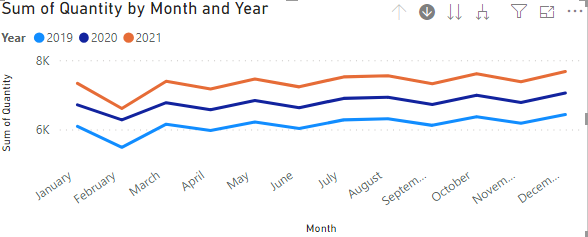
In in the chart above, the values are summed up to each month, wheresea instead I'd like to see the Daily values.
I can display daily values by switching the Axis to Date (rather than Date Hierarchy), but then I'm unable to display Years side by side, instead the whole chart is continuous (and x-axis granularity is not necessary monthly, depends on available size):
Chart-2
Quantity - Values
Date - Axis
Years - Legend
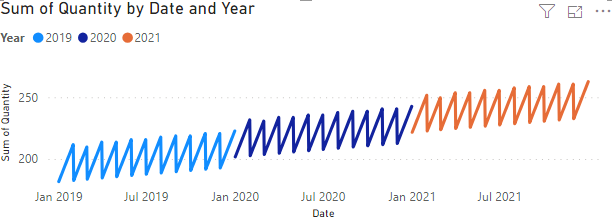
What I would like is the daily values (Y) from Chart-2 in the format (monthly, by year) of Chart-1 (X)
Any ideas?
Regards,
Stefan
Solved! Go to Solution.
- Mark as New
- Bookmark
- Subscribe
- Mute
- Subscribe to RSS Feed
- Permalink
- Report Inappropriate Content
Since none of the ideas reflected what I need, I've posted my own Idea Suggestion:
Please support
- Mark as New
- Bookmark
- Subscribe
- Mute
- Subscribe to RSS Feed
- Permalink
- Report Inappropriate Content
Since none of the ideas reflected what I need, I've posted my own Idea Suggestion:
Please support


- Mark as New
- Bookmark
- Subscribe
- Mute
- Subscribe to RSS Feed
- Permalink
- Report Inappropriate Content
Hi @Anonymous ,
Unfortunately,we can't use the month and year as the axis, but corresponds to the daily value.
What we can do is to drill down to get the daily value.

Best Regards,
Liang
If this post helps, then please consider Accept it as the solution to help the other members find it more quickly.
- Mark as New
- Bookmark
- Subscribe
- Mute
- Subscribe to RSS Feed
- Permalink
- Report Inappropriate Content
Hi @V-lianl-msft ,
thank you for your response. Could work in some cases, but I know for a fact that for our users this won't be accetable.
Especially since this is an exercise to see if we can migrate from Tableau (which can do this) to Power Bi.
Is there a user voice request to have this implemented? (I'm asking because I don't even know how to phraze this 'feature request' correctly)
Regards,
Stefan
- Mark as New
- Bookmark
- Subscribe
- Mute
- Subscribe to RSS Feed
- Permalink
- Report Inappropriate Content
Hi @Anonymous ,
For voice request, please refer to this article to see if it can meet your needs.
https://docs.microsoft.com/en-us/power-bi/consumer/mobile/mobile-apps-ios-qna
Best Regards,
Liang
If this post helps, then please consider Accept it as the solution to help the other members find it more quickly.
- Mark as New
- Bookmark
- Subscribe
- Mute
- Subscribe to RSS Feed
- Permalink
- Report Inappropriate Content
I'm sorry I meant Power Bi Ideas, I thought it's called "user voice requests"
https://ideas.powerbi.com/forums/265200-power-bi-ideas
Any idea what would be a good name for the feature in this thread?
Kind Regards,
Stefan
- Mark as New
- Bookmark
- Subscribe
- Mute
- Subscribe to RSS Feed
- Permalink
- Report Inappropriate Content
Hi @Anonymous ,
Sorry, I misunderstood you before. You can vote for this idea or share your own idea.
Best Regards,
Liang
If this post helps, then please consider Accept it as the solution to help the other members find it more quickly.
Helpful resources

Power BI Monthly Update - November 2025
Check out the November 2025 Power BI update to learn about new features.

Fabric Data Days
Advance your Data & AI career with 50 days of live learning, contests, hands-on challenges, study groups & certifications and more!

FabCon Atlanta 2026
Join us at FabCon Atlanta, March 16-20, for the ultimate Fabric, Power BI, AI and SQL community-led event. Save $200 with code FABCOMM.

| User | Count |
|---|---|
| 58 | |
| 45 | |
| 41 | |
| 20 | |
| 18 |


