cancel
Showing results for 
Search instead for 
Did you mean: 

Learn from the best! Meet the four finalists headed to the FINALS of the Power BI Dataviz World Championships! Register now

Reply
AdrianHamouda
Regular Visitor

Continuous Week Count

Hello,


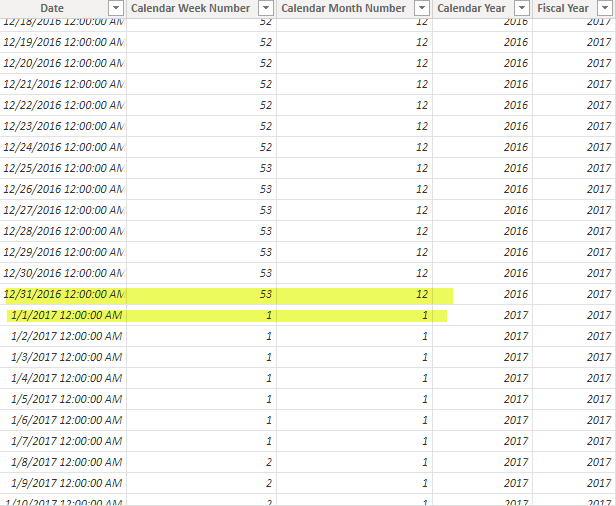
I am working on a project where I need to display historical data on a weekly basis (i.e. one week ago, two weeks ago, etc). The relative date slicer will not work as far as I understand because I do not want to see the data combined but rather separated. The best way I could think to do this would be to create a continuous week counter in Power BI that counts each week year over year instead of the default of 1-53 for each year, then starting back at 1 on the first week of January. I have attached a screen shot of my data table showing how when the new year begins the week counter restarts at one. Is there a formula that I can use so that the week count is continuous (instead of starting at 1 at the beginning of a new year the week count goes to 54). I have looked through various questions on the forums but have been unable to find an answer. Thank you!!!PowerBI Question.png

1 REPLY 1
DataInsights
Super User
Super User

@AdrianHamouda,


Try this solution.


1. Create calculated table:


WeeksByYear = 
SUMMARIZECOLUMNS (
    DimDate[Year],
    DimDate,
    "Weeks In Year", CALCULATE ( MAX ( DimDate[Week Num of Year] ) )
)


2. Create calculated column in DimDate table:


Week Number Since Inception = 
VAR vCurrentYear = DimDate[Year]
VAR vTable =
    FILTER ( WeeksByYear, WeeksByYear[Year] < vCurrentYear )
VAR vTotalWeeksInPriorYears =
    SUMX ( vTable, WeeksByYear[Weeks In Year] )
VAR vResult =
    IF (
        ISBLANK ( vTotalWeeksInPriorYears ),
        DimDate[Week Num of Year],
        vTotalWeeksInPriorYears + DimDate[Week Num of Year]
    )
RETURN
    vResult


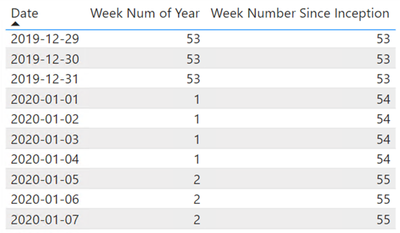
DataInsights_0-1660067806634.png


Did I answer your question? Mark my post as a solution!

Proud to be a Super User!


Helpful resources

Announcements
Join our Fabric User Panel

Join our Fabric User Panel

Share feedback directly with Fabric product managers, participate in targeted research studies and influence the Fabric roadmap.

February Power BI Update Carousel

Power BI Monthly Update - February 2026

Check out the February 2026 Power BI update to learn about new features.

FabCon Atlanta 2026 carousel

FabCon Atlanta 2026

Join us at FabCon Atlanta, March 16-20, for the ultimate Fabric, Power BI, AI and SQL community-led event. Save $200 with code FABCOMM.