cancel
Showing results for 
Search instead for 
Did you mean: 

The Power BI Data Visualization World Championships is back! Get ahead of the game and start preparing now! Learn more

Reply
spandy34
Responsive Resident
Responsive Resident

Continuous Date Table

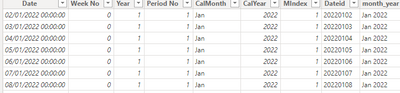
I have a date table with a MIndex field as outlined below.  I want to be able to plot a line graph that goes from June 2022 to todate based on month.


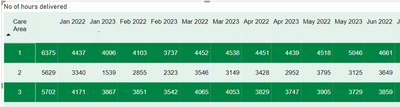
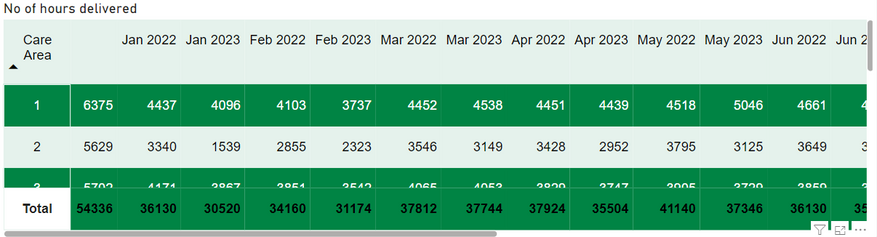
How do I stop all the May , June , July etc for 2022 and 2033 being clumped together .  I sort by MIndex but the MIndex goes back to 1 for January.  Is there a way this can be continuous?
 

spandy34_0-1694114038583.png

@tamerj1 @parry2k  @Anonymous @Greg_Deckler 


Thank you


Procurement_Delivered_Visit_Date = var _tab = CALENDAR(MINX('Procurement_Main_Data',[DeliveredEntryDateTime]), MAXX ('Procurement_Main_Data',[DeliveredEntryDateTime]))
var _tab1 = ADDCOLUMNS(_tab ,"Week No", QUOTIENT( datediff(minx(_tab, [Date]),[date],day) ,7),
"Year" , QUOTIENT( QUOTIENT( datediff(minx(_tab, [Date]),[date],day),7),52)+1
,"Period No", MOD(QUOTIENT(DATEDIFF(minx(_tab,[Date]),[date],day),28),13)+1,
"CalMonth", FORMAT ( [Date], "mmm" ),
"CalYear", YEAR ( [Date] ),
"MIndex", MONTH ( [Date] ),
"Dateid",FORMAT([Date],"yyyymmdd")
)
return _tab1
 
 
spandy34_0-1694098418048.png


1 ACCEPTED SOLUTION
amitchandak
Super User
Super User

@spandy34 , Create sort column and mark that as the sort column


month year sort = year([Date])*100 + month([Date])


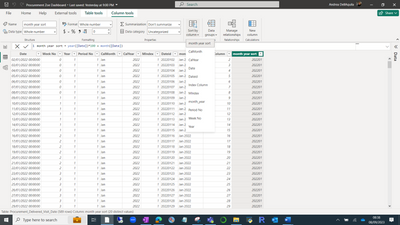
Click on month year and the in the "column tools" uses sort by column and mark month year sort as a sort column


How to Create Sort Column and Solve Related Errors:
https://www.youtube.com/watch?v=KK1zu4MBb-c


Share with Power BI Enthusiasts: Full Power BI Video (20 Hours) YouTube
Microsoft Fabric Series 60+ Videos YouTube
Microsoft Fabric Hindi End to End YouTube

View solution in original post

3 REPLIES 3
amitchandak
Super User
Super User

@spandy34 , Create sort column and mark that as the sort column


month year sort = year([Date])*100 + month([Date])


Click on month year and the in the "column tools" uses sort by column and mark month year sort as a sort column


How to Create Sort Column and Solve Related Errors:
https://www.youtube.com/watch?v=KK1zu4MBb-c


Share with Power BI Enthusiasts: Full Power BI Video (20 Hours) YouTube
Microsoft Fabric Series 60+ Videos YouTube
Microsoft Fabric Hindi End to End YouTube

Ive sorted it - I really appreciate your help


THank you 

Hi thats created the column great - i have selected the month year sort column then selected as a sort as below but I am still getting the result in the table below.  What am i doing wrong please?


spandy34_0-1694158836641.png


spandy34_1-1694158850062.png


Helpful resources

Announcements
Power BI DataViz World Championships

Power BI Dataviz World Championships

The Power BI Data Visualization World Championships is back! Get ahead of the game and start preparing now!

December 2025 Power BI Update Carousel

Power BI Monthly Update - December 2025

Check out the December 2025 Power BI Holiday Recap!

FabCon Atlanta 2026 carousel

FabCon Atlanta 2026

Join us at FabCon Atlanta, March 16-20, for the ultimate Fabric, Power BI, AI and SQL community-led event. Save $200 with code FABCOMM.