
cancel
Showing results for 
Search instead for 
Did you mean: 

The Power BI Data Visualization World Championships is back! Get ahead of the game and start preparing now! Learn more

Reply
GregoryMartin
Frequent Visitor

Continous X Axis with data (integers) from two different tables

Hello there, me again,


Solved my last problem with continuous X-axis involving dates from two different table with the CALENDARAUTO() functionnality (thanks again to @jthomson) but I'm now having the same issue with a similar X-axis with interger values instead of dates. Is there a CALENDARAUTO()-like functionnality working with columns containing integers ?


Have you got some magic tricks in your hat to help me with that problem ?

1 ACCEPTED SOLUTION

Hi @GregoryMartin,


Filtering out the blanks could be helpful.

Result =
FILTER (
    DISTINCT ( UNION ( VALUES ( Table1[ID] ), VALUES ( Table2[ID] ) ) ),
    [ID] <> BLANK ()
)

Best Regards,

Dale

Community Support Team _ Dale
If this post helps, then please consider Accept it as the solution to help the other members find it more quickly.

View solution in original post

5 REPLIES 5
v-jiascu-msft
Microsoft Employee
Microsoft Employee

Hi @GregoryMartin,


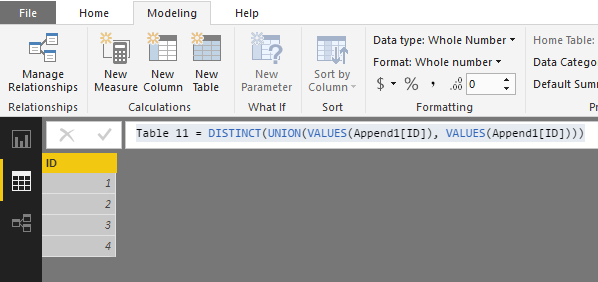
If you have the integers in different tables, you can bring them together in a new table like this.


Result =
DISTINCT ( UNION ( VALUES ( Table1[ID] ), VALUES ( Table2[ID] ) ) )

Continous X Axis with data (integers) from two different tables.PNG


Best Regards,

Dale

Community Support Team _ Dale
If this post helps, then please consider Accept it as the solution to help the other members find it more quickly.

Before all, thank you both for your quick answers.


@jthomson : I juste can't found the function you told me about. Power BI only give me the choice between GENERATE and GENERATEALL (as seen on th screenshot). GENERATESERIES is a function given with a plug-in ?


generalseries.png

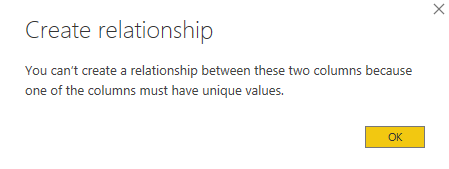
@v-jiascu-msftI'd already tried to do this way but I couldn't create the relation between this new table and the two others, due tu a non unique values column.


relation.PNG

Hi @GregoryMartin,


Filtering out the blanks could be helpful.

Result =
FILTER (
    DISTINCT ( UNION ( VALUES ( Table1[ID] ), VALUES ( Table2[ID] ) ) ),
    [ID] <> BLANK ()
)

Best Regards,

Dale

Community Support Team _ Dale
If this post helps, then please consider Accept it as the solution to help the other members find it more quickly.

Hi @v-jiascu-msft,


Thank you so much ! There was my problem. I was absolutly certain that the DISTINCT funtion was concerning also the 'blank' value and that the table will consider that blank value as unique. Didn't thought of that kind of problem.


Again thank you very much. Problem solved.

jthomson
Solution Sage
Solution Sage

You can probably try something similar using the GENERATESERIES function, if you are able to work out the highest and lowest values of your two tables (or know what sort of values you expect them to be), you can plug these in and it'll make a table of integers that you can relate your data to and use the value column as a common link for your axis

Helpful resources

Announcements
Power BI DataViz World Championships

Power BI Dataviz World Championships

The Power BI Data Visualization World Championships is back! Get ahead of the game and start preparing now!

December 2025 Power BI Update Carousel

Power BI Monthly Update - December 2025

Check out the December 2025 Power BI Holiday Recap!

FabCon Atlanta 2026 carousel

FabCon Atlanta 2026

Join us at FabCon Atlanta, March 16-20, for the ultimate Fabric, Power BI, AI and SQL community-led event. Save $200 with code FABCOMM.