Join us at FabCon Atlanta from March 16 - 20, 2026, for the ultimate Fabric, Power BI, AI and SQL community-led event. Save $200 with code FABCOMM.
Register now!The Power BI Data Visualization World Championships is back! It's time to submit your entry. Live now!
Hello,
we create contest in our company and i want to show resoults.
Our managers and their offices are collect points. One manager have many offices. For example:
Manager1 - 50 points (their offices: Office1 - 30 points, Ofiice2 - 10points)
Manager 2 - 70 points (Office3 - 20 points, Office4 - 5ponts)
Soo the rank look line this:
1. Manager2
2. Manager1
1. Office1
2. Office3
3. Office2
4. Offce4
And this was easy part - I used "Ranking = RANKX(ALL(Table1),CALCULATE(SUM(Table1[Score])),,DESC)" all works good.
But i need to show this on chart and when i drill down Manager to see their offices I need to keep this resoults. For exaple:
When i drill manager2 i see Place 1- Office 3, Place 2 - Office4 - It should be Office3 - place2 and Office4 - place4.
It is posoble to do this? Please help and sorry for my english.
Solved! Go to Solution.
Hi @Lokisame ,
One sample for your reference. We can create two measures to get the excepted result.
scorem = CALCULATE(SUM(Table1[Score]))
Measure = IF(ISINSCOPE(Table1[Office]),RANKX(ALL(Table1),[scorem],,DESC),RANKX(ALL(Table1[Manager]),[scorem],,DESC))
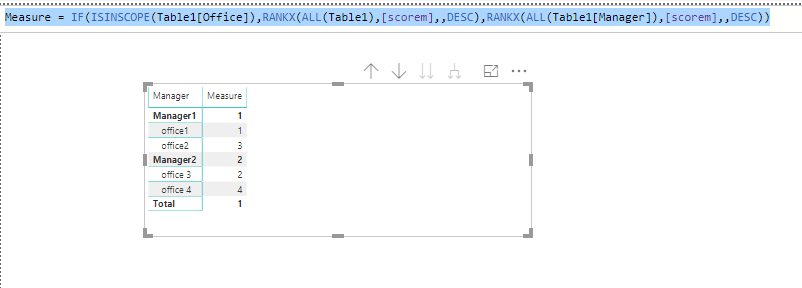
Please find the pbix as attached.
Regards,
Frank
Hi @Lokisame ,
One sample for your reference. We can create two measures to get the excepted result.
scorem = CALCULATE(SUM(Table1[Score]))
Measure = IF(ISINSCOPE(Table1[Office]),RANKX(ALL(Table1),[scorem],,DESC),RANKX(ALL(Table1[Manager]),[scorem],,DESC))
Please find the pbix as attached.
Regards,
Frank
Hi @Lokisame ,
Does that make sense? If so, kindly mark my answer as the solution to close the case please. Thanks in advance.
Regards,
Frank
| User | Count |
|---|---|
| 53 | |
| 40 | |
| 35 | |
| 24 | |
| 22 |
| User | Count |
|---|---|
| 134 | |
| 103 | |
| 57 | |
| 43 | |
| 38 |