cancel
Showing results for 
Search instead for 
Did you mean: 

The Power BI Data Visualization World Championships is back! Get ahead of the game and start preparing now! Learn more

Reply
WhataguyTX
New Member

Consolidate Continuous Date Ranges into one record

See example below.  I am trying to consolidate the date ranges depending if they are continuous or not and then aggregate it.  Any help is appreciated!

ProblemIDFirstLastFirst DOSLast DOSPaid
 1JohnSmith1/1/20171/15/2017$100.00
 2JohnSmith1/16/20171/20/2017$100.00
 3JohnSmith1/21/20171/22/2017$100.00
 4JohnSmith1/25/20171/27/2017$50.00
       
Desired Result FirstLastFirst DOSLast DOSPaid
  JohnSmith1/1/20171/22/2017$300.00
  JohnSmith1/25/20171/27/2017$50.00
4 REPLIES 4
Greg_Deckler
Community Champion
Community Champion

First, very nicely done with presenting the full picture of your data in a form that can be easily copy and pasted as well as the desired result. Seems like you could potentially use the technique described here...


See my article on Mean Time Before Failure (MTBF) which uses EARLIER: http://community.powerbi.com/t5/Community-Blog/Mean-Time-Between-Failure-MTBF-and-Power-BI/ba-p/3395...


...to retun the MAX date of "First DOS" that is less than the "First DOS" of the current row (EARLIER) and then check if the difference between "Last DOS" of the current row minus that is 1. That would indicate that it is part of a continuous series. Obviously you would also have constraints for First and Last. Once you had that, you could potentially create a measure that did want you wanted but I haven't thought it that far through. If I have some time tonight I will look into this a little more.


Follow on LinkedIn
@ me in replies or I'll lose your thread!!!
Instead of a Kudo, please vote for this idea
Become an expert!: Enterprise DNA
External Tools: MSHGQM
YouTube Channel!: Microsoft Hates Greg
Latest book!:
DAX For Humans

DAX is easy, CALCULATE makes DAX hard...

OK, I think I have this. First, in your query add an Index that starts at 1. This is my query (Enter Data).


let
    Source = Table.FromRows(Json.Document(Binary.Decompress(Binary.FromText("i45WMlTSUfLKz8gDUsG5mSUZQNpQ31DfyMDQHMI0hbFVDA0M9AwMFJRidaKVjLBqM0PoMzLAqs8Ymz4jJPuMjLDqM8GqzxRJnzlcnylUWywA", BinaryEncoding.Base64), Compression.Deflate)), let _t = ((type text) meta [Serialized.Text = true]) in type table [ID = _t, First = _t, Last = _t, #"First DOS" = _t, #"Last DOS" = _t, Paid = _t]),
    #"Changed Type" = Table.TransformColumnTypes(Source,{{"ID", Int64.Type}, {"First", type text}, {"Last", type text}, {"First DOS", type date}, {"Last DOS", type date}, {"Paid", Currency.Type}}),
    #"Added Index" = Table.AddIndexColumn(#"Changed Type", "Index", 1, 1),
    #"Reordered Columns" = Table.ReorderColumns(#"Added Index",{"Index", "ID", "First", "Last", "First DOS", "Last DOS", "Paid"})
in
    #"Reordered Columns"

My table created by this query is called "Problems". OK, now create the column as above, here is the code again:


Column = 
VAR mydate = MAXX(FILTER(ALL(Problems),Problems[First DOS]<EARLIER(Problems[First DOS]) && Problems[First]=EARLIER(Problems[First]) && Problems[Last]=EARLIER(Problems[Last])),Problems[Last DOS])
RETURN IF(Problems[First DOS]-mydate = 1,1,0)

Now create this second column like this:


Column 2 = IF([Column]=0,[Index],
VAR myindex = MAXX(FILTER(ALL(Problems),Problems[Last DOS]<EARLIER(Problems[First DOS]) && Problems[First]=EARLIER(Problems[First]) && Problems[Last]=EARLIER(Problems[Last]) && [Column]=0),Problems[Index]) RETURN myindex)

You should end up with a table like this:


ID First Last First DOS Last DOS Paid Column Index Column 2
1 John Smith Sunday, January 1, 2017 Sunday, January 15, 2017 $100 0 1 1
2 John Smith Monday, January 16, 2017 Friday, January 20, 2017 $100 1 2 1
3 John Smith Saturday, January 21, 2017 Sunday, January 22, 2017 $100 1 3 1
4 John Smith Wednesday, January 25, 2017 Friday, January 27, 2017 $50 0 4 4


Now create a Table visualization in the Report pane and place First, Last, Earliest First DOS, Latest Last DOS, Column 2 and Paid and you should get this:
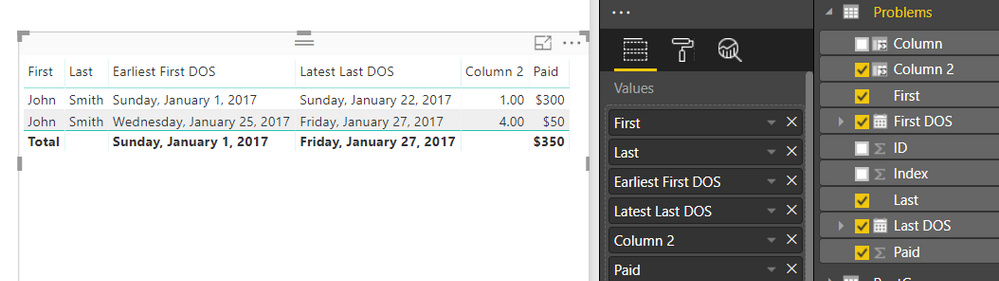
 

image.png


Probably a more elegant way but this is the first thing I thought of. I was trying to account for the possibility that the Index may not be contiguous between rows in a sequence but I may not have thought of every possible boundary case. 


Follow on LinkedIn
@ me in replies or I'll lose your thread!!!
Instead of a Kudo, please vote for this idea
Become an expert!: Enterprise DNA
External Tools: MSHGQM
YouTube Channel!: Microsoft Hates Greg
Latest book!:
DAX For Humans

DAX is easy, CALCULATE makes DAX hard...

Your time invested on this problem is appreciated. I will take a deeper look when I roll into work on Monday and will follow up with questions if needed. Again, thank you.

Here is the formula which I was speaking about:


Column = VAR mydate = MAXX(FILTER(ALL(Problems),Problems[First DOS]<EARLIER(Problems[First DOS]) && Problems[First]=EARLIER(Problems[First]) && Problems[Last]=EARLIER(Problems[Last])),Problems[Last DOS])
RETURN IF(Problems[First DOS]-mydate = 1,1,0)


Follow on LinkedIn
@ me in replies or I'll lose your thread!!!
Instead of a Kudo, please vote for this idea
Become an expert!: Enterprise DNA
External Tools: MSHGQM
YouTube Channel!: Microsoft Hates Greg
Latest book!:
DAX For Humans

DAX is easy, CALCULATE makes DAX hard...

Helpful resources

Announcements
Power BI DataViz World Championships

Power BI Dataviz World Championships

The Power BI Data Visualization World Championships is back! Get ahead of the game and start preparing now!

December 2025 Power BI Update Carousel

Power BI Monthly Update - December 2025

Check out the December 2025 Power BI Holiday Recap!

FabCon Atlanta 2026 carousel

FabCon Atlanta 2026

Join us at FabCon Atlanta, March 16-20, for the ultimate Fabric, Power BI, AI and SQL community-led event. Save $200 with code FABCOMM.