Share feedback directly with Fabric product managers, participate in targeted research studies and influence the Fabric roadmap.
Sign up nowGet Fabric certified for FREE! Don't miss your chance! Learn more
I have this data set ine excel and I have these forumulas to check for duplicated as well check anyone whos worked consecutive Night and I need help with a dax expression for the excel formulas below.
Duplicate Check : = COUNTIFS(A:A,A2,B:B,B2)
Consecutive Nights : =IF(A2<>A1,1,IF(AND(C2=C1,B2-B1=1),E1+1,1))
I have also attached my sample daata
| Name | Date | WeekNum | Duplicate Check | Consecutive Nights |
| Ab Ale | 01/09/2018 | 35 | 1 | 1 |
| Ab Ale | 05/09/2018 | 36 | 1 | 1 |
| Ab Ale | 08/09/2018 | 36 | 1 | 1 |
| Ab Ale | 15/09/2018 | 37 | 1 | 1 |
| Ab Ale | 29/09/2018 | 39 | 1 | 1 |
| Ab Ale | 09/10/2018 | 41 | 1 | 1 |
| Ab Ale | 10/10/2018 | 41 | 1 | 2 |
| Ab Ale | 20/10/2018 | 42 | 1 | 1 |
| Aha Mor | 01/09/2018 | 35 | 1 | 1 |
| Aha Mor | 02/09/2018 | 35 | 1 | 2 |
Thanks.
Solved! Go to Solution.
Hi @oolamide85,
Please check the steps as below.
1.Insert an index column in Power query.
2. Create a calculated column.
Column = 1
3. Create the measures as below.
Duplicate Check =
VAR prename =
CALCULATE (
MAX ( Table1[Name] ),
FILTER ( ALL ( Table1 ), Table1[Index] = MAX ( Table1[Index] ) - 1 )
)
VAR predate =
CALCULATE (
MAX ( Table1[Date] ),
FILTER ( ALL ( Table1 ), Table1[Index] = MAX ( Table1[Index] ) - 1 )
)
RETURN
IF (
AND ( MAX ( Table1[Name] ) = prename, MAX ( Table1[Date] ) = predate ),
0,
1
)
Consecutive Nights =
VAR prename =
CALCULATE (
MAX ( Table1[Name] ),
FILTER ( ALL ( Table1 ), Table1[Index] = MAX ( Table1[Index] ) - 1 )
)
VAR predate =
CALCULATE (
MAX ( Table1[Date] ),
FILTER ( ALL ( Table1 ), Table1[Index] = MAX ( Table1[Index] ) - 1 )
)
VAR preweek =
CALCULATE (
MAX ( Table1[WeekNum] ),
FILTER ( ALL ( Table1 ), Table1[Index] = MAX ( Table1[Index] ) - 1 )
)
RETURN
IF (
AND (
MAX ( Table1[WeekNum] ) = preweek,
DATEDIFF ( predate, MAX ( Table1[Date] ), DAY ) = 1
),
CALCULATE (
SUM ( Table1[Column] ),
FILTER (
ALLEXCEPT ( Table1, Table1[Name] ),
MAX ( Table1[Name] ) = prename
&& Table1[WeekNum] = preweek
&& DATEDIFF ( predate, MAX ( Table1[Date] ), DAY ) = 1
&& Table1[Index] <= MAX ( Table1[Index] )
)
),
1
)
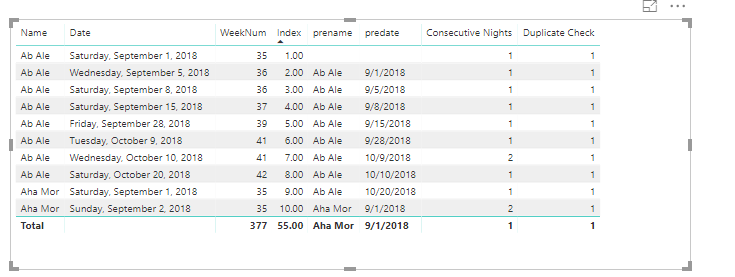
For more details, please check the pbix as attached.
Regards,
Frank
Hi @oolamide85,
Please check the steps as below.
1.Insert an index column in Power query.
2. Create a calculated column.
Column = 1
3. Create the measures as below.
Duplicate Check =
VAR prename =
CALCULATE (
MAX ( Table1[Name] ),
FILTER ( ALL ( Table1 ), Table1[Index] = MAX ( Table1[Index] ) - 1 )
)
VAR predate =
CALCULATE (
MAX ( Table1[Date] ),
FILTER ( ALL ( Table1 ), Table1[Index] = MAX ( Table1[Index] ) - 1 )
)
RETURN
IF (
AND ( MAX ( Table1[Name] ) = prename, MAX ( Table1[Date] ) = predate ),
0,
1
)
Consecutive Nights =
VAR prename =
CALCULATE (
MAX ( Table1[Name] ),
FILTER ( ALL ( Table1 ), Table1[Index] = MAX ( Table1[Index] ) - 1 )
)
VAR predate =
CALCULATE (
MAX ( Table1[Date] ),
FILTER ( ALL ( Table1 ), Table1[Index] = MAX ( Table1[Index] ) - 1 )
)
VAR preweek =
CALCULATE (
MAX ( Table1[WeekNum] ),
FILTER ( ALL ( Table1 ), Table1[Index] = MAX ( Table1[Index] ) - 1 )
)
RETURN
IF (
AND (
MAX ( Table1[WeekNum] ) = preweek,
DATEDIFF ( predate, MAX ( Table1[Date] ), DAY ) = 1
),
CALCULATE (
SUM ( Table1[Column] ),
FILTER (
ALLEXCEPT ( Table1, Table1[Name] ),
MAX ( Table1[Name] ) = prename
&& Table1[WeekNum] = preweek
&& DATEDIFF ( predate, MAX ( Table1[Date] ), DAY ) = 1
&& Table1[Index] <= MAX ( Table1[Index] )
)
),
1
)
For more details, please check the pbix as attached.
Regards,
Frank
If you love stickers, then you will definitely want to check out our Community Sticker Challenge!
Check out the January 2026 Power BI update to learn about new features.
| User | Count |
|---|---|
| 61 | |
| 58 | |
| 45 | |
| 21 | |
| 18 |
| User | Count |
|---|---|
| 120 | |
| 116 | |
| 37 | |
| 34 | |
| 30 |