This is best Fabric, Power BI, SQL and AI community event. How do we know? The last event sold out! Save €200 with code FABCMTY200.
Register nowA new Data Days event is coming soon! This time we’re going bigger than ever. Fabric, Power BI, SQL, AI and more. Don't miss out.
Hi all,
I am stuck with creating a measure.
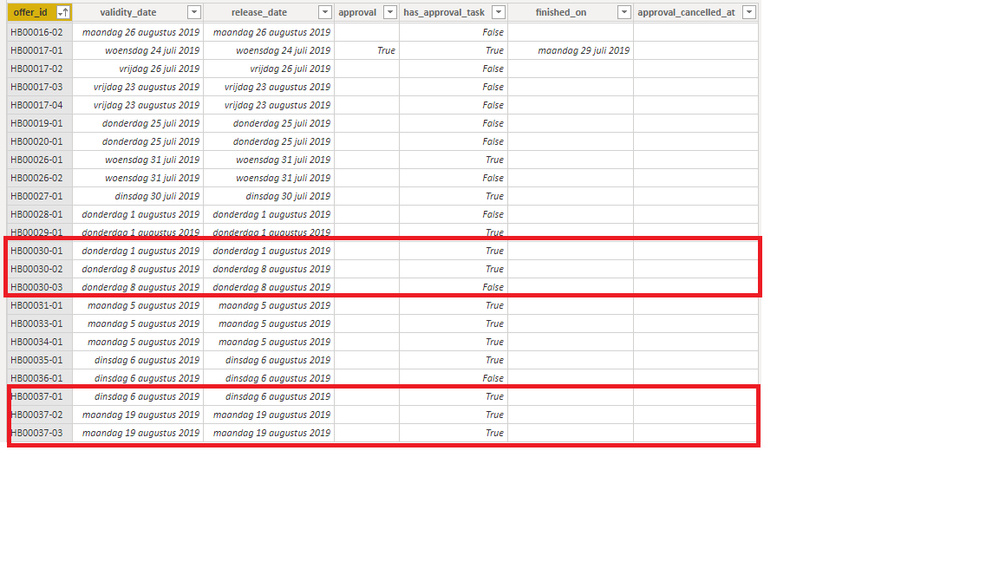
I want to display in a table the total value of offers that are in the 'pipeline'. My issue is that some offers, have multiple sub-offers that have an has_approval_task = true. If this is the case I only want to display one of those sub-offers.
So for example. HB00030 has three offers, of which two have an has_approval_task = true. If this is the case I only want to display 1 of those 2 sub-offers. HB000037 has the same thing, but with 3 suboffers who have an has_approval_task = true.
Other requirements that this measure should have is that the columns: approval, finished_on and approval_cancelled_at should be empty.
Can anyone help with this?
You may try RANKX to add a column.
https://community.powerbi.com/t5/Desktop/DAX-Grouping-tagging/m-p/189391#M83354
Thanks for your reply @v-chuncz-msft ,
However, I prefer to create a measure because I want to keep my file small.
Do you know a solution where I can solve my problem using a measure?
Sign up to receive a private message when registration opens and key events begin.
If you have recently started exploring Fabric, we'd love to hear how it's going. Your feedback can help with product improvements.
| User | Count |
|---|---|
| 32 | |
| 26 | |
| 21 | |
| 20 | |
| 15 |
| User | Count |
|---|---|
| 65 | |
| 43 | |
| 28 | |
| 22 | |
| 22 |