We've captured the moments from FabCon & SQLCon that everyone is talking about, and we are bringing them to the community, live and on-demand. Starts on April 14th. Register now
Hi,
Please let me know if this is possible, i have some data in matrix view where in the column there is month and row there are product sales
eg.
| Products | 201711 | 201712 | 201801 | 201802 | 201803 |
| Product A | 13095 | 12689 | 14076 | 14187 | 14507 |
I have attached my dataset for reference.
What i would like to get is, if current month sales is more than 10% of previous month it should be in green.
let me know if this is can be achieved.
| Products | 201711 | 201712 | 201801 | 201802 | 201803 | 201804 | 201805 | 201806 | 201807 | 201808 | 201809 | 201810 | 201811 | 201812 | 201901 | 201902 |
| Product A | 13095 | 12689 | 14076 | 14187 | 14507 | 14053 | 14674 | 13689 | 13956 | 15762 | 13914 | 18394 | 14616 | 12758 | 13717 | 14199 |
| Product B | 3684 | 3434 | 3894 | 3795 | 4160 | 3472 | 3989 | 3641 | 3594 | 3786 | 3173 | 4230 | 3539 | 2811 | 3352 | 3440 |
| Product C | 2659 | 2475 | 2889 | 2691 | 3326 | 2741 | 3552 | 3465 | 3321 | 3580 | 3194 | 4196 | 3440 | 3098 | 2644 | 2788 |
| Product D | 1806 | 1984 | 2526 | 2722 | 3001 | 2776 | 2991 | 2772 | 2780 | 3400 | 2566 | 2943 | 2735 | 2691 | 2641 | 2482 |
| Product E | 2103 | 1782 | 2144 | 2133 | 2272 | 1826 | 2391 | 2349 | 2436 | 2515 | 2226 | 2537 | 2187 | 1996 | 2352 | 2121 |
| Product F | 370 | 386 | 448 | 502 | 638 | 651 | 779 | 1098 | 1266 | 1377 | 1380 | 1393 | 1276 | 1411 | 1888 | 1964 |
| Product G | 857 | 772 | 834 | 906 | 948 | 952 | 1058 | 1036 | 925 | 938 | 842 | 991 | 801 | 719 | 860 | 1032 |
| Product H | 2 | 10 | 20 | 27 | 12 | 20 | 110 | 183 | 193 | 120 | 152 | 129 | 15 | 57 | 929 | |
| Product I | 1015 | 866 | 1029 | 1000 | 1063 | 1046 | 953 | 1020 | 1036 | 901 | 997 | 984 | 995 | 863 | 823 | 812 |
| Product J | 39 | 234 | 194 | 235 | ||||||||||||
| Product K | 79 | 80 | 92 | 65 | 76 | 62 | 72 | 93 | 113 | 81 | 115 | 103 | 40 | 64 | 80 | 140 |
| Product L | 1 | 18 | 49 | 111 |
Hi @Mahadevaraobc ,
Please refer to the following steps:
First, we can create a calculated column as a rank for date, please refer to the following DAX query:
timerank =
CALCULATE (
COUNTROWS ( Table1 ),
FILTER (
ALL ( Table1 ),
Table1[Products] = EARLIER ( Table1[Products] )
&& Table1[Date] < EARLIER ( Table1[Date] )
)
) + 1
Then we can create a measure to judge if the data meets the requirement:
Measure =
VAR lastmon =
CALCULATE (
MIN ( Table1[Value] ),
FILTER (
ALL ( Table1 ),
Table1[Products] = MIN ( Table1[Products] )
&& Table1[timerank]
= MIN ( Table1[timerank] ) - 1
)
)
VAR result =
IF (
lastmon = BLANK (),
0,
DIVIDE ( MIN ( Table1[Value] ) - lastmon, lastmon )
)
RETURN
IF ( result > 0.1, 1, 0 )Then, in the format panel, we can set the Conditional Formatting like below:
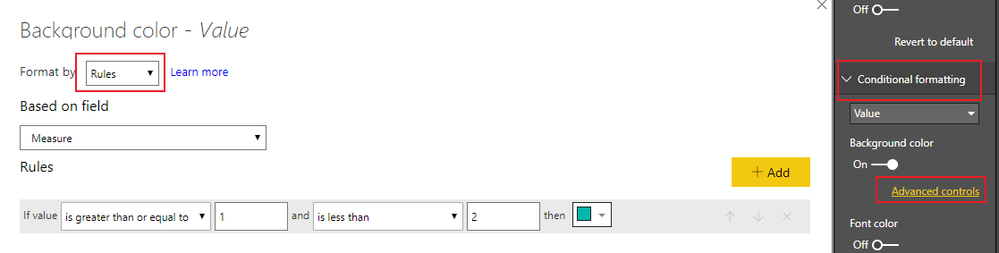
The result will like below:
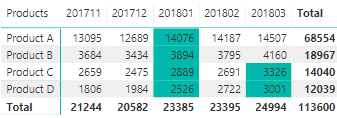
Here is the sample pbix file, please check it: https://1drv.ms/u/s!Ao9Of0JgO6MU72BV52pw-fZH9gtj
Best Regards,
Teige
Thanks for the reply TeigeGao,
I tried this but it is not working on my data, do i need to unpivot my data before doing this?
My data has many other columns also..
Hi @Mahadevaraobc ,
Could you please share some sample data to me for analysis? Besides, please first check my pbix file, it includes my sample data.
Best Regards,
Teige
Hi,
Here is the sample data,
| Products | 201711 | 201712 | 201801 | 201802 | 201803 | 201804 | 201805 | 201806 | 201807 | 201808 | 201809 | 201810 | 201811 | 201812 | 201901 | 201902 |
| Product A | 13095 | 12689 | 14076 | 14187 | 14507 | 14053 | 14674 | 13689 | 13956 | 15762 | 13914 | 18394 | 14616 | 12758 | 13717 | 14199 |
| Product B | 3684 | 3434 | 3894 | 3795 | 4160 | 3472 | 3989 | 3641 | 3594 | 3786 | 3173 | 4230 | 3539 | 2811 | 3352 | 3440 |
| Product C | 2659 | 2475 | 2889 | 2691 | 3326 | 2741 | 3552 | 3465 | 3321 | 3580 | 3194 | 4196 | 3440 | 3098 | 2644 | 2788 |
| Product D | 1806 | 1984 | 2526 | 2722 | 3001 | 2776 | 2991 | 2772 | 2780 | 3400 | 2566 | 2943 | 2735 | 2691 | 2641 | 2482 |
| Product E | 2103 | 1782 | 2144 | 2133 | 2272 | 1826 | 2391 | 2349 | 2436 | 2515 | 2226 | 2537 | 2187 | 1996 | 2352 | 2121 |
| Product F | 370 | 386 | 448 | 502 | 638 | 651 | 779 | 1098 | 1266 | 1377 | 1380 | 1393 | 1276 | 1411 | 1888 | 1964 |
| Product G | 857 | 772 | 834 | 906 | 948 | 952 | 1058 | 1036 | 925 | 938 | 842 | 991 | 801 | 719 | 860 | 1032 |
| Product H | 2 | 10 | 20 | 27 | 12 | 20 | 110 | 183 | 193 | 120 | 152 | 129 | 15 | 57 | 929 | |
| Product I | 1015 | 866 | 1029 | 1000 | 1063 | 1046 | 953 | 1020 | 1036 | 901 | 997 | 984 | 995 | 863 | 823 | 812 |
| Product J | 39 | 234 | 194 | 235 | ||||||||||||
| Product K | 79 | 80 | 92 | 65 | 76 | 62 | 72 | 93 | 113 | 81 | 115 | 103 | 40 | 64 | 80 | 140 |
Product L | 1 | 18 | 49 | 111 |
The above data is from a matrix visual and i would want conditional formatting to be applied to this visual only...
If you have recently started exploring Fabric, we'd love to hear how it's going. Your feedback can help with product improvements.
A new Power BI DataViz World Championship is coming this June! Don't miss out on submitting your entry.
| User | Count |
|---|---|
| 57 | |
| 40 | |
| 36 | |
| 18 | |
| 18 |
| User | Count |
|---|---|
| 70 | |
| 67 | |
| 38 | |
| 34 | |
| 23 |