Join us at FabCon Atlanta from March 16 - 20, 2026, for the ultimate Fabric, Power BI, AI and SQL community-led event. Save $200 with code FABCOMM.
Register now!The Power BI Data Visualization World Championships is back! Get ahead of the game and start preparing now! Learn more
Hello,
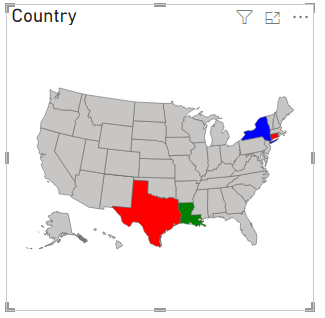
I would like to manage colors on the Shape Map based on certain conditions. I have projects and statuses low, medium and high. I would like to show high risk projects red, medium risk projects yellow and low risk projects green on the shape map. My current map only shows the projects at high risk. My dax can be seen below,
If there is existing project with high status I want to assign the country red. If country has both medium and high items, country should be assigned red too. Same logic applies for medium and low statuses.
Anyone who has any idea?
Thank you!
Solved! Go to Solution.
Hi, @GrimReaperX
You can try the following methods.
Measure = SWITCH(TRUE(),
SELECTEDVALUE('Table'[Risk Level])="High","Red",
SELECTEDVALUE('Table'[Risk Level])="Medium","Blue",
SELECTEDVALUE('Table'[Risk Level])="Low","Green")
Is this the result you expect?
Best Regards,
Community Support Team _Charlotte
If this post helps, then please consider Accept it as the solution to help the other members find it more quickly.
Hi, @GrimReaperX
You can try the following methods.
Measure = SWITCH(TRUE(),
SELECTEDVALUE('Table'[Risk Level])="High","Red",
SELECTEDVALUE('Table'[Risk Level])="Medium","Blue",
SELECTEDVALUE('Table'[Risk Level])="Low","Green")
Is this the result you expect?
Best Regards,
Community Support Team _Charlotte
If this post helps, then please consider Accept it as the solution to help the other members find it more quickly.
Hello,
Thanks for the reply. However, my table shows the same color for all of the countries. I have different table for countries and different table for Risk level. I also use custom map but not predefined maps. Could you please help?
Thanks!
Hi, @GrimReaperX
Can you provide sample data for testing? Sensitive information can be removed in advance. And give an example of the output you expect.
Best Regards
The Power BI Data Visualization World Championships is back! Get ahead of the game and start preparing now!
| User | Count |
|---|---|
| 39 | |
| 37 | |
| 33 | |
| 32 | |
| 29 |
| User | Count |
|---|---|
| 133 | |
| 88 | |
| 85 | |
| 68 | |
| 64 |